English
73
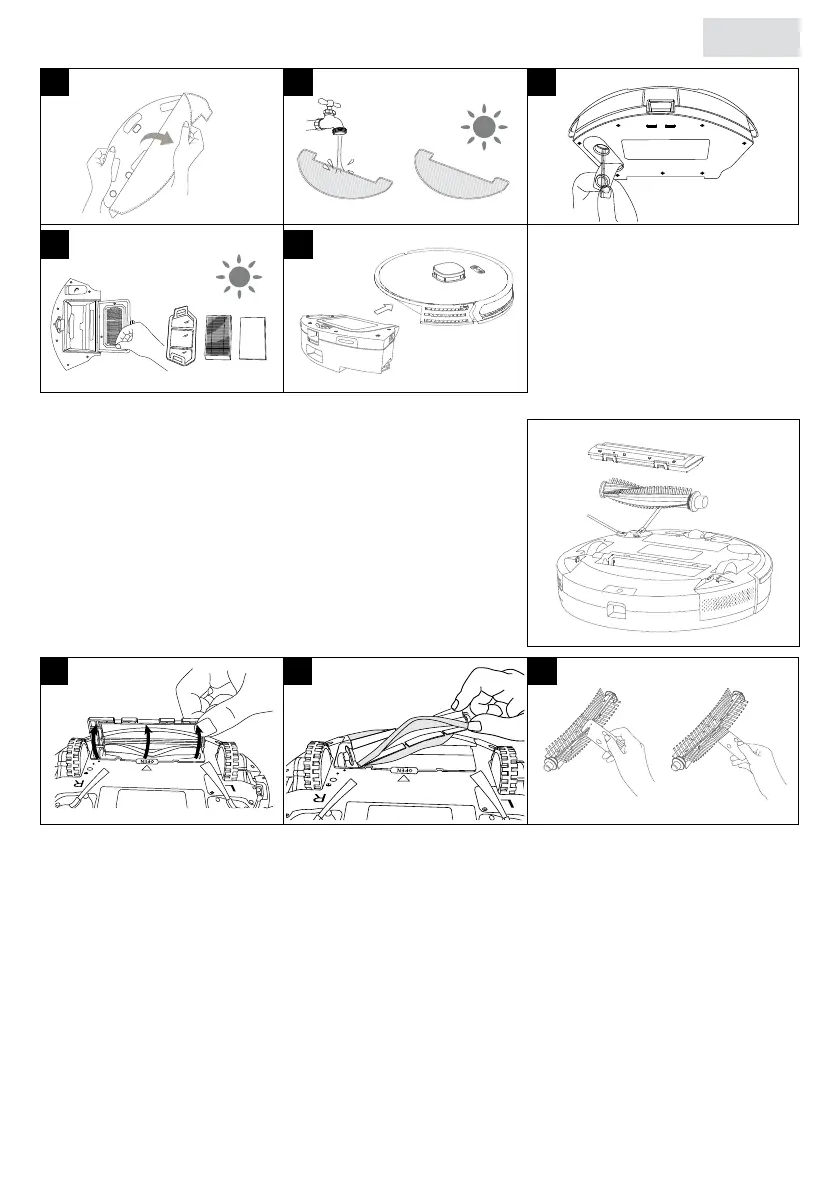
5.6 Cleaning the main brush
See 1.2 Product Overview for designations.
1. Open the main brush cover at the bottom of the
robot.
2. Remove the main brush from the robot.
3. If there is dust, hair or dirt on the suction port or main
brush, use the cleaning comb to remove it.
• The main brush can be washed with water. After washing it with water, it must be
completely dry before placing it back in the robot.
5.7 Cleaning the side brushes
1. Remove the side brushes on both sides at the bottom of the robot.
2. If there is dust, hair or dirt on the side brushes, use the cleaning comb to remove it. Wipe it
off with a clean cloth.
• The side brushes can be washed with water. After washing it with water, it must be
completely dry before placing it back in the robot.
3. Replace the clean side brushes or replace them with new side brushes.
The side brush is an utensil. Replace it every 3-6 months to ensure its cleaning effect.
30
29
7 98
10 11
afbeelding 2
kan ik nergens vinden,
waar staat deze?
1 32


 To Next Page