English
71
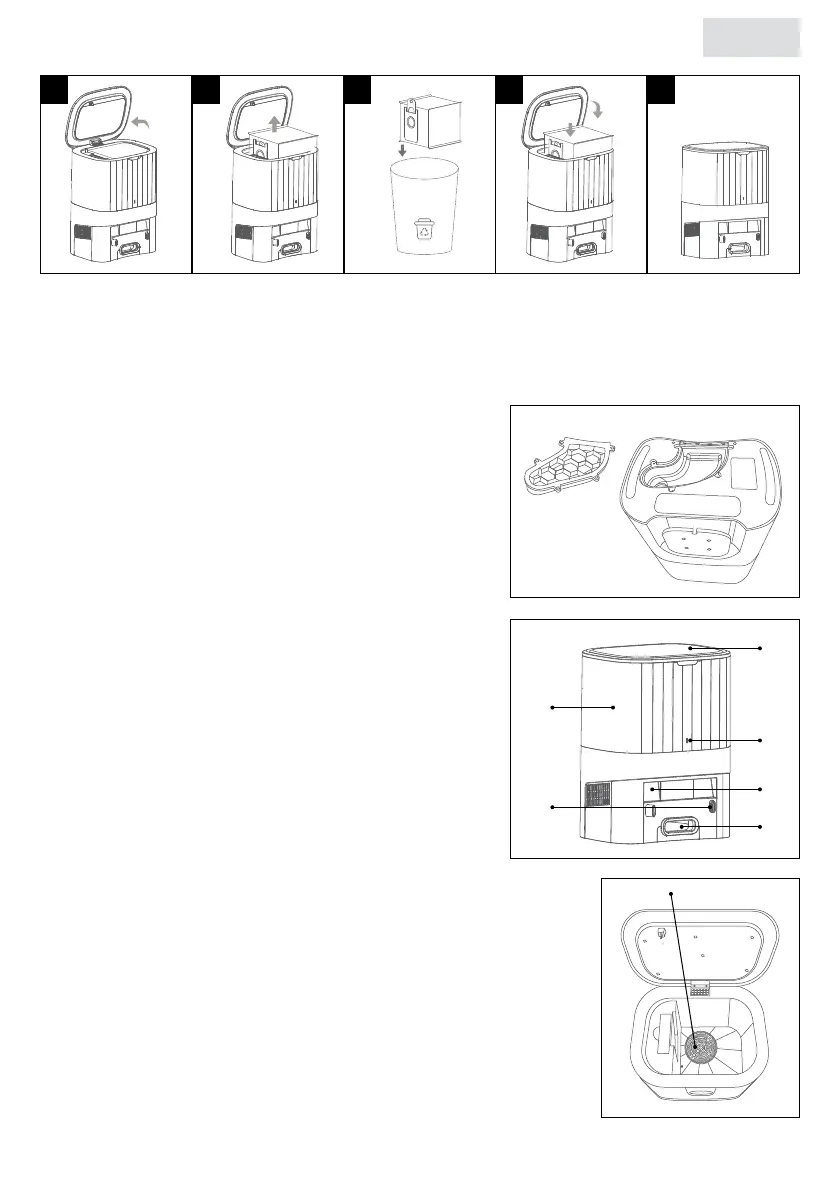
5.2 Cleaning the dust tube
If the indicator light of the charging station is continuously red, it is recommended to clean the
dust tube.
1. Unplug the dust collection station from the power
outlet.
2. Turn the dust collection station over and check if
the dust tube is blocked by foreign objects.
3. If the dust tube is blocked, remove the dust tube
cover with a screwdriver, and remove the foreign
objects.
4. Screw the cover back on.
See 1.2 Product overview for designations.
5.3 Cleaning the infrared lens/sensor head
Gently wipe the infrared lens/sensor head with a clean,
soft dry cloth. It is recommended to clean it once a
month.
See 1.2 Product overview for designations.
5.4 Cleaning the fan lter
The fan lter is located under the dust bag. When dust
accumulates, wipe it with a clean, soft dry cloth. It is recommended
to clean the fan lter once a month.
See 1.2 Product overview for designations.
37
38
31
33
36
34
32
35
1 3 4 52
39


 To Next Page