74
5.8 Cleaning the universal caster
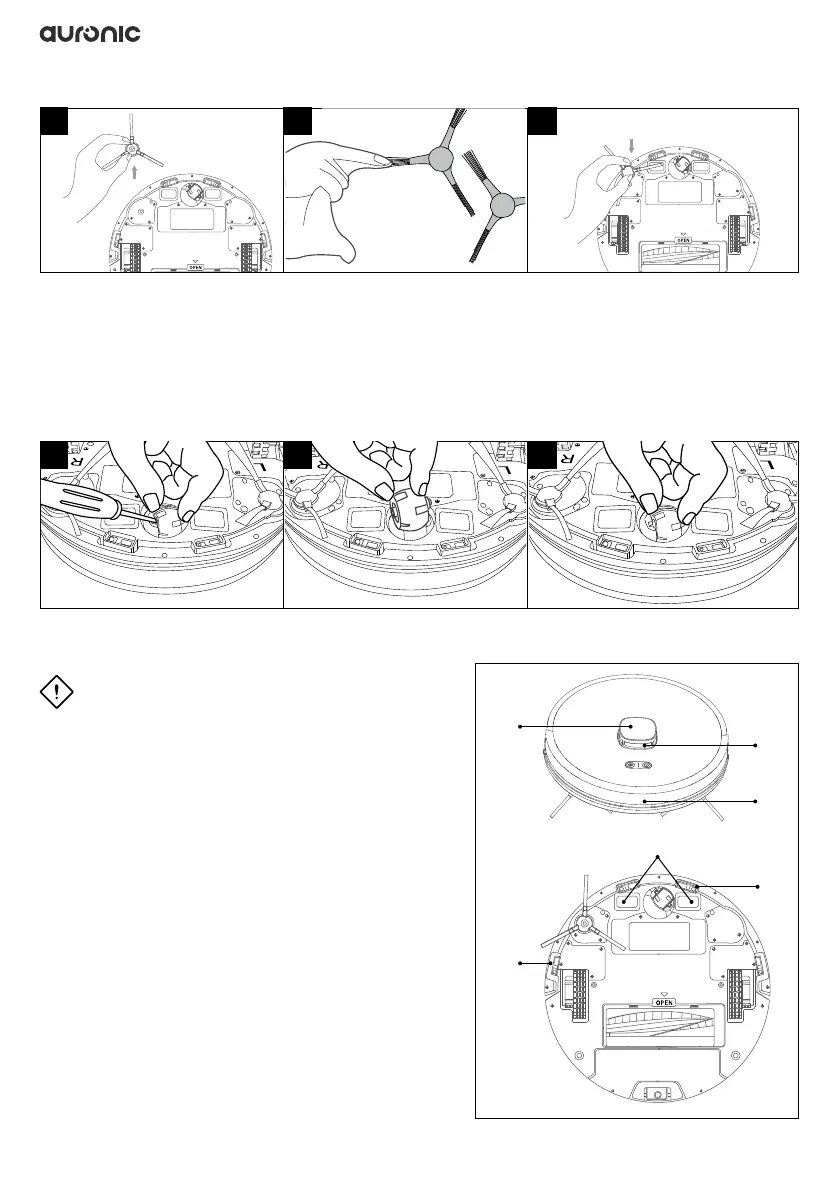
1. Carefully pry out the universal caster at the bottom of the robot with a screwdriver.
2. Take out the universal caster and remove dust, hair and dirt. You can use the cleaning comb
to remove it. Wipe it with a clean cloth.
3. Return the universal caster to its designated position and press it into place.
5.9 Cleaning the sensors
ATTENTION!
◊ If a sensor is damaged, please contact our
customer service department.
See 1.2 Product Overview for designations.
Gently wipe all sensors and charging terminals
with a cotton swab or soft cloth. If the sensor
or charging station is damaged, contact our
customer service department.
It is recommended to gently wipe each sensor
every week with a clean, soft, dry cloth to ensure
proper use of the product.
21
23
26
16
17
17
1 32
1 32


 To Next Page