72
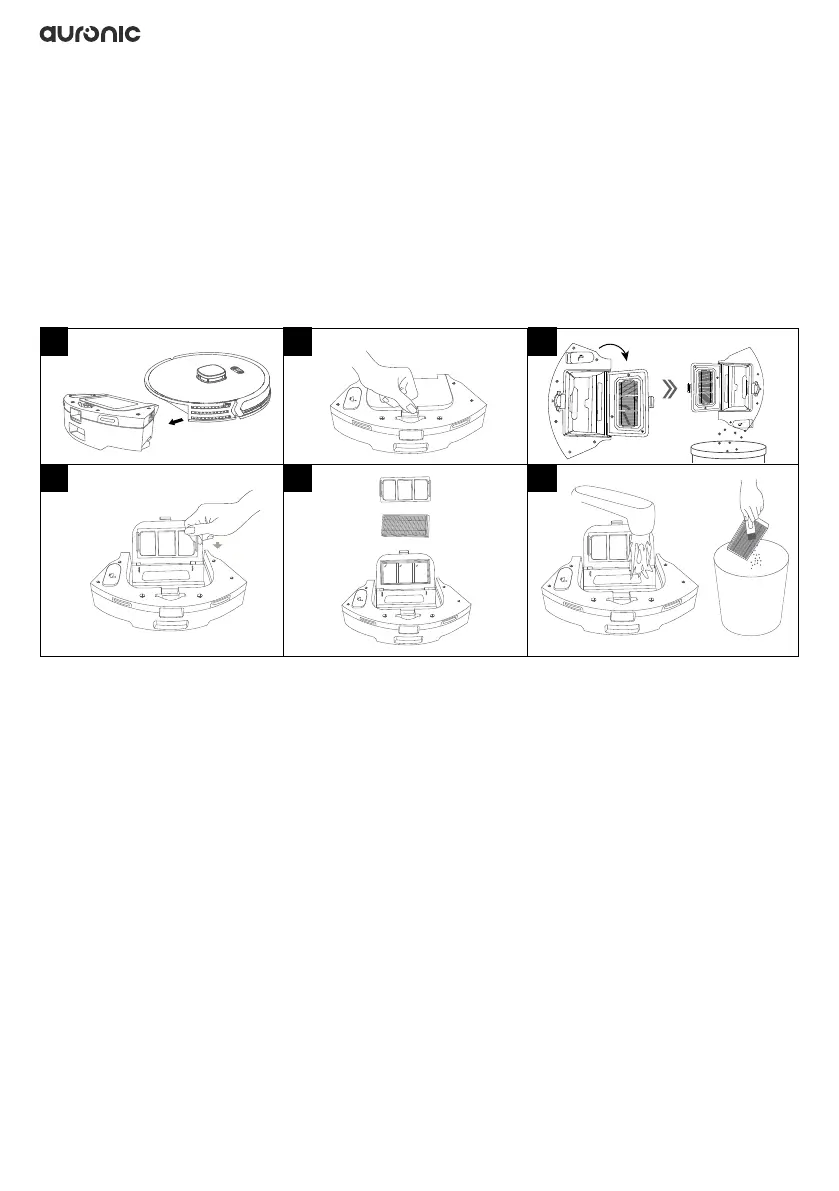
5.5 Cleaning the water tank/dust collector and lters
1. Press the button in the center of the water tank/dust collector and pull it horizontally out of
the robot.
2. Open the water tank/dust collector.
3. Open the water tank/dust collector and empty it over a trash can.
4. Remove the lter holder.
5. Remove the HEPA lter.
6. Clean the lter holder and HEPA lter with running water and let them dry completely. You
can also use a brush to remove the dust.
• All types of lters and HEPA can be cleaned with water.
• The lter is an article of use. It is recommended to replace it every 3-6 months.
7. Remove the mop holder and detach the mop from the mop holder.
8. Clean the mop with clean water and let it dry completely.
• If the mop is too dirty, it affects the mopping quality. Therefore, clean the mop in time.
• Remove the mop to clean it and install it after drying. Do not clean the mop when it is
installed on the 2-in-1 water tank, otherwise the lter element will be clogged by the dirty
water.
• The mop is an article of use. Replace it every 3 or 6 weeks.
9. Empty the remaining water left in the water tank.
10. Let everything dry completely before putting it back into the robot and using it.
11. Place the lter holder and HEPA lter into the water tank/dust collector. Insert the water tank/
dust collector horizontally into the robot body until it clicks into place.
1 32
4 65


 To Next Page