54
3.2 Setting up the cleaning zone
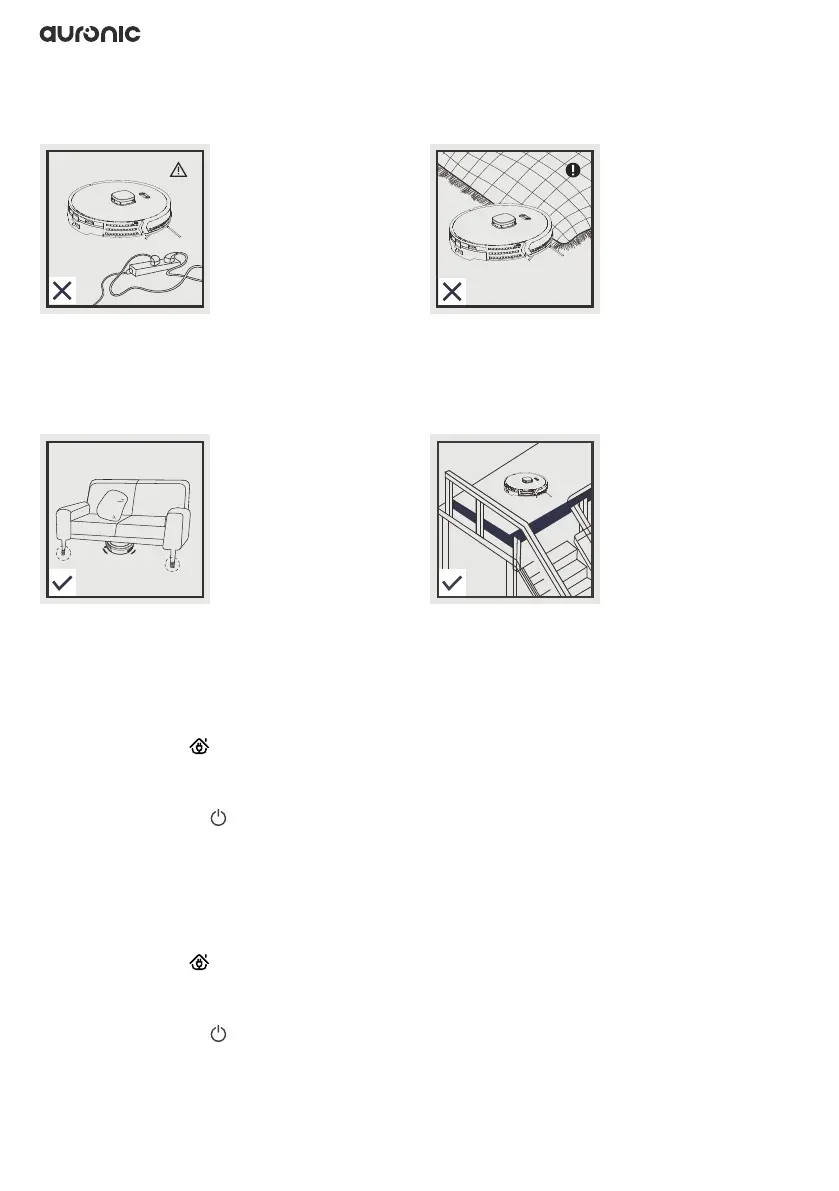
Ensure that the cleaning area is set up according to the following guidelines before use.
3.3 Connecting to the Wi-Fi network
1. Press and hold for at least 3 seconds.
2. You will hear a “ding dong” sound and the robot gives a voice notication “Connecting to
network”.
3. The green light of ashes slowly.
4. The robot connects to the network.
5. Once the connection is complete, the robot gives a voice notication “Network connection
successful”.
3.4 Connecting to the app hotspot
1. Press and hold for at least 6 seconds.
2. You will hear a “ding dong” sound twice and the robot will give a voice notication
“Start AP network connection mode”.
3. The green light of ashes rapidly.
4. The app connects to the robot’s hotspot.
5. Once the connection is complete, the robot gives a voice notication “Network connection
successful”.
Power cord(s) and other items lying on the
ground can entangle the robot. Be sure to
remove them before use or secure them with
the tiewraps provided.
Make sure there is at least 10 cm of space at
the bottom of the furniture so that the robot
does not get stuck.
Roll up the fringes of the carpet or make sure
the robot is used on low-pile carpet without
fringes.
Place railings at the edge of stairs to ensure
safe operation of the robot.


 To Next Page