Calidus
SYSTEM DESCRIPTION
AutoGyro_POH_Calidus Revision 4.0 – Issue Date 17.JAN.2019 7-11
setting will reduce vibration, but give a heavier feel to the aircraft handling - good for long
distance cruising. A light setting will increase vibration, but give a light feel to the aircraft -
great for general handling.
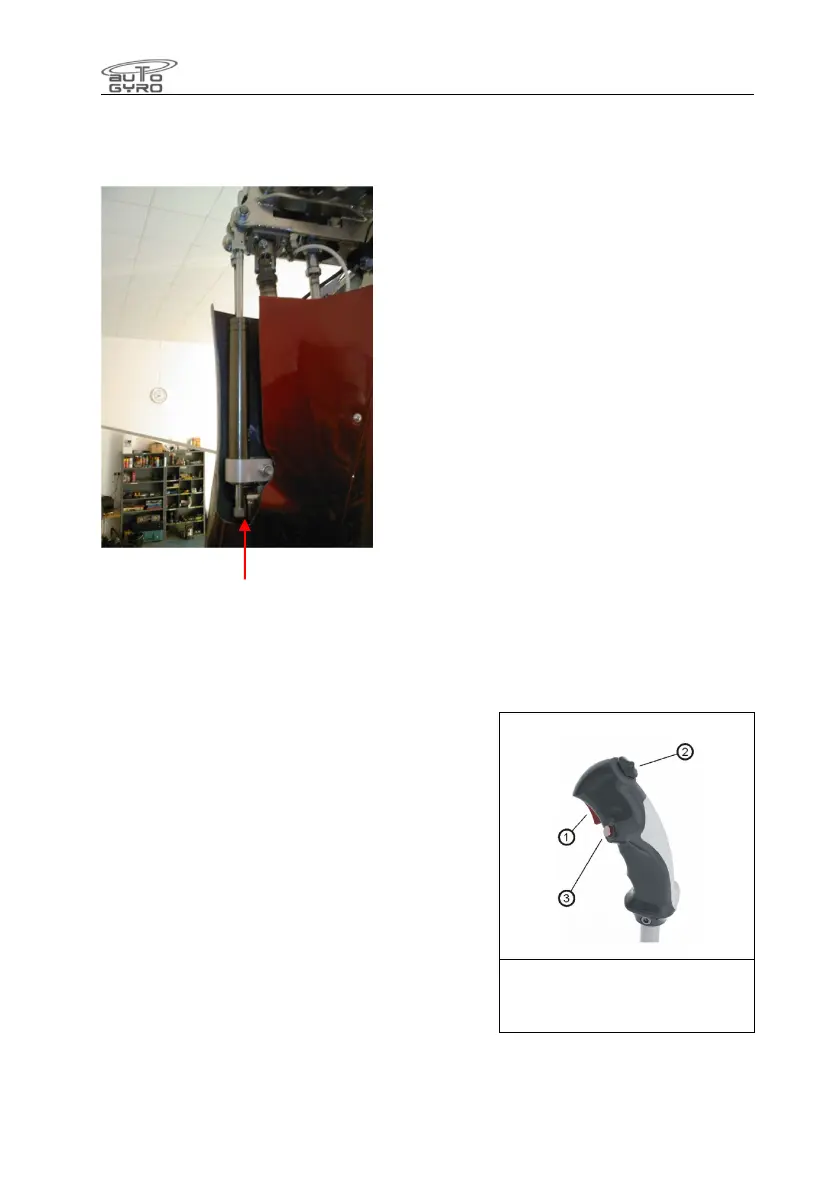
Damper Adjust here
This unit was only fitted to early aircraft, being superseded by the performance of
Rotorsystem II and later developments.
7.10 Flight Controls
Rotor head and trim control
Pitch and roll of the gyroplane are controlled by
tilting the complete rotor head by means of the
control stick. Control input is transferred via torsion
tube and linkage running below the seats to the base
link and from there to the rotor head via push-pull
control cables.
The control stick head is ergonomically shaped to fit
the pilot’s right hand and features control buttons for
radio transmission (1), a four-way trim function (2),
and activation of the pre-rotator (3).
The trim control works as a classical 4-way beep
switch. Pulling the beep switch back increases aft
trim or nose-up tendency, while pushing the switch
forward reduces back trim pressure, leading to a nose-down tendency. Roll trim (if installed)
is effected by pushing the trim switch to the respective side.
1 – Radio transmission
2 – Trim switch
3 – Pre-rotator


 To Next Page