HIRO Installation Manual GDO-12V1
13
© Copyright 2019
6.5 Setting Speed and Limits
STEP ONE
When setting the Close limit, ensure the position
is when the door makes rst contact with the
ground. Alternatively for the Open limit the
position should be at the height of the garage
opening.
STEP TWO
To move the door to the
halfway point.
tip
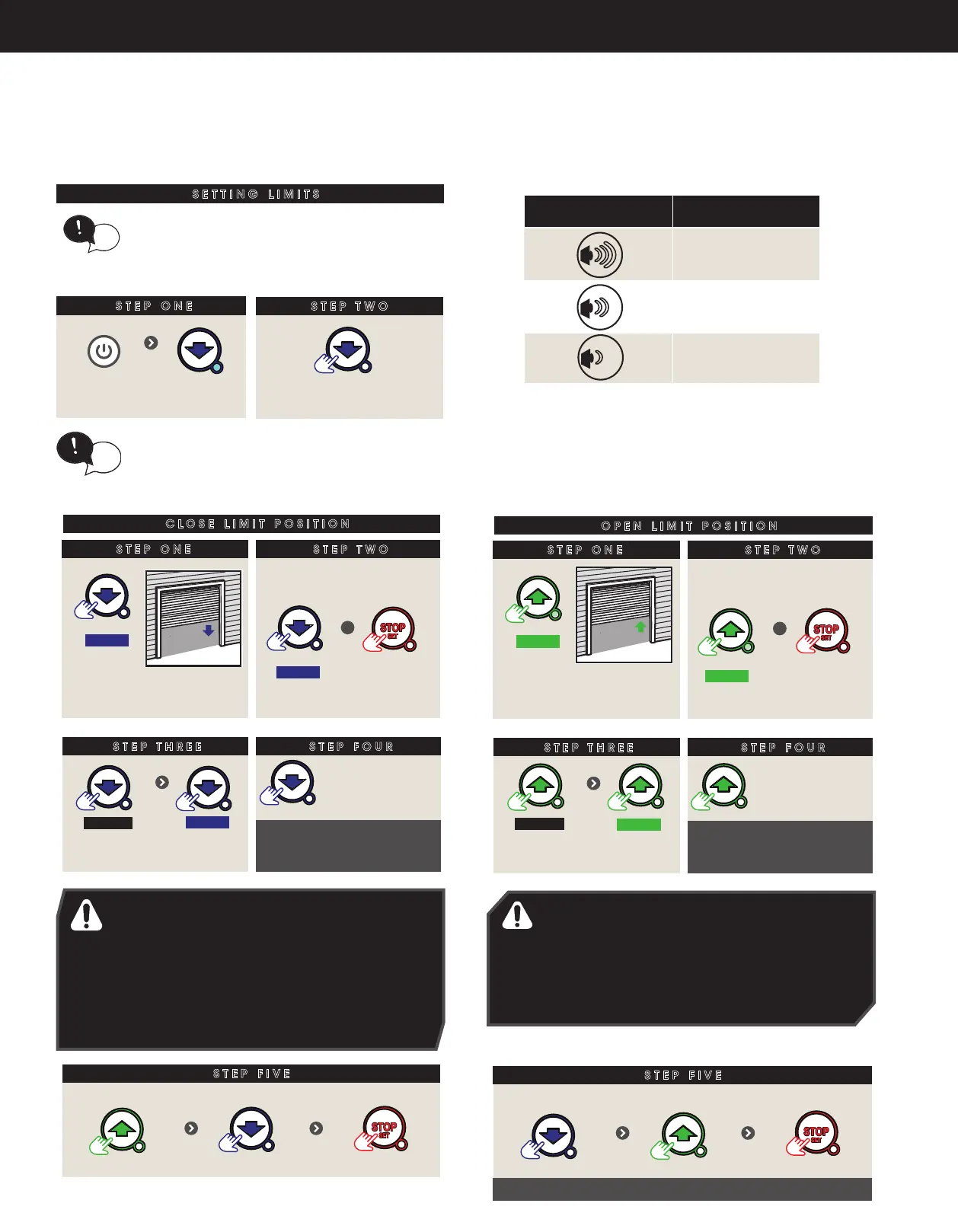
SETTING LIMITS
Switch power on.
BLUE LED will ash
STEP ONE
CLOSE LIMIT POSITION
STEP TWO
HOLD
Take note of the speed as
door moves
If Close speed not suitable,
release button, THEN
HOLD
+
Each press
changes speed
as per table
BEEPER SPEED MODE
3 x FAST (Default)
2 x MEDIUM
1 x SLOW
RELEASE
When at
desired speed
STEP FIVE
When door near
close, single
presses inch door
Press to
close door
HOLD
CLOSE limit should be
when rubber strip touches
the ground
WARNING! In setting the close limit position,
do not force the door into the oor with
excessive force, as this can interfere with the
ease of operation of the manual release
mechanism.
If door overshoots
Press
Press to position Press to set
If door overshoots
Press
Press to position Press to set
STEP FOUR
STEP ONE
OPEN LIMIT POSITION
STEP TWO
HOLD
Take note of the speed as
door moves
If Open speed not suitable,
RELEASE button, THEN
+
Each press
changes speed
as per table
RELEASE
When at
desired speed
STEP FIVE
When door near
open, single
presses inch door
Press to
open door
OPEN limit should be the
height of the garage
opening
WARNING! The door will automatically close.
open and close again after the next step.
Ensure that nothing is in the door’s path.
HOLD
HOLD
Door will open & close to calculate safety obstruction settings
BEEPER SPEED MODE
3 x FAST (Default)
2 x MEDIUM
1 x SLOW
6.5.1 Set the Limit Positions and adjust drive speed:
WARNING! In setting the close limit position, do not
force the door into the floor with excessive force, as
this can interfere with the ease of operation of the
manual release mechanism.
AVERTISSEMENT! Ne pas forcer la porte contre le
sol lors du réglage de fin de course, car une force
excessive peut entraver le fonctionnement du
système de déclenchement manuel.
STEP FOUR
STEP ONE
CLOSE LIMIT POSITION
STEP TWO
HOLD
Take note of the speed as
door moves
STEP THREE
If Close speed not suitable,
release button, THEN
HOLD
+
Each press
changes speed
as per table
BEEPER SPEED MODE
3 x FAST (Default)
2 x MEDIUM
1 x SLOW
RELEASE
When at
desired speed
STEP FIVE
When door near
close, single
presses inch door
Press to
close door
HOLD
CLOSE limit should be
when rubber strip touches
the ground
WARNING! In setting the close limit position,
do not force the door into the oor with
excessive force, as this can interfere with the
ease of operation of the manual release
mechanism.
If door overshoots
Press
Press to position Press to set
Fig.6.5.1
(Fig.6.5.1)
STEP FOUR
STEP ONE
CLOSE LIMIT POSITION
STEP TWO
HOLD
Take note of the speed as
door moves
STEP THREE
If Close speed not suitable,
release button, THEN
HOLD
+
Each press
changes speed
as per table
BEEPER SPEED MODE
3 x FAST (Default)
2 x MEDIUM
1 x SLOW
RELEASE
When at
desired speed
When door near
close, single
presses inch door
Press to
close door
HOLD
CLOSE limit should be
when rubber strip touches
the ground
WARNING! In setting the close limit position,
do not force the door into the oor with
excessive force, as this can interfere with the
ease of operation of the manual release
mechanism.
If door overshoots
Press
Press to position Press to set
STEP FOUR
STEP ONE
CLOSE LIMIT POSITION
STEP TWO
HOLD
Take note of the speed as
door moves
STEP THREE
If Close speed not suitable,
release button, THEN
HOLD
+
Each press
changes speed
as per table
BEEPER SPEED MODE
3 x FAST (Default)
2 x MEDIUM
1 x SLOW
RELEASE
When at
desired speed
STEP FIVE
When door near
close, single
presses inch door
Press to
close door
HOLD
CLOSE limit should be
when rubber strip touches
the ground
WARNING! In setting the close limit position,
do not force the door into the oor with
excessive force, as this can interfere with the
ease of operation of the manual release
mechanism.
If door overshoots
Press
Press to position Press to set
(Fig.6.5.1)
If door overshoots
Press
Press to position Press to set
STEP FOUR
STEP ONE
OPEN LIMIT POSITION
STEP TWO
HOLD
Take note of the speed as
door moves
STEP THREE
If Open speed not suitable,
RELEASE button, THEN
+
Each press
changes speed
as per table
RELEASE
When at
desired speed
When door near
open, single
presses inch door
Press to
open door
OPEN limit should be the
height of the garage
opening
WARNING! The door will automatically close.
open and close again after the next step.
Ensure that nothing is in the door’s path.
HOLD
HOLD
Door will open & close to calculate safety obstruction settings
BEEPER SPEED MODE
3 x FAST (Default)
2 x MEDIUM
1 x SLOW
WARNING! The door will automatically close, open
and close again after the next step. Ensure that
nothing is in the door’s path.
AVERTISSEMENT! La porte va se fermer puis s’ouvrir
automatiquement, avant de se fermer. S’assurer
que rien ne bloque l’ouverture ou la fermeture de la
porte.
If door overshoots
Press
Press to position Press to set
STEP FOUR
STEP ONE
OPEN LIMIT POSITION
STEP TWO
HOLD
Take note of the speed as
door moves
STEP THREE
If Open speed not suitable,
RELEASE button, THEN
+
Each press
changes speed
as per table
RELEASE
When at
desired speed
STEP FIVE
When door near
open, single
presses inch door
Press to
open door
OPEN limit should be the
height of the garage
opening
WARNING! The door will automatically close.
open and close again after the next step.
Ensure that nothing is in the door’s path.
HOLD
HOLD
Door will open & close to calculate safety obstruction settings
BEEPER SPEED MODE
3 x FAST (Default)
2 x MEDIUM
1 x SLOW
HELPFUL TIP: If the door moves in opposite direction,
press and hold the OPEN and CLOSE buttons at the
same time (approx 3 seconds) until you hear a
beep. This will reverse the direction of the motor.
tip


 To Next Page