14 HIRO Installation Manual GDO-12V1
6.5 Setting Speed and Limits
HELPFUL TIP: Alternatively set travel limits using a
Remote Control Transmitter, allowing free movement
around the garage to better assess the desired limit
positions. See Appendix D.
tip
NOTE: If unhappy with the speed or travel limit setting, restart this
procedure by clearing the door limit positions as per below first.
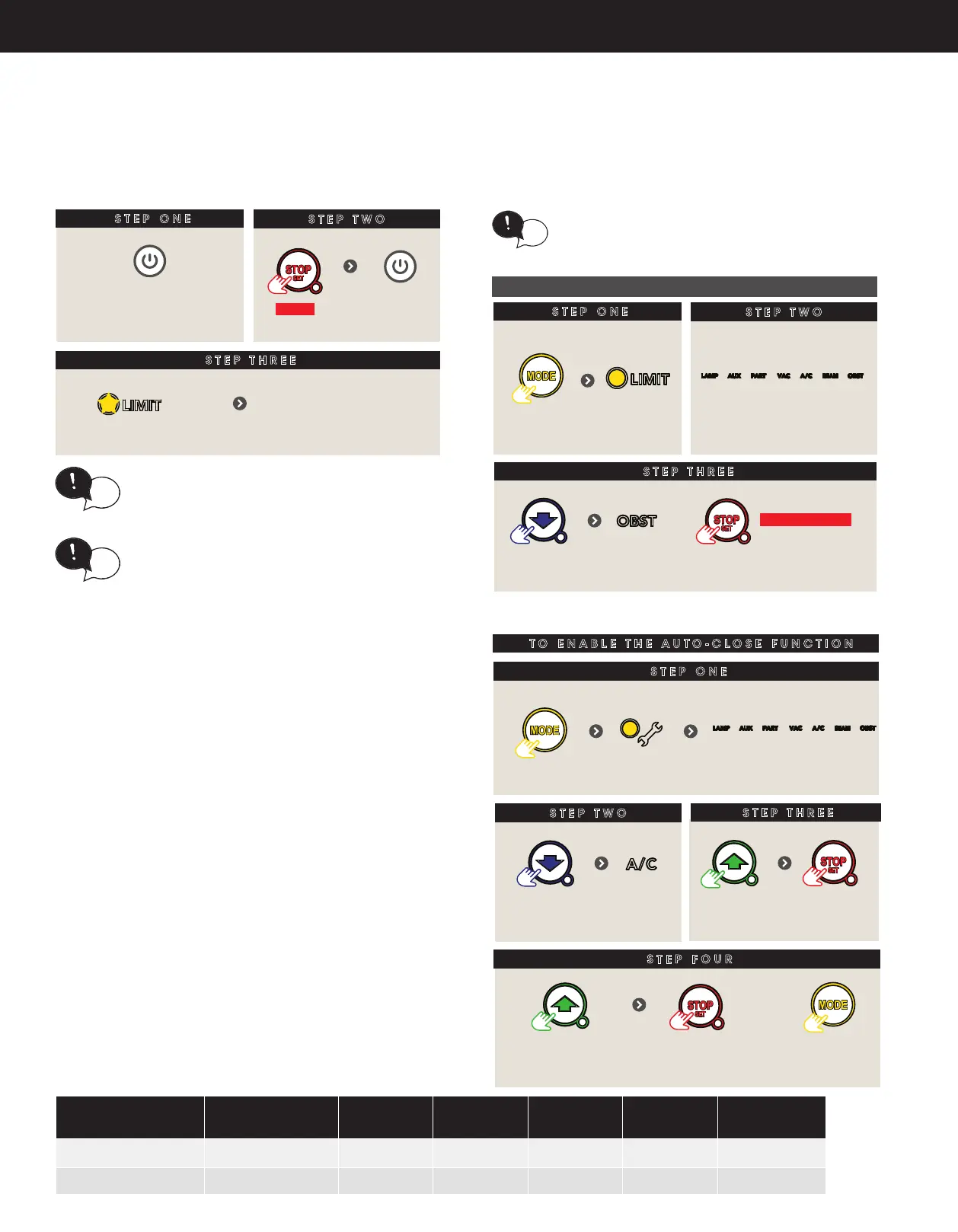
6.5.2 Clearing the Door Limit Positions
6.5.3 Re-profiling the Door
HELPFUL TIP: The door can be set to a partial open
position and programmed to a Remote Control
Transmitter button. Refer to Appendix B.
tip
6.6.1 Auto-Close
Auto-Close mode is a function that automatically closes the door after
a pre-set time. Safety beams must be installed in order to run the Auto-
Close function. There are two types of Auto-Close available:
(i) Standard auto-close - the door will Auto-Close after
a programmed time. In this mode the timer starts to
countdown as soon as the door is fully open. This function is
useful in case the safety beam does not get triggered.
(ii) Safety Beam triggered auto-close - the door will auto-close
after a programmed time. In this mode the timer starts
counting down only when the safety beam is triggered. ie car
leaving the garage.
STEP ONE
STEP TWO
STEP THREE
CLEARING THE DOOR LIMIT POSITIONS
SET Close & Open limits
Switch power OFF
HOLD
Switch power
ON
LIMIT LED will ash
STEP ONE
STEP TWO
Remove controls cover
till LIMIT
LED lit
Press
repeatedly
Re-proling is a simple way of re-learning the travel
characteristics of a previously setup Limit Switch
travel. Re-proling is used when travel characteristic
change due to mechanical adjustments.
tip
To initiate a re-prole: LIMITS must already be set.
STEP THREE
The shutter will open and
close by itself to record prole
One of the word LED’s
will light up
Press
repeatedly
till OBST
LED lit
HOLD for 2 secs
6.6 Auto-Close
STEP ONE
STEP TWO
Remove controls cover
till Spanner
LED is lit
Press
repeatedly
TO ENABLE THE AUTO-CLOSE FUNCTION
STEP FOUR
STEP THREE
Press to enter
parameter
Press to move through
options as per table
Press to save
OR
Press to leave
unchanged
One of the word LED’s
will light up
Press
repeatedly
till A/C
LED lit
x 2 PE Auto
x 3 Std Auto
Press
LED Indicators
Parameter OPEN OPEN &
STOP
STOP CLOSE &
STOP
CLOSE
A/C LED A/C Function
90s 60s 30s 15s OFF
A/C & BEAM LED’S
P.E A/C Function
60s
30s 15s 5s OFF


 To Next Page