Automatic Technology America
3626 North Hall Street, Suite 610, Dallas, TX 75219, United States of America
P: +1 800 934 9892 W: www.ata-america.com
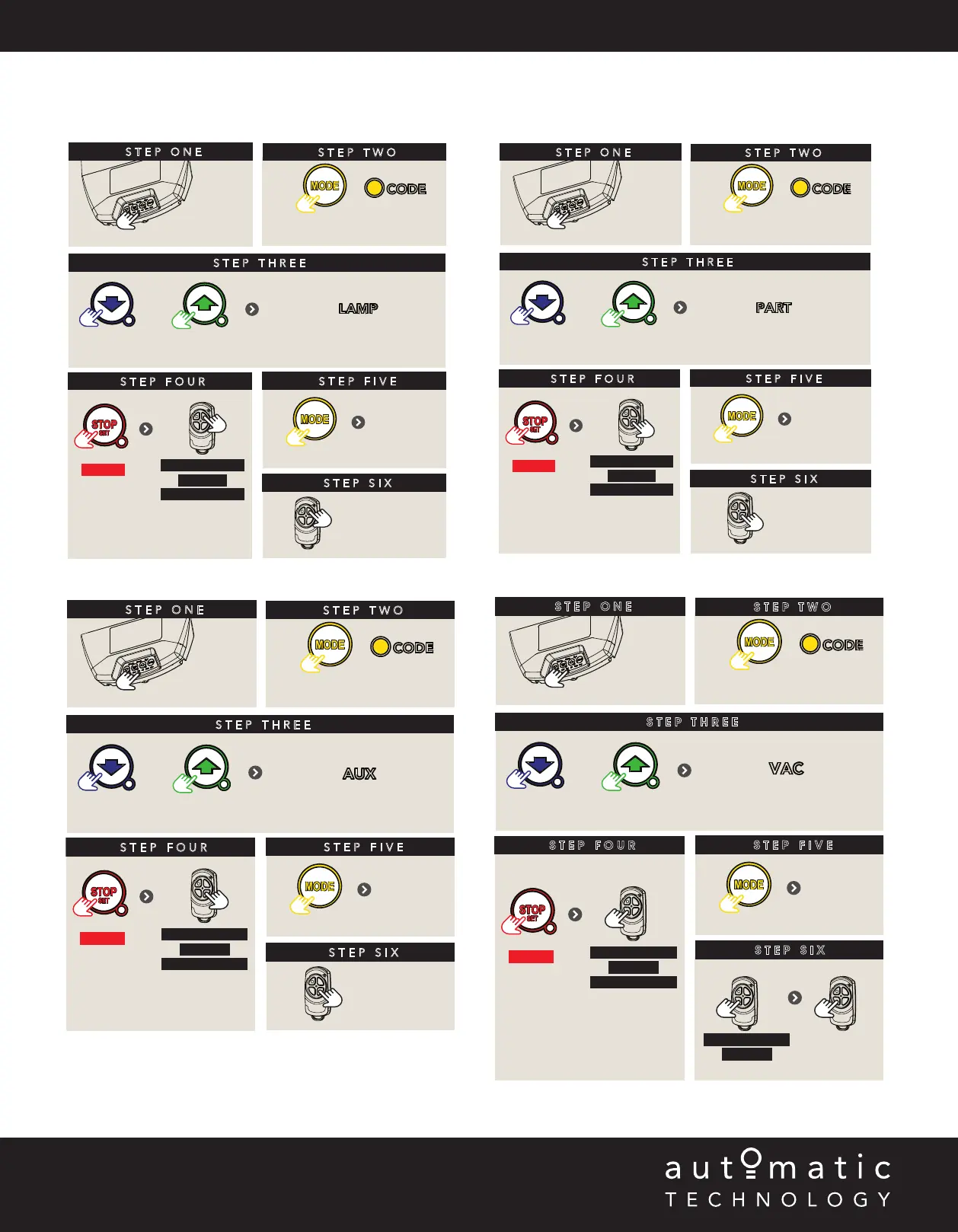
E - Additional Remote Control Functions
E.4 remote control button to activate vacation mode
E.1 remote control button to the courtesy light
STEP THREE
Press repeatedly
remove
controls cover
STEP TWO
STEP ONE
Press repeatedly till
CODE LED is lit
OR
STEP FOUR
to enter
coding
HOLD
HOLD for 3 sec
HOLD for 3 sec
RELEASE
Release both
buttons
STEP FIVE
STEP SIX
Press to test
Then replace controls cover
To exit
coding
CODING REMOTE FOR PART MODE
till PART LED lit
STEP THREE
Press repeatedly
remove
controls cover
STEP TWO
STEP ONE
Press repeatedly till
CODE LED is lit
OR
STEP FOUR
to enter
coding
HOLD
HOLD for 3 sec
HOLD for 3 sec
RELEASE
Release both
buttons
STEP FIVE
STEP SIX
Press to test
Then replace controls cover
To exit
coding
CODING REMOTE FOR COURTESY LIGHT
till LAMP LED lit
VACATION MODE
STEP THREE
Press repeatedly
remove
controls cover
STEP TWO
STEP ONE
Press repeatedly till
CODE LED is lit
OR
STEP FOUR
to enter
coding
HOLD
HOLD for 3 sec
HOLD for 3 sec
RELEASE
Release both
buttons
STEP FIVE
Then replace controls cover
To exit
coding
till VAC LED lit
STEP SIX
Turn on
HOLD for 4 sec
RELEASE
Turn off
Press, then
try another
remote
E.2 remote control button to enable AUX output
STEP THREE
Press repeatedly
remove
controls cover
STEP TWO
STEP ONE
Press repeatedly till
CODE LED is lit
OR
STEP FOUR
to enter
coding
HOLD
HOLD for 3 sec
HOLD for 3 sec
RELEASE
Release both
buttons
STEP FIVE
STEP SIX
Press to test
Then replace controls cover
To exit
coding
CODING REMOTE FOR AUX OUTPUT
till AUX LED lit
E.3 remote control button to operate PART Mode


 To Previous Page