Installation Instructions MegaCode
®
Receiver 19
Navigating To “Edit Transmitter” Menu
a. Press NEXT to navigate to Menu 1 (Fig. E.1) .
b. Press SET to enter the transmitter edit procedure.
c. Press NEXT to enter transmitter list and edit mode.
Editing Button Function Field
a. Press NEXT or PREV to move the cursor to the left or right and between
the top and bottom lines to select the desired field.
b. Use UP and DOWN to change the displayed value. When the correct
setting has been made repeat step a to select the next field to edit. The
example (Fig. E.2) shows editing the function of transmitter number 510
assigned to the Output 1.
Available functions:
M_# (Mimic)
P_# (Pulse)
PR# (Pulse/Reset)
T_# (Toggle)
S_# (Set)
R_# (Reset)
VAC (Vacation)
−−− (OFF)
Where # is the output number M_1,M_2, M_3,M_4
Press SET to save the settings or EXIT to abort without saving.
Editing The Store Location
This feature is only available when coding the first button of a new transmitter.
c. Press NEXT or PREV to move the cursor over Store No. (Fig. E.3)
d. Press UP or DOWN to select new Store No.
e. Press SET to Confirm or NEXT/PREV to move to the next field.
This is useful when managing transmitters using a scheme which ties the
store location to the transmitter’s owner.
Selection Of ID or Serial Number Display
a. Press NEXT to navigate to the Menu 1 ”Code Transmitter”.
b. Press SET to enter the transmitter edit procedure.
c. Press NEXT to enter transmitter list and edit mode.
d. Press NEXT/PREV to move the cursor over the ID field.
e. Press NEXT to reveal the Serial Number (Fig. E.4).
The serial number display is provided for additional means of identification.
The transmitter in this example has serial number 12345.
Editing A Character Field
a. Press NEXT or PREV to move select character.
b. Press UP or DOWN to scroll through and select a new character.
c. Press NEXT or PREV to move to the next character.
d. Repeat step b.
e. Press SET to record changes.
The second line of the display shows a list of available characters with the
current value indicated at the cursor position (Fig. E.5).
E - Transmitter Editing
Transmitter Listing Facility
The MegaCode
®
provides a transmitter listing facility which enables
the User to find a transmitter location within memory. Once located
a stored transmitter can be replaced, deleted, edited, copied or, if
the location is empty, a new transmitter can be coded.
Method 1 - Go To The Start Of The List
Accessing The List Menu
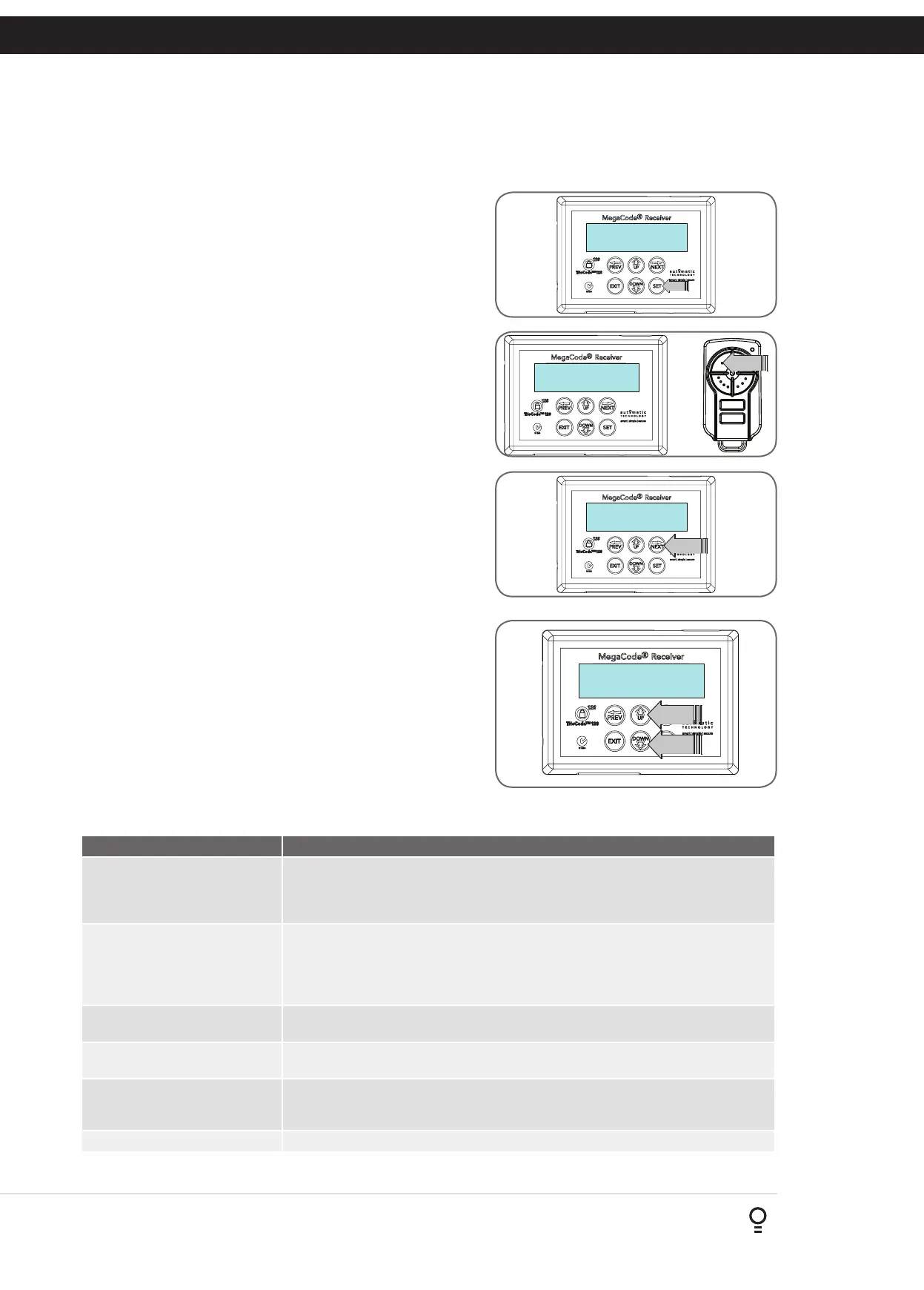
a. Press NEXT to navigate to Menu 1 (Fig. F.1).
b. Press SET to enter the transmitter edit procedure.
c. Press NEXT to enter the transmitter list and edit mode.
Method 2 - Use The Transmitter To Go Direct To The List
Accessing The List Menu
a. Press NEXT to navigate to Menu 1 (Fig. F.1).
b. Press SET to enter the transmitter edit procedure.
c. Press the transmitter once (Fig. F.2).
d. Press NEXT to view the transmitter parameters (Fig. F.3).
This method is used for quick navigation if the transmitter is
available.
NOTE: “VIEW” will not be shown if the transmitter is not stored.
Once the list is displayed, it can be sorted by stored number, ID
Label or Serial Number. Use the NEXT or PREV buttons to select
the sorting method.
NOTE: When sorting by ID label or S/N, only stored transmitters
locations are displayed.
Navigating The List
a. Press the UP or DOWN buttons to navigate through the list
(Fig. F.4).
NOTE: Holding a button down will step through the list faster.
b. Press SET to display the menu of available functions.
Selecting An Operation
a. Press NEXT or PREV to cycle through the four menu options
(Fig F.5)
b. Press EXIT to return to the list. Press SET to execute the menu’s
operation.
Fig F.1
Fig F.2
Fig F.3
Fig F.4
Menu Option Operation
Code Operation (location empty) If the code operation is selected on an empty transmitter location, the BASIC CODE
TRANSMITTER PROCEDURE will be initiated with the transmitter being saved in the
selected location. This is useful when managing transmitters using a scheme which ties
the store location to the transmitter’s owner.
Code Operation (location used) If the code operation is selected for a location that already contains a transmitter,
then the BASIC CODE TRANSMITTER PROCEDURE will be initiated and the new
transmitter will replace the existing one. Note that the button functions and name of
the existing transmitter will be transferred to the new transmitter. This procedure is of
great convenience when replacing a lost transmitter.
Delete Operation The delete operation is used to remove a transmitter from memory along with the
name and button function settings.
Edit Operation The edit operation displays the transmitter record for editing purposes. See
TRANSMITTER EDIT PROCEDURE (Appendix E) for details.
Copy Operation The copy operation is used to code multiple transmitters with the same button function as
that of the selected transmitter. Once selected an abbreviated code set routine is initiated for
each transmitter to be coded. Coding is terminated by pressing the EXIT button.
Exiting The List To exit the transmitter list, simply press EXIT to return to the Code menu.
Fig F.5
F - Transmitter Managment
Appendix
MENU 1
Code Transmitter
PRESS
Press Tx'er
Again! VIEW—»
PRESS
Press Tx'er
Button! LIST—›
PRESS
31∆ ID T SMITH
P_1 --- R_1 T_2
PRESS
PRESS


 To Next Page