Installation Instructions MegaCode
®
Receiver 15
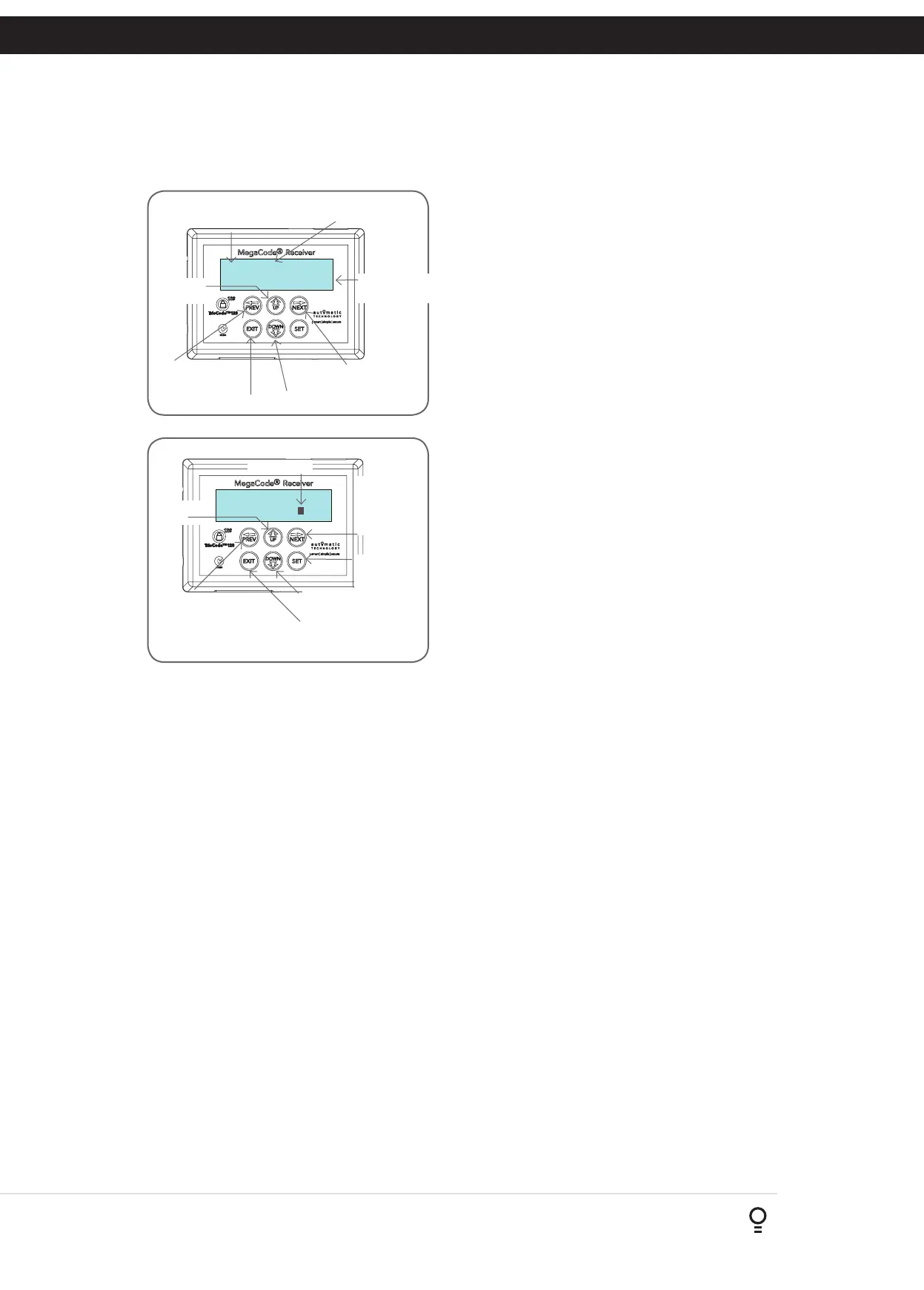
This section illustrates how to locate, view and adjust parameters.
Locating parameters
Refer to Appendix A for Consile Menu Structure. Locate the required
parameter and note the MENU number. The example used in
(Fig. B.1) displays “Output Pulse Time”
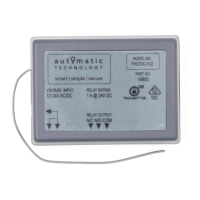
Changing Setting
a. Press NEXT/PREV to navigate to the required menu.
b. Press SET to show the sub-menu.
c. Press NEXT/PREV to go to the required sub-menu.
d. Press UP/DOWN to change parameter setting. Holding the
button down causes the parameter’s value to change rapidly.
The longer the button is held the faster the value changes.
e. Press SET to SAVE setting.
Reload Default Setting
a. Press NEXT/PREV buttons to display LOAD DEFAULT screen.
b. Press SET to load the default value.
Return To Menu
If the parameter’s value is not to be changed, press EXIT to return
to the submenu. Press EXIT again to return to the MAIN SCREEN.
Fig B.1
Fig B.2
B - Viewing and Editing Parameters
Appendix
1: Output Pulse
Time 1.0
1: Output Pulse
Time 1.0
Parameter name
Parameter
value
Displays next
parameter in list
Parameter number in list
Enter Edit
Mode
Displays previous
parameter in list
Returns back to menu Enter Edit Mode
View Mode (No cursor)
Edit Mode (Cursor shown)
Increase
value
Displays “Load
Default?” screen,
giving option of
loading default value
Exits back to View Mode
with no changes made
Decrease
value
Displays “Load
Default?” screen,
giving option of
loading default
value
Cursor shown
Saves new
value and exits
back to View
Mode


 To Next Page