8
MegaCode
®
Receiver Installation Instructions
4. Coding Transmitter
The MegaCode
®
receiver can store up to five hundred and eleven
(511) transmitters in its memory. Each transmitter can be allocated
an alpha-numeric ID label up to eleven (11) characters in length
and each button can be assigned to any channel. The settings for a
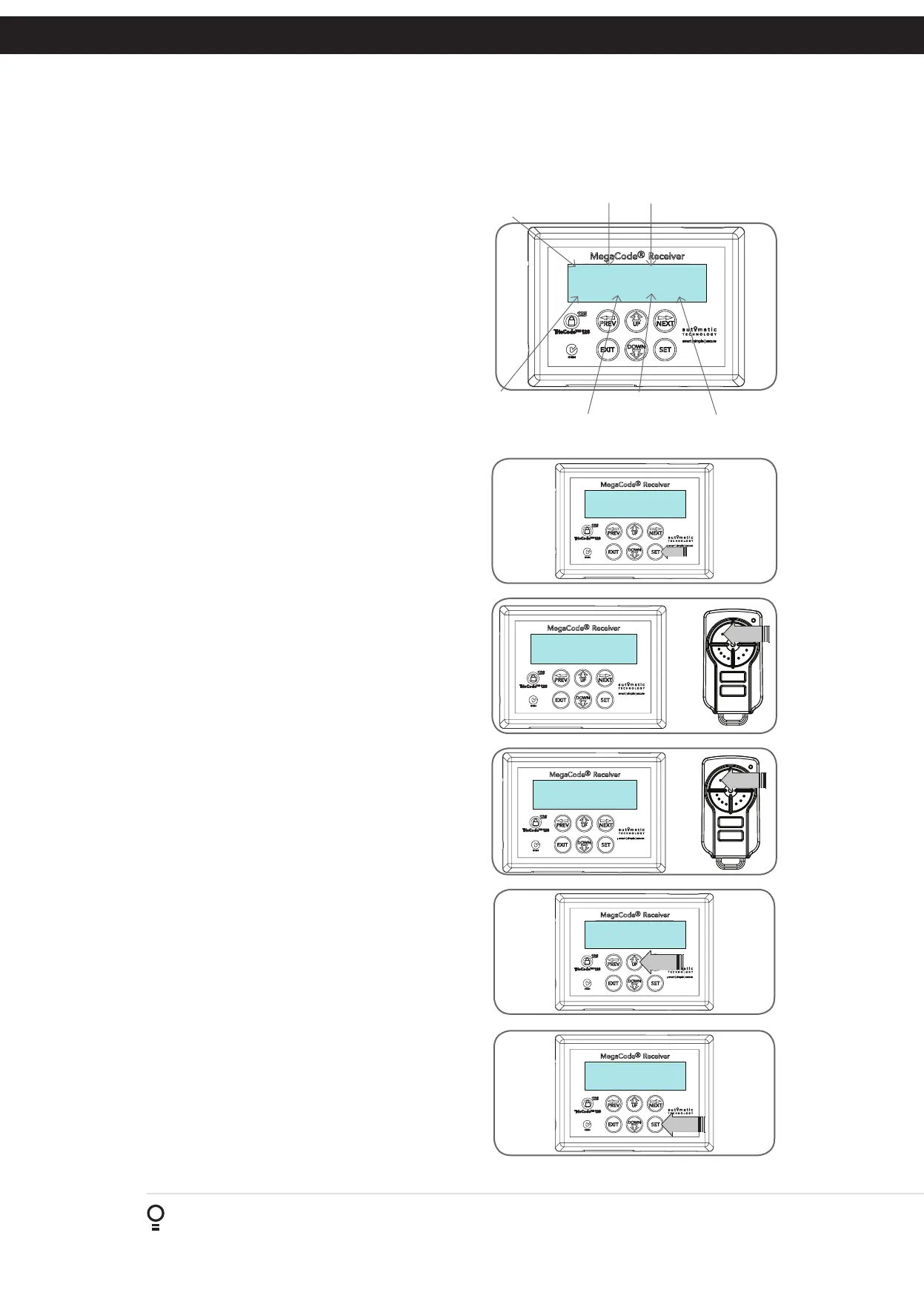
transmitter are represented in (Fig. 4.1). It shows the transmitter’s
store number, ID label or serial number and the functions assigned
to each of its four buttons. To toggle between ID/SN display, press
UP/DOWN with the cursor on the ID/SN indicator.
Brand Of Transmitters
The first memory location sets the type of transmitters which can be
stored into the memory of the receiver. It either can be Automatic
Technology TrioCode™128 or B&D Tri-Tran
+
™ transmitters. For
example, if the first transmitter stored is TrioCode™128, then the
rest of the transmitters can only be the TrioCode™128 type and
mixing of TrioCode™128, Tri-Tran
+
™ is not possible. The deletion
of all stored transmitter codes from the receivers memory
will allow you to choose either TrioCode™128 or Tri-Tran
+
™
transmitters again.
4.1 Coding Transmitter Button
Navigating To Menu 1 “Code Transmitter”
a. Press NEXT to navigate to Menu 1 (Fig. 4.2).
b. Press SET to enter the code set procedure.
Storing Transmitter Code
a. The controller will prompt to press one of the transmitter’s
buttons.
b. Press and hold for approximately 2 seconds the transmitter
button you wish to use to operate the Door Opener (e.g. button
1) (Fig. 4.3) .
c. Press the hold for approximately 2 seconds the same transmitter
button again as prompted by the display (Fig. 4.4).
4.2 Selecting Function Of The Button
The controller will now show the transmitter’s record, with
a cursor on the field for the button being coded (Fig. 4.5).
Use OPEN/CLOSE to select the function for the button.
Available functions:
M_# (Mimic) P_# (Pulse)
PR# (Pulse/Reset) T_# (Toggle)
S_# (Set) R_# (Reset)
VAC (Vacation) --- (OFF)
NOTE: Where # is the output Number 1,2,3,4.
Press SET to save the settings or EXIT to abort without saving
(Fig. 4.6).
4.3 Returning To Main Screen
The “Code Transmitter” menu will now be shown. Press EXIT to
return to the MAIN SCREEN and test the transmitter.
Fig 4.1
I.D label/Serial number
Output 1 function
Store number
ID/SN display indicator
12 ID NAME/SN
M_1 T_4 PR_3 S_1
Output 2 function
Output 3 function
Output 4 function
MENU 1
Code Transmitter
PRESS
2 ID[ No Name ]
M_1 --- --- ---
PRESS
2 ID[ No Name ]
M_∆ --- --- ---
PRESS
Press Tx'er
Button! LIST—›
PRESS
Fig 4.2
Fig 4.3
Fig 4.4
Fig 4.5
Fig 4.6


 To Next Page