10
Overview
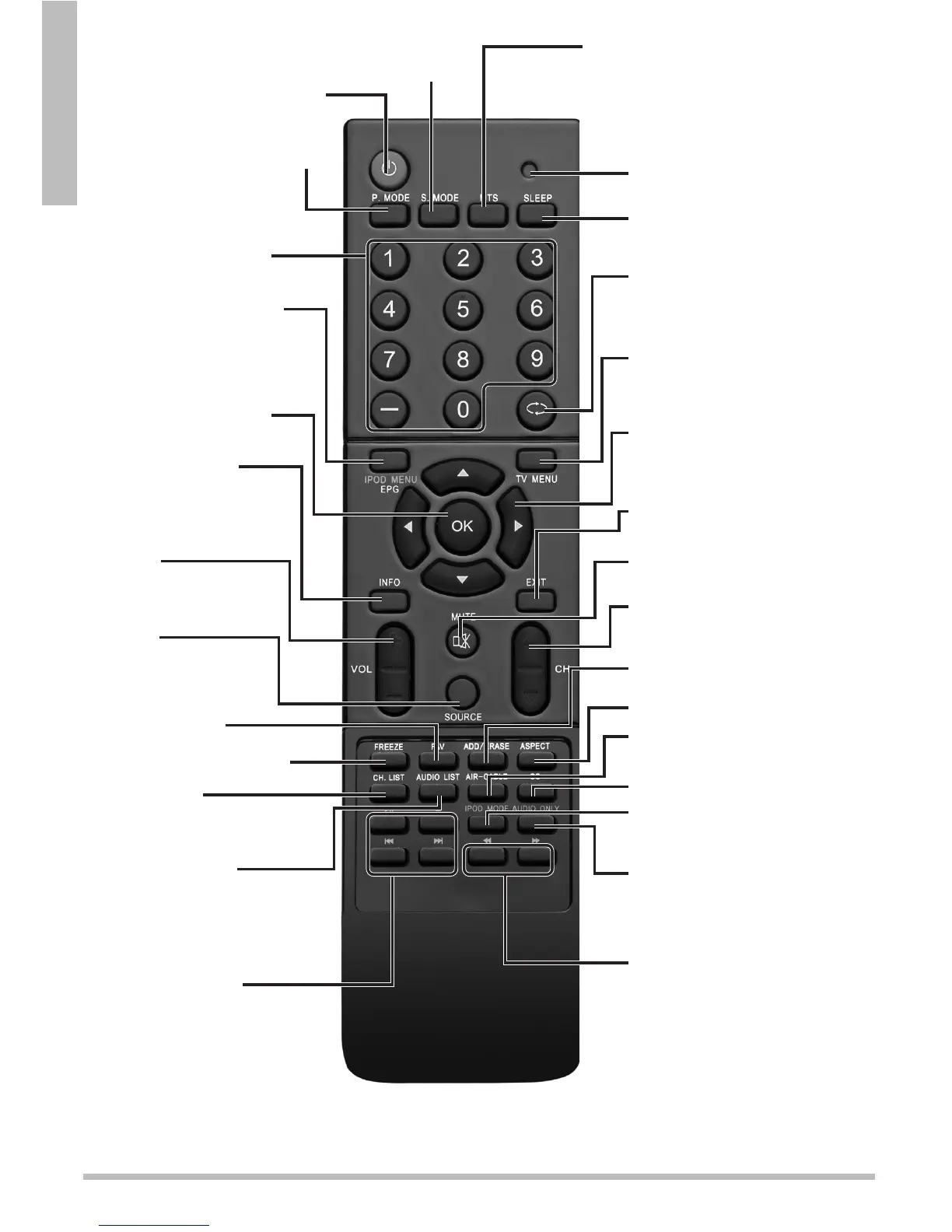
nNote: The remote works best within of 20 ft (6 m) of the TV.
POWER – Turn the TV on or to
standby.
SOURCE – Select an
available video input
source.
f
– Return to the previous
channel.
EXIT – Exit the menu.
MENU – Access the TV menu.
VOL +/–
Decrease or increase the
volume.
CH –
Select next /previous channel.
SLEEP – Set the sleep timer.
ASPECT – Select the screen size.
S.MODE
Select an audio preset.
P.MODE – Select a video preset.
CC – Turn closed captions on/off.
INFO – Turn show
information on or off.
Number Buttons (0-9, –)
Set the channel or enter
password.
– Navigate menus.
OK – Make selections.
FAV –
Display a list of
favorite channels.
MUTE – Turn sound off or on.
FREEZE – Pause live TV.
AUDIO LIST –
Switch between audio channels,
if available.
CH. LIST –
Display a list of channels saved in
Tuner memory.
ADD/ERASE –
Add or delete a Favorite channel.
AIR–CABLE –
Switch broadcast type.
IPOD MODE –
Enter the main iPod menu.
AUDIO ONLY –
Press to hide video. Hold for 3
seconds to restore..
IPOD MENU/EPG –
Navigate iPod menus or view
scheduled programming for the
current channel.
MTS – Select alternate audio if
available.
/// –
Play, pause/stop/previous track/
next track.
/ –
Rewind or Fast Forward through
iPod tracks.
LED Indicator – Blinks red
while remote is in use.


 To Next Page