16
Basic Operation
Basic Operation
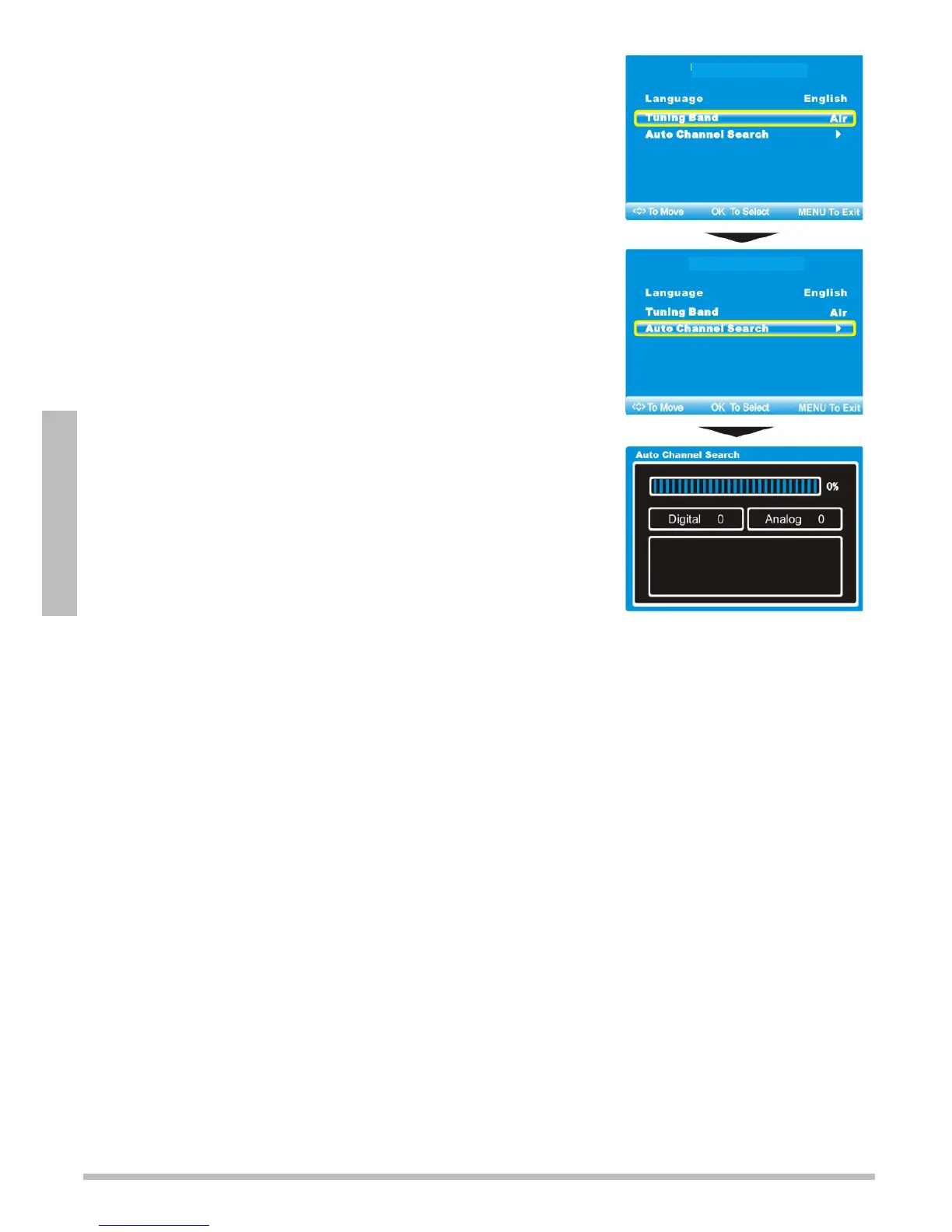
Initial Setup Menu
Before watching any programs, you must configure your TV.
1. Plug the TV’s power cord into a standard AC outlet, then
press POWER. The Initial Setup Menu appears.
2. Press or to select a language: English, French, or
Spanish and press to go to the next setting.
3. Press or to select Air or Cable for over-the-air
broadcast or for paid cable or satellite input.
4. For over-the-air broadcasts, press
to highlight Auto
Channel Search, then press to begin.
5. When the search completes, you can watch TV.
nNotes:
To turn off the TV completely, press POWER, then unplug
the TV. To put the TV in standby mode, just press POWER.
Weak electric power is consumed in standby mode.
After 5 minutes with no signal or a blank screen, the TV
automatically goes to standby mode.
See page 21 for manual channel search instructions.
Press SOURCE to select input sources: TV, Composite,
S-Video, Component, VGA, HDMI, or iPod.
Adjust the Volume
Press VOL+ and VOL– to increase or decrease the volume.
Press MUTE on the remote control to temporarily silence the sound. To restore the
sound, press VOL+, VOL–, or MUTE.
Change Channels
To cycle through channels, press CH
or CH
.
To directly select a channel, press the number buttons on the remote control and – for
the desired channel. Wait for 5 seconds, or press OK to confirm the channel change. For
example, to select the channel 5, press 5 OK. To select the channel 22-1, press
2 2 – 1 OK.
To switch between the current and previously tuned channel, press
f
.
Closed Captions
Press CC on the remote control to cycle through available captions:
•CCOff
•CCOn
•CCOnMute
n Note: To set Analog, Digital , and Advanced CC Settings, see “Set Closed Captions” on
page 24.
Initial Setup Menu
Initial Setup Menu


 To Next Page