15
Setup
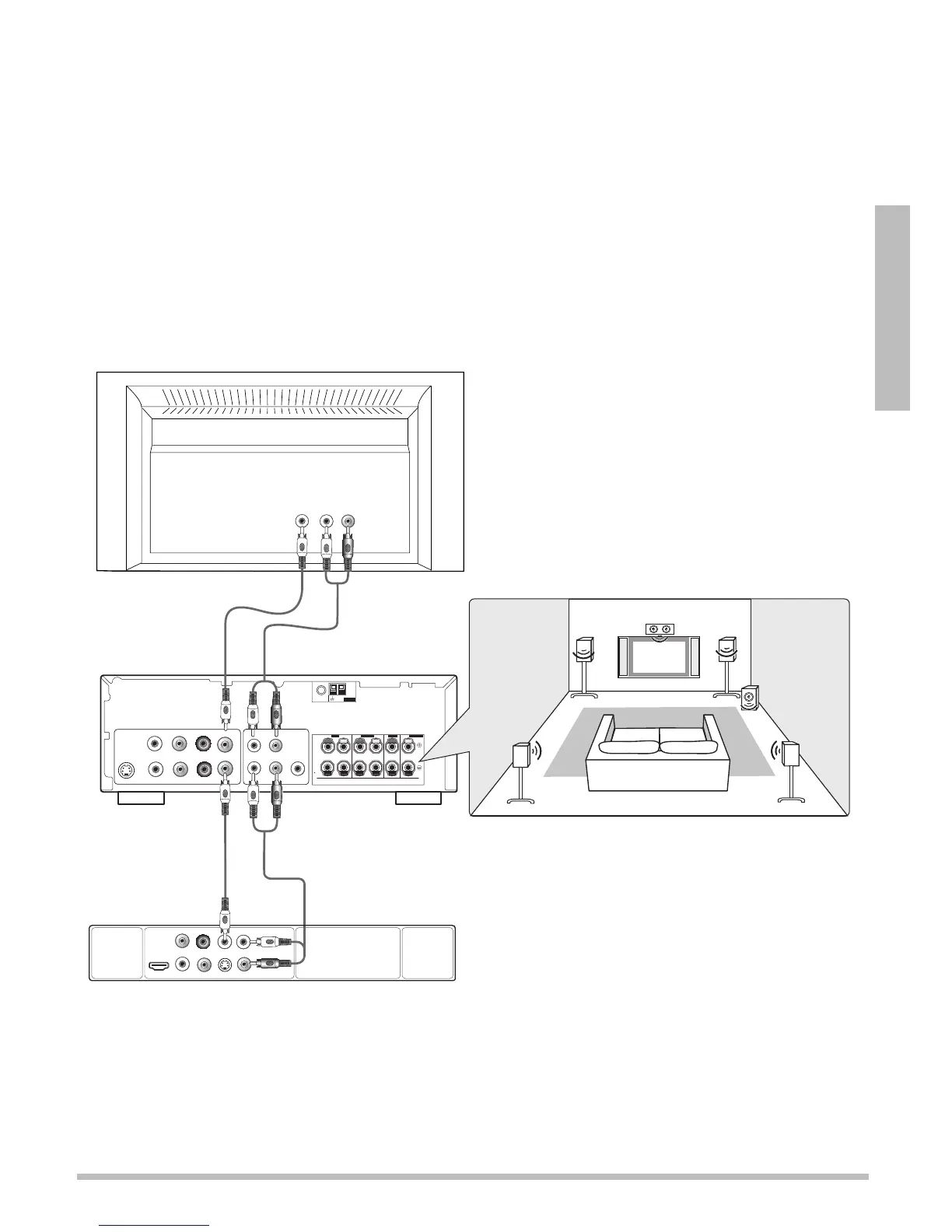
Connecting to a Home Theater
Connect Audio and Video through your A/V receiver/amplifier
1. Connect audio and video cables from your DVD player or other device to your A/V
receiver/amplifier, then connect the receiver/amplifier to the TV.
2. Refer to the instructions from your A/V receiver/amplifier or speaker system to make
speaker connections.
n Note: For best results, use the highest quality of audio/video cables that your devices
will accept. Use the same type of audio and video cables to go from the device to the
receiver/amplifier that you use to go from the TV to the receiver/amplifier.
Optimal Speaker Layout
A/V Receiver
TV
DVD Player or
Other Device
Video Out
Video In
Y Pb Pr
AM
LOOP
FM UNBAL
75
Ω
ANTENNA
FRONT
R
L
CENTER
SURROUND
S
K
E
R
S
R
L
SUB WOOFER
S-VIDEO
Audio In
Component Video
Out
In
Audio Out
Coaxial
Digital
Audio
Video
Y
P
R
PB
L
R
S-VideoCoaxialHDMI
Audio Out


 To Next Page