14
Setup
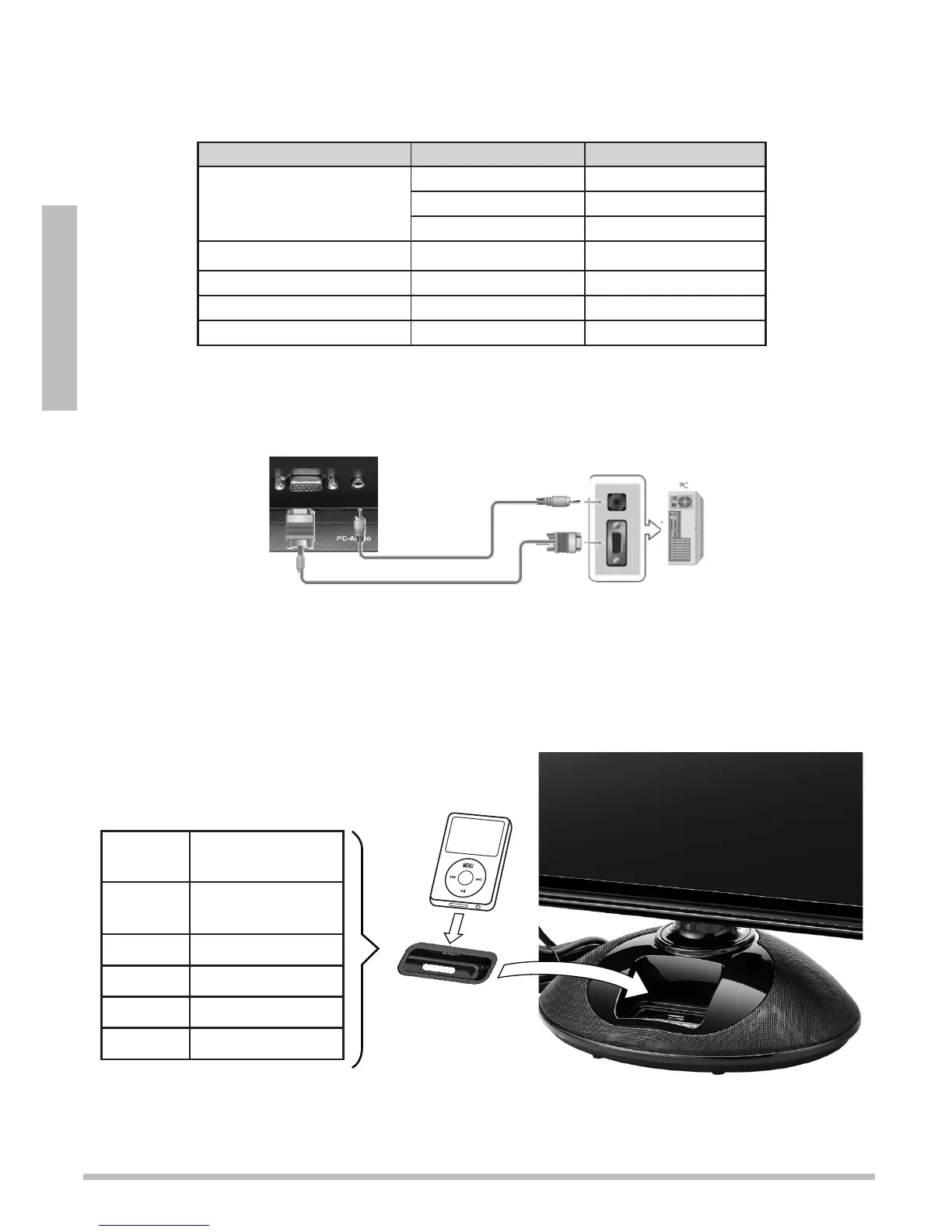
Connecting a PC
1. Your TV automatically adjusts the screen resolution and saves it when receiving a VGA
signal from a PC. If the receiving signal is not the standard mode signal, refer to the
table to set your PC’s resolution.
Resolution Vertical Frequency Horizontal Frequency
640 x 480 (VGA) 60 Hz – / –
72 Hz – / –
75 Hz – / –
720 x 400 70 Hz – / +
800 x 600 60 Hz 48.363 KHz
1024 x 768 (XGA) 60 Hz 63.974 KHz
1360 x 768 (recommended) 60 Hz 47.7 KHz
2. Use a VGA cable (not supplied) to connect the PC-RGB port on the back of the TV, to the
VGA port on your PC.
3. Use a PC audio cable (not supplied) to connect the PC-Audio jack on the back of the TV
to the audio out jack on your PC.
Connecting an iPod
Insert the iPod adapter for your iPod model into the docking station on the front of the TV,
then insert your iPod. Wait 3 to 5 seconds for the iPod to connect before use.
Choose the adapter that fits
your iPod. Refer to the number
marked on the adapters:
Adapter
No.
Compatible
Models
10 Video 60G/80G
& Classic 160G
13 Nano 3G
14 Touch 1G
16 Touch 2G
17 Nano 4G
VGA Cable
PC Audio
Cable


 To Next Page