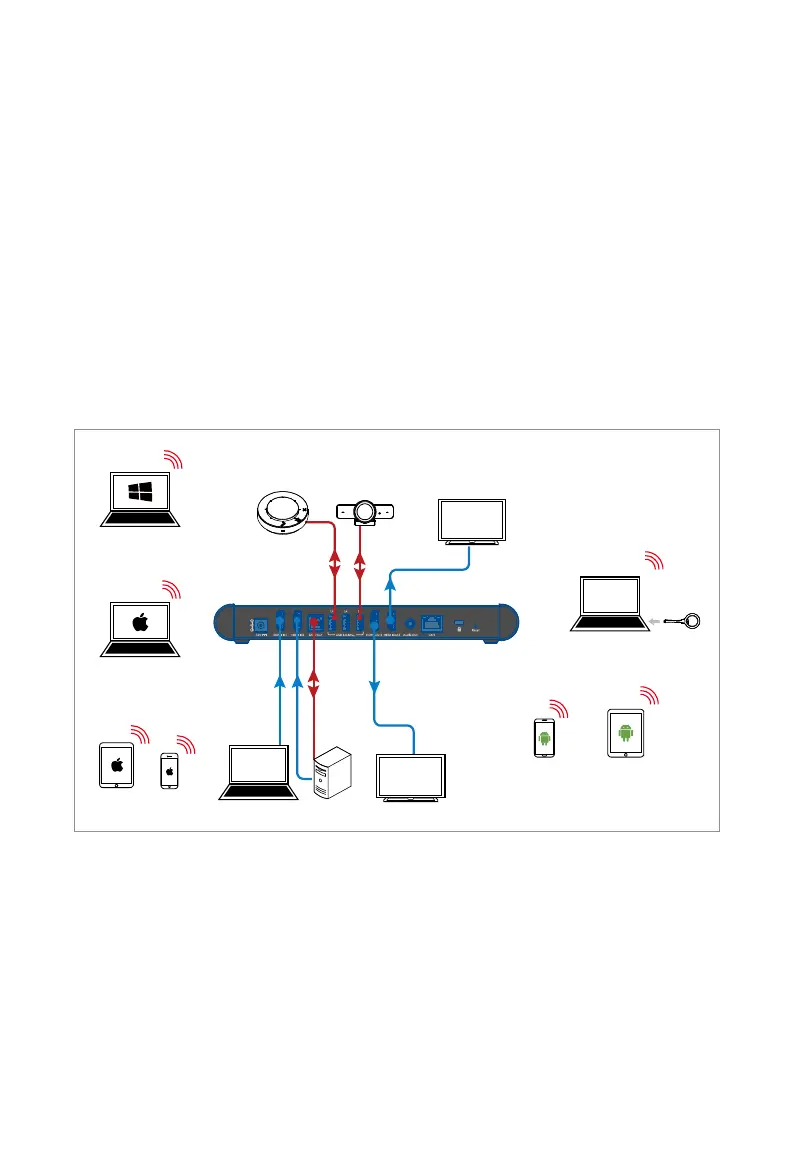
Application
Features:
• Plug a dongle into the laptop after the dongle is paired with the
device successfully, the laptop can connect to the device
wirelessly via the dongle as well as access the camera and
speakerphone at the device.
• User can wirelessly project the screen content of the laptop and
mobile devices to the device over Airplay and Miracast.
• If only one HDMI output is connected to an HDMI display device,
Dual View Display function will be activated in need.
Scenario 2
HDMI
HDMI
USB
USB
Speakerphone
Camera
Laptop Desktop Display 1
Display 2
iPad
iPhone
Android
Tablet
Android
Mobile
Macbook
Windows 11 PC
Dongle
Laptop
• Plug a dongle into a laptop after the dongle is paired with the
device successfully, the laptop can connect to the device
wirelessly via the dongle as well as access the camera and
speakerphone at the device.
• User can wirelessly project the screen content of the laptop and
mobile devices to the device over Airplay and Miracast.



 To Next Page