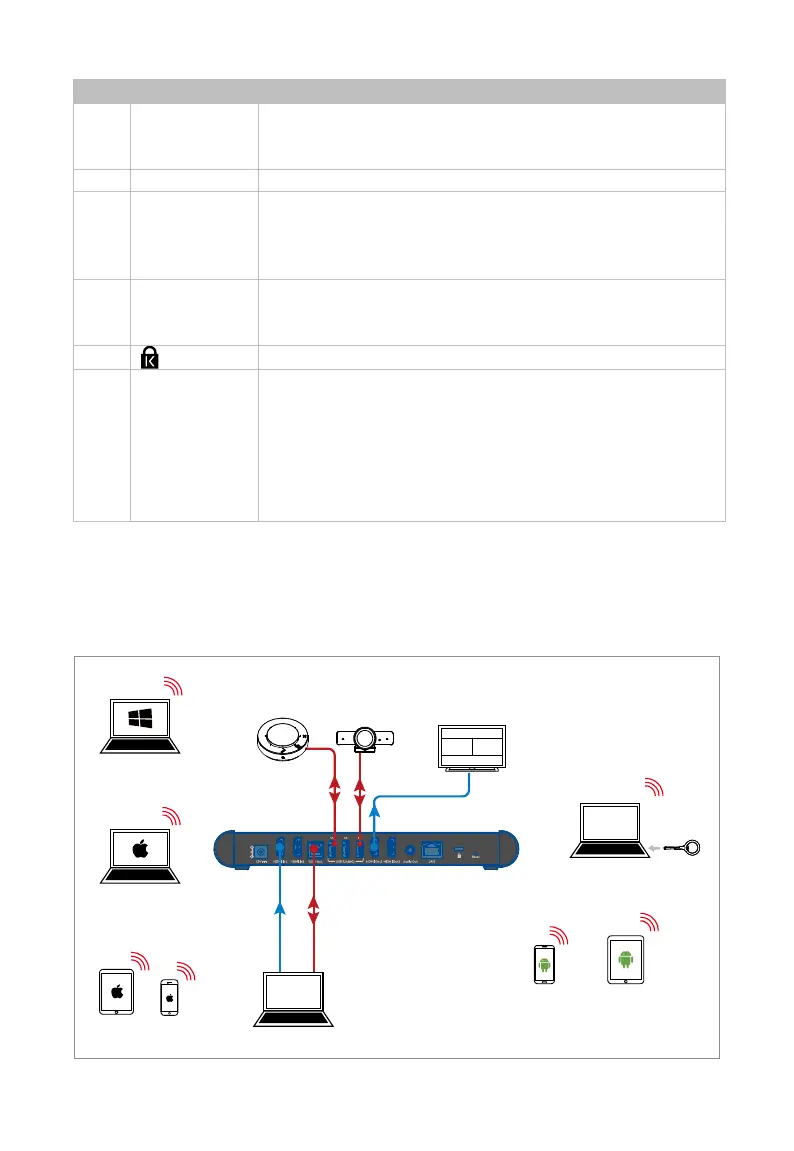
Application
(2) Connect to a U-
disk for firmware upgrade. More
information, see Firmware Upgrade section.
Connect to HDMI displays.
6 Audio Out
Connect to an audio receiver for unbalanced analog audio
output.
Important: This port automatically outputs the audio from
the latest connected source.
7 LAN
Connect to a network device (e.g. network switch, wireless
router, computer, etc.) for LAN control (Web UI) and airplay
Kensington security slot.
9 Reset
Reset button for the following two functions:
When the device is powered on, short press the button,
the device’s OSD information appears on the display
screen for 10 seconds.
When the device is powered on, press and hold the
button for at least 5 seconds, the device reboots and
restores to its factory defaults.
Application
Scenario 1
HDMI
USB
USB
Speakerphone
Camera
Laptop
Display
iPad
iPhone
Android
Tablet
Android
Mobile
Macbook
Windows 11 PC
Dongle
Laptop



 To Next Page