Dashboard
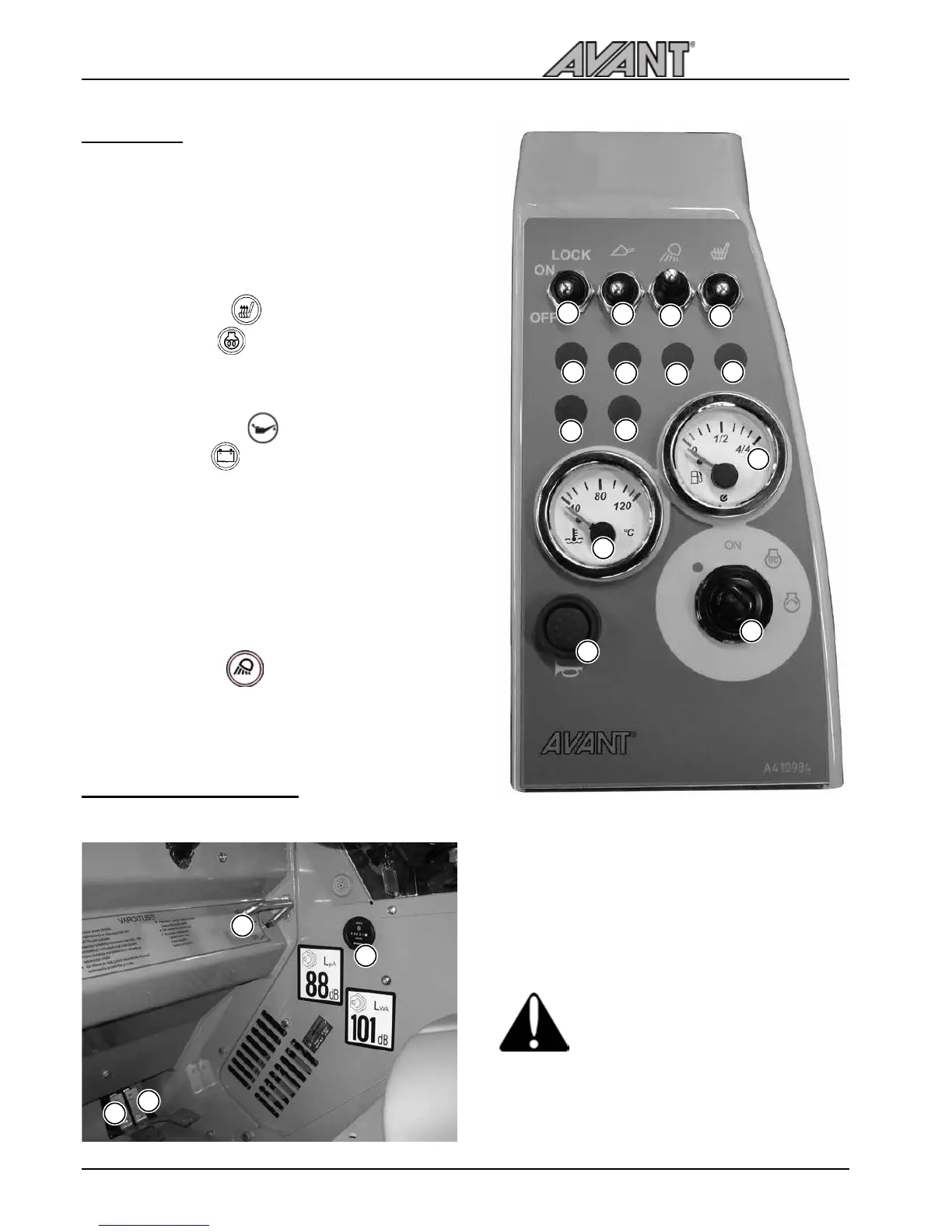
On the dashoard on the right side of the driver’s
seat are mounted gauges, indicators and switches
which help the operator to control the loader.
Operating instructions
Controls in the footwell
Following picture shows the controls located in the footwell
2
1
19
15
16
17
10
7
2
4
5
11
12
14
13
2. Headlamp indicator (Road traffic light kit)
4. Seat heater indicator
5. Glow plug indicator
6. Fuel gauge
7. Work light switch
10. Oil pressure indicator
11. Charge indicator
12. Thermometer
13. Ignition switch
14. Signal horn
15. Seat heater switch (optional extra)
16. Drive release / anti slip valve switch (optional extra)
17. Boom floating switch (optional extra)
19. Worklight indicator
1. Drive pedal, left: drive backward
2. Drive pedal, right: drive forward
3. Parking/emergency brake handle
• locking: pull the handle and turn down into
locking position
• releasing: turn up and let the handle go down
Parking brake locks mechanically - spring-
loaded pins go into the holes of the
parking brake drum on the front wheels.
Make sure that the brake locks properly
by driving a bit forward or backward.
4. Hour meter
See correct operation of drive pedals on page 22.
3
4
6



 To Next Page