STEP 1
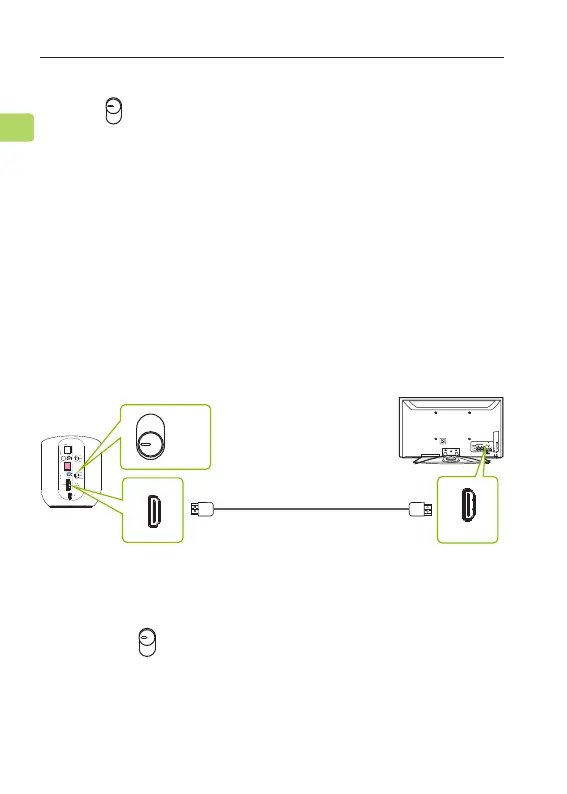
Plug your HDMI cable (not provided) into the TV’s
“HDMI ARC”port, then plug the other end into the
Orbit Pro’s HDMI port in the “Input” section.
OPTION 1: HDMI ARC (recommended)
ORBIT PRO
User Manual
8
EN
STEP 2
Switch the button to the “HDMI” position.
AUX
OPT
HDMI
Once the Orbit Pro is connected to its power source,
switch to the "TX" position. You can then connect
it to your TV's audio ports. You can choose one of 4
dierent ways to do this:
TX
OFF
RX
RGB IN
COMPONENT IN
AUDIO
(RGB/DVI)
RGB(PC)
ANTENNA/
CABLE IN
1
2
RS-232C I
N
(CONT
ROL & SE
RVICE)
VIDEO
AUDIO
VIDEO
AUDIO OUT
OPTICA
LCOAXIAL
MONO
( )
AUDIO
S-VIDEO
DIGI
TAL AUDIO OUT
AV IN 1
HDMI/DVI IN
3
2
1
REMOTE
CONTROL IN
AV IN 2
L/MONO
R
AUDIO
VIDEO
USB IN
HDMI IN 4
HDMI ARC
HDMI
AUX
OPT
(Not Provided)



 To Next Page