11
EN
ORBIT PRO
User Manual
STEP 1
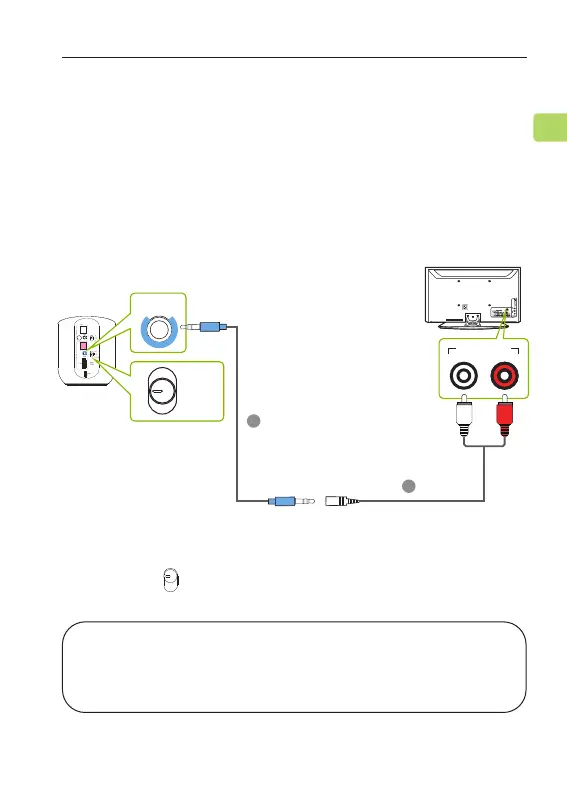
Plug the red & white RCA connectors into the TV’s
“AUDIO OUT” ports, then use the provided RCA to AUX
adapter to plug the other end into the transmitter’s
AUX 3.5mm port in the “Input” section.
OPTION 4: RCA port
STEP 2
Switch the button to the “AUX” position.
AUX
OPT
HDMI
NOTE: Double check to ensure that optical / RCA cables
are plugged into the TV’s audio OUT ports and not the
AUDIO IN / COMPONENT IN ports.
C
D
AUX
RGB IN
COMPONENT IN
AUDIO
(RGB/DVI)
RGB(PC)
ANTENNA/
CABLE IN
1
2
RS-232C IN
(CONTROL & SERVICE)
VIDEO
AUDIO
VIDEO
AUDIO OUT
OPTICALCOAXIAL
MONO
( )
AUDIO
S-VIDEO
DIGITAL AUDIO OUT
AV IN 1
HDMI/DVI IN
3
2
1
REMOTE
CONTROL IN
AV IN 2
L/MONO
R
AUDIO
VIDEO
USB IN
HDMI IN 4
Audio Out
HDMI
AUX
OPT



 To Next Page