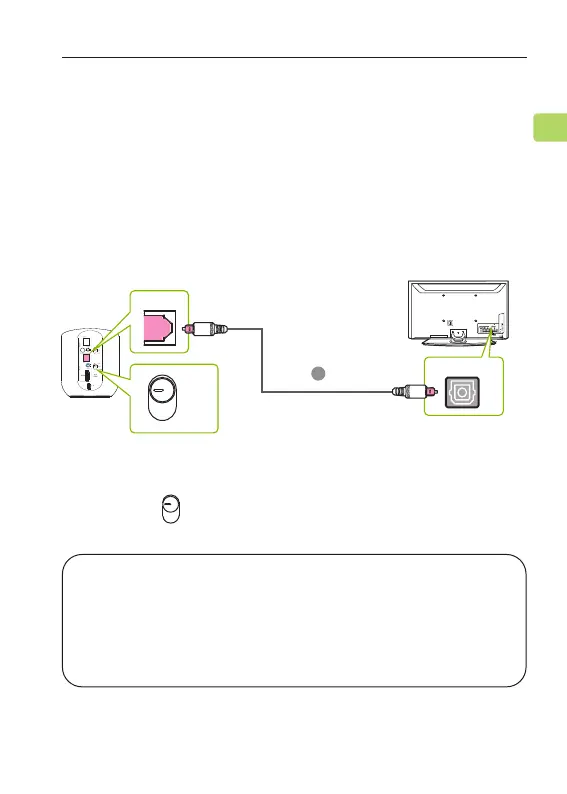
STEP 1
Plug the provided optical audio cable into the TV’s
“optical OUT” or “OPT OUT” port, then plug the other
end into the transmitter’s optical port in the “Input”
section.
OPTION 2: Optical port (recommended)
ORBIT PRO
User Manual
9
EN
STEP 2
Switch the button to the “OPT” position.
AUX
OPT
HDMI
NOTE: Most TVs support audio output through only
one digital output port at a time, so if your TV’s HDMI
ARC port is in use, the optical port may be disabled.
You can either unplug the HDMI ARC, or try connecting
the transmitter via RCA / AUX.
OPT
B
RGB IN
COMPONENT IN
AUDIO
(RGB/DVI)
RGB(PC)
ANTENNA/
CABLE IN
1
2
RS-232C I
N
(CONT
ROL & SE
RVICE)
VIDEO
AUDIO
VIDEO
AUDIO OUT
OPTICA
LCOAXIAL
MONO
( )
AUDIO
S-VIDEO
DIGI
TAL AUDIO OUT
AV IN 1
HDMI/DVI IN
3
2
1
REMOTE
CONTROL IN
AV IN 2
L/MONO
R
AUDIO
VIDEO
USB IN
HDMI IN 4
DIGITAL OUT
HDMI
AUX
OPT



 To Next Page