EasyManua.ls Logo

Avermedia EzRecorder 310 - Connection Ports (Front and Rear)

Avermedia EzRecorder 310
56 pages
Print Icon
To Next Page IconTo Next Page
To Previous Page IconTo Previous Page
Loading...
5
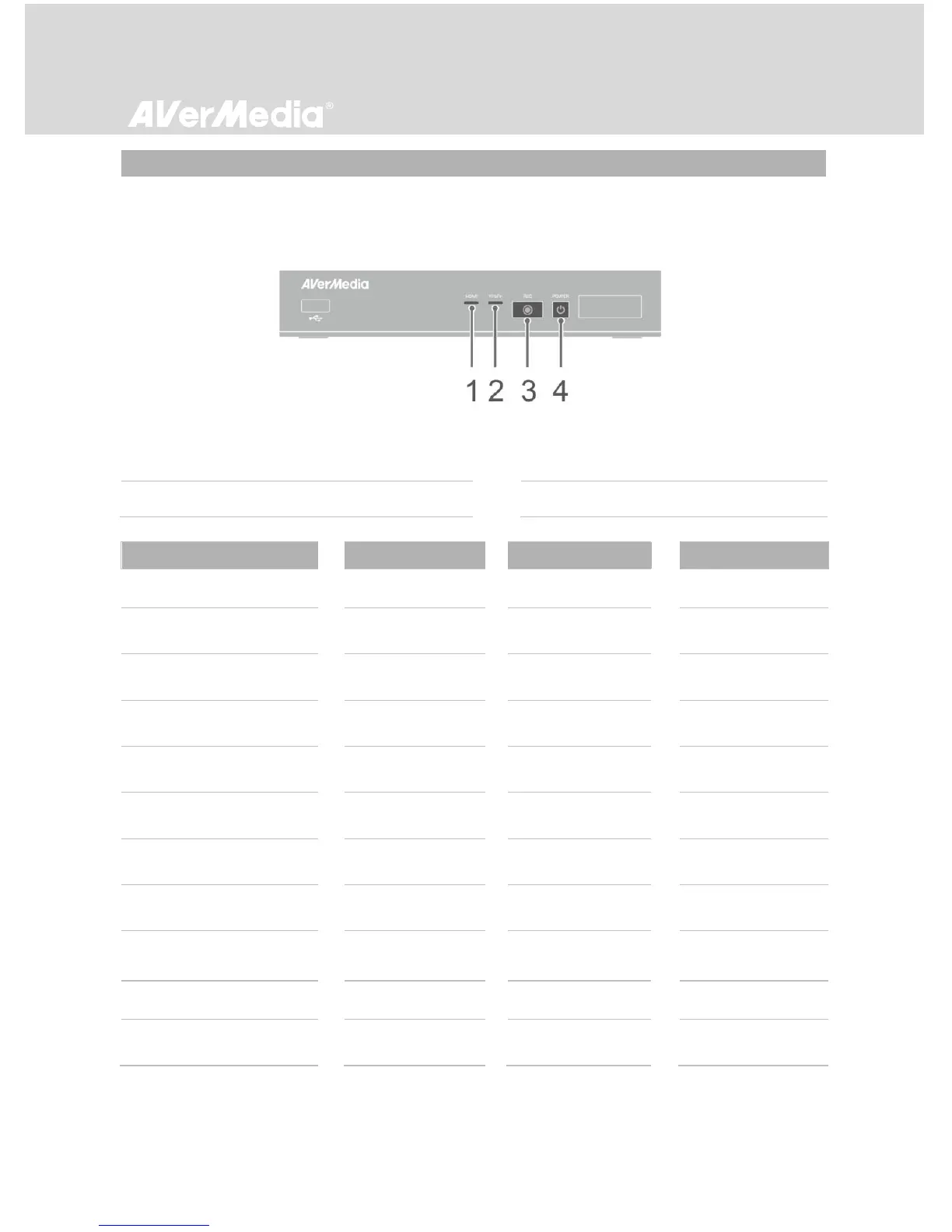
2.3 LED Indicator
The LED indicators on the front of the unit show the device’s status.
1 HDMI source LED indicator
2 YPbPr source LED indicator
3 Record status LED indicator
4 Power status LED indicator
Status
Source
Record
Power
Powered on
Solid green
Ready to
record/snapshot
Solid green
Solid green
Recording
Solid green
Breathing
Solid green
Take a snapshot
Flashes red
once
Flashes red
once
Flashes red
once
Unable to
record/snapshot
Solid green
Flashes green
continuously
No source
Flashes green
continuously
Source is available
Solid green
Powering off
Solid green
Flashes green
continuously
Pass-through ON
when powering off
Solid orange
Recording paused
Solid red
Solid red
Solid red
Finishing recording
Solid green
Flashes red
continuously
Solid green