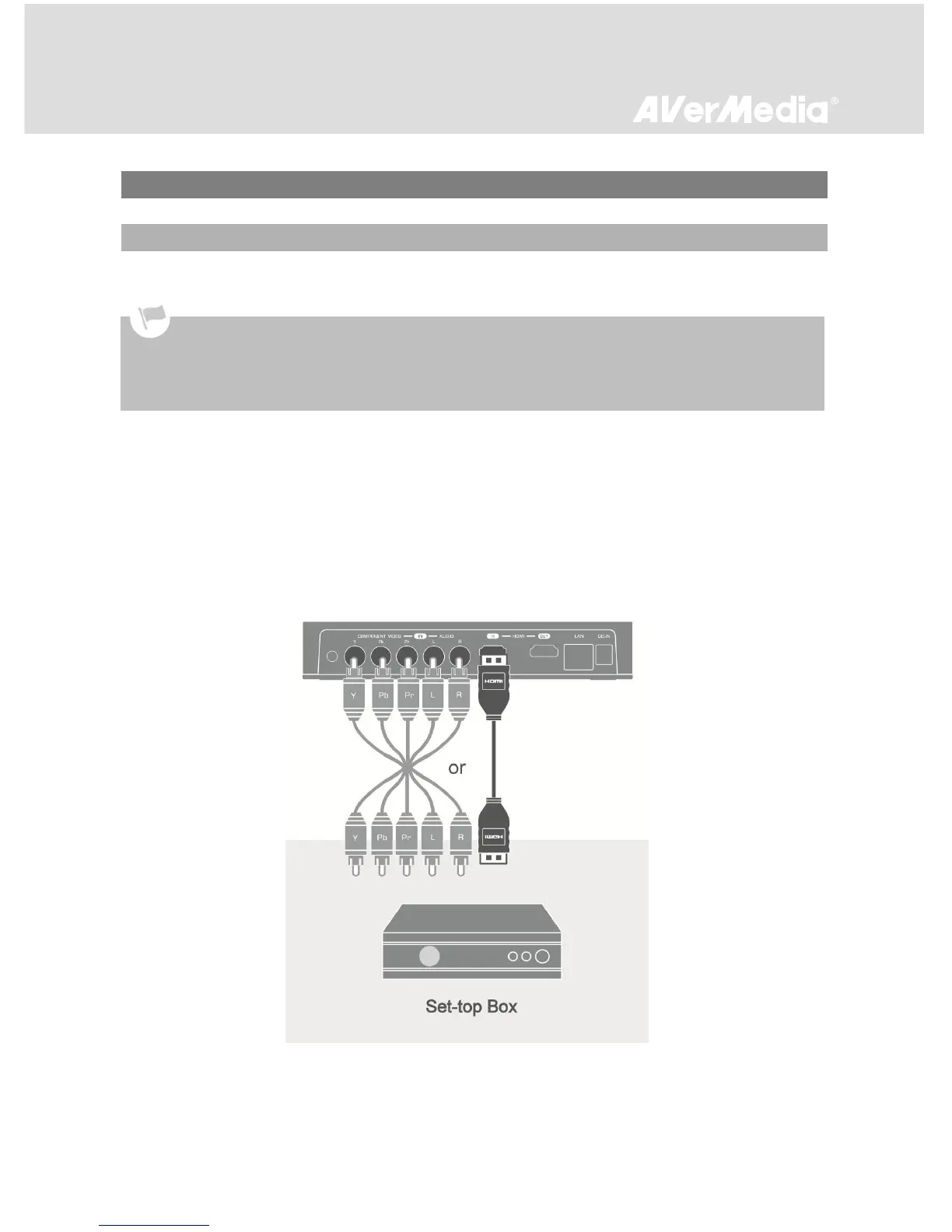
Please follow the steps below to properly connect EzRecorder 310 to your set-top box (STB) and TV.
Step 1
Connecting EzRecorder 310 to Your Set-top Box
Connect one end of the an HDMI cable or a component video cable to the rear of EzRecorder 310 and
the other end to the HDMI or COMPONENT VIDEO OUT (red, green, and blue) port on your STB.
If you are using a component cable for video, you’ll need a composite cable for audio. Connect one end
of the composite audio cable to the AUDIO IN port on the rear of EzRecorder 310 and the other end to
the AUDIO OUT (red and white) port on the STB.
Before making the connections, make sure to set STB’s video output to “Component” and adjust its output
resolution to 1080i or below. Then power your STB off.
If you would like to install internal hard drive, install it before making the connections.
Make sure that the cables are firmly connected and that neither of the cables are loose. If any of the cables are
loose or disconnected, there may be a loss of signal or screen color problems.



 To Next Page