7
Name of LED Description
Power
Steady green light: Indicate power has been turned
on.
Green light extinguished: Indicate power has been
turned off.
LCD Screen
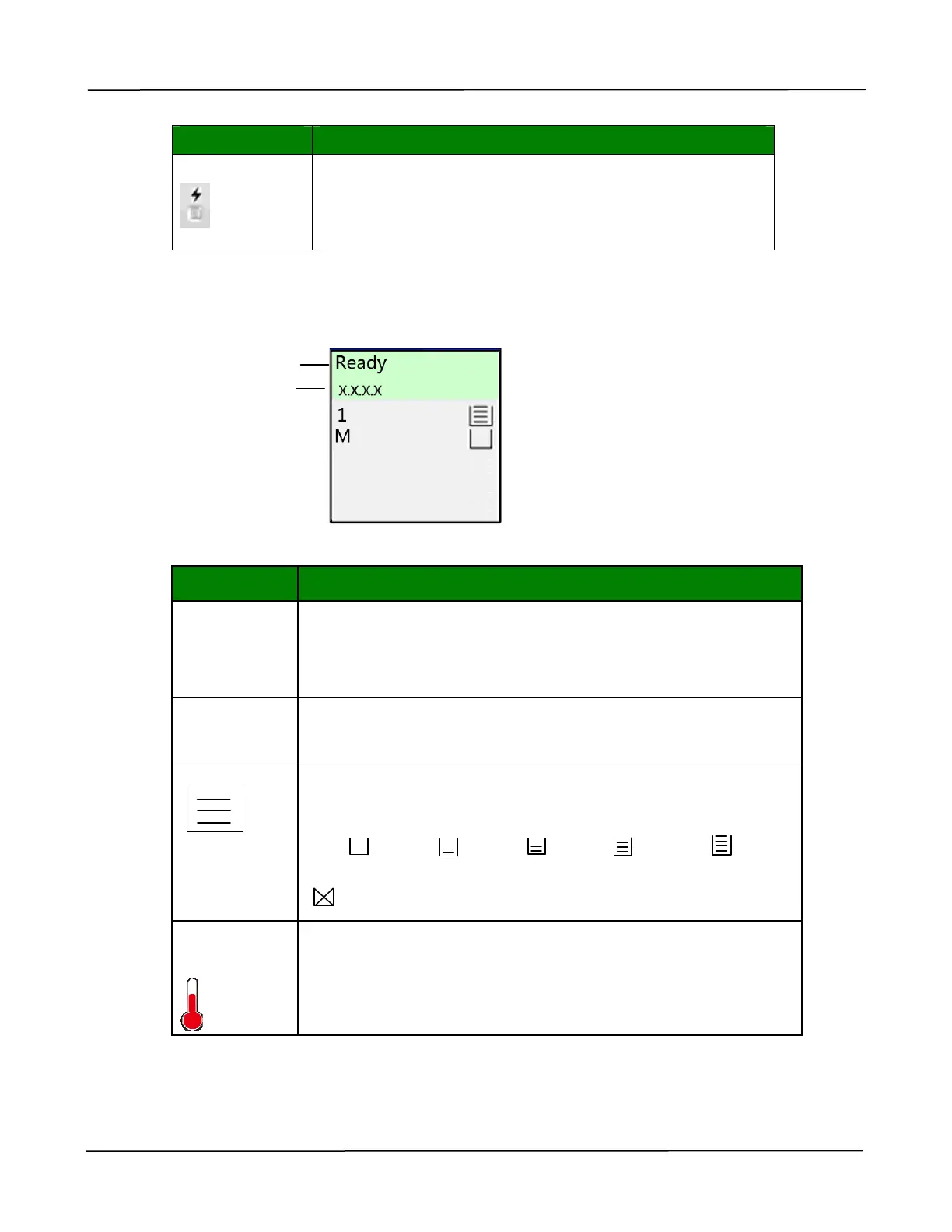
Status Bar
Item Description
Ready
IP Address
Connect the network cable and obtain an IP address
successfully.
If the network cable is not connected or the IP cannot be
obtained from the DHCP Server, it will display 0.0.0.0
1
M
1: Indicate Tray 1.
M: Indicate Manual Tray.
Displays the percentage of paper capacity in the paper tray
(0%、25%、50%、75%、100%).
0%: / 25%: / 50%: / 75%: / 100%:
Manual Tray: 100% - with paper, 0% - no paper.
: This indicates the paper can not be used.
Slow down
indicator
The temperature inside the printer is too high. The Backside
printing for duplex printing will pause for 6 seconds
temporarily. After the machine has been idle for a few
minutes and the temperature has been lowered to normal
temperature, the [Slow down indicator] icon will disappear.
Status Indication
IP Address


 To Next Page