IFU-00367 Rev A
B.
Replacing the Aviveä Pad Cartridge
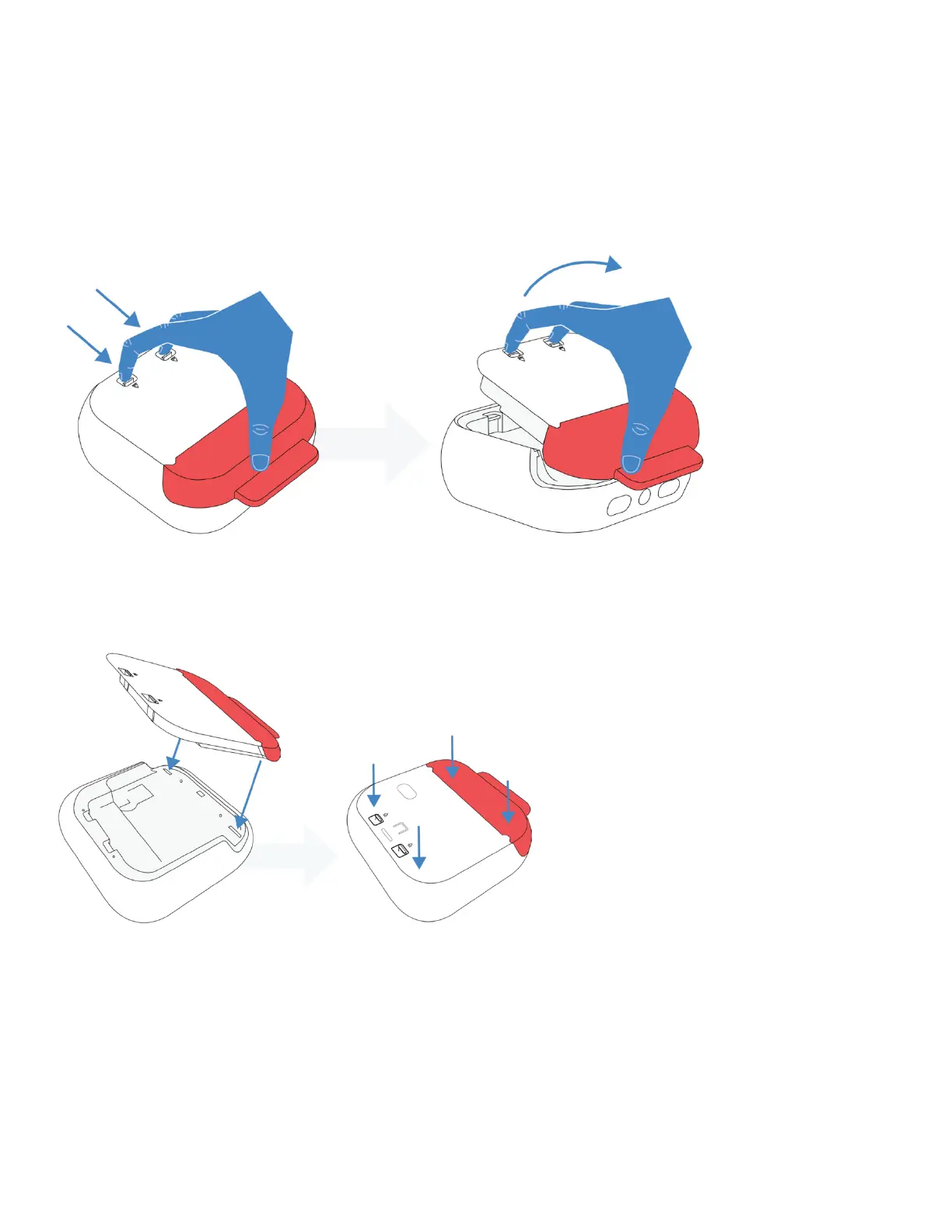
Removing a Pad Cartridge
IMPORTANT: Replace the Pad Cartridge if it’s expired, previously used, or the sealed pad package has been
opened. (See Section 7).
When replacing cartridges make sure the device is powered off and no charging cable is connected.
1. Firmly pull back and lift up on both snaps on the back of the device to release the cartridge.
Installing a New Pad Cartridge
1. Install a new Pad Cartridge by first aligning the cartridge with the back of the AED. Push the cartridge
firmly into the recess on the back of the AED.
2. IMPORTANT: Press down firmly on the corners of the cartridge. Make sure the cartridge is fully
inserted around all sides of the AED.
TIP: The Avive AEDä will say “Pad Cartridge Connected” once it senses that a new Pad Cartridge is correctly
installed.



 To Next Page