19
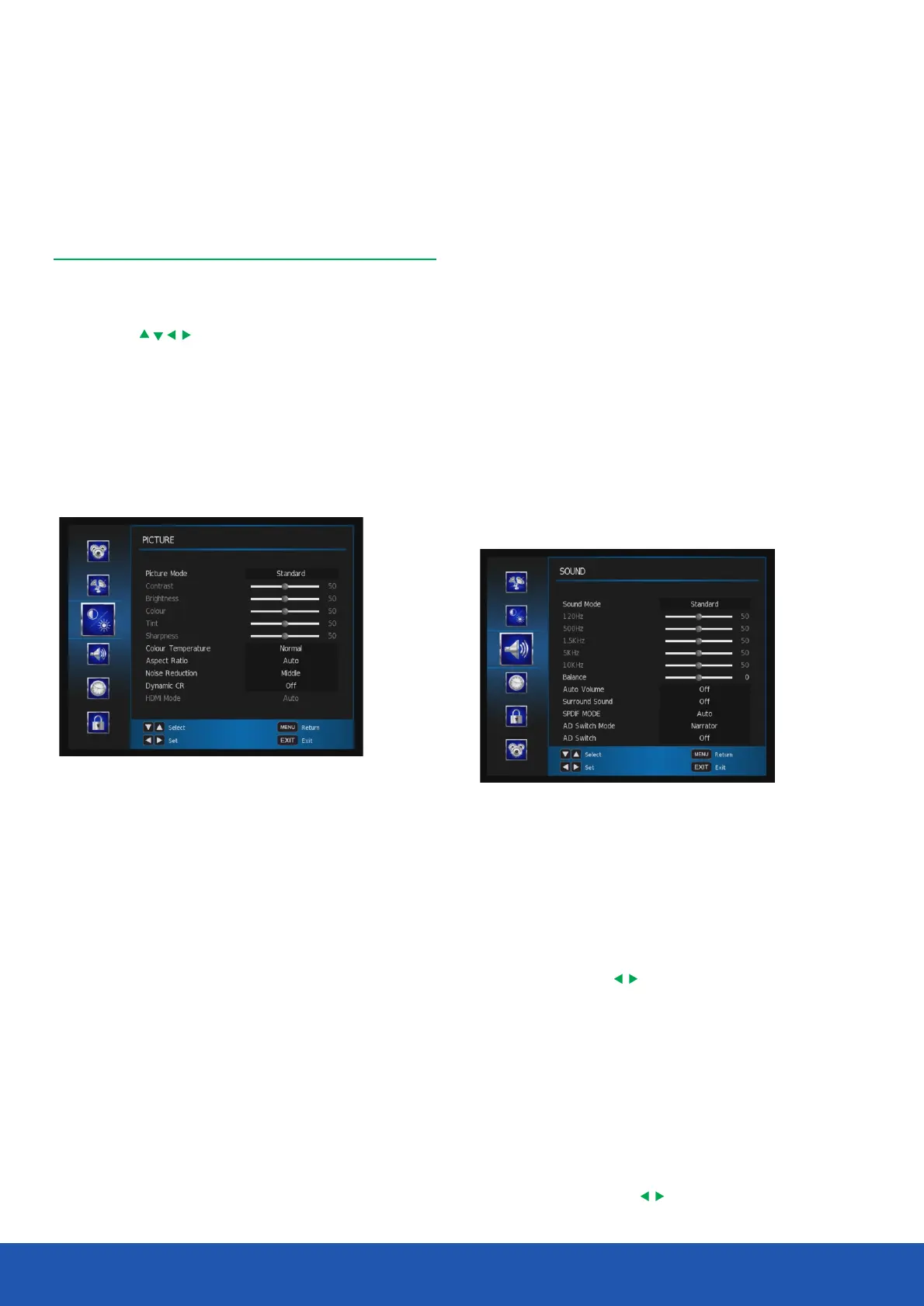
Picture Mode - Allows you to select preset levels of
contrast, brightness and colour. You can choose from the
following settings:
• User
• Standard
• Dynamic
• Mild
Brightness - Allows you to increase or decrease the
brightness of the picture.
Contrast - Allows you to increase or decrease the contrast
of the picture.
Colour - Allows you to increase or decrease the colour of
the picture.
Sharpness - Allows you to increase or decrease
the sharpness of the picture.
The menus allow you to adjust and control the TV.
1. To access the on screen menus, press the button. MENU
2. Press the buttons to navigate around the menu
screens and available options.
3. To exit the menu press the or button.Exit MENU
Picture settings
This menu gives the options for adjusting the appearance of
the TV picture.The following options are available:
Menus
Operating the TV
Tint - Allows you to increase or decrease the level of tint of
the picture (only NTSC signal)
Colour Temperature - Allows you to change the colour
tones of the screen.You can choose from the following
settings:
Aspect Ratio - Allows you to set up aspect ratio.
Noise Reduction - Allows you to reduce/alter any noise
on the images.
Dynamic CR - Turn dynamic contrast ratio on/off.
HDMI Mode - Allows you to set HDMI settings Auto/Video/PC.
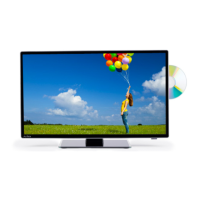
Sound settings
This menu gives you the options for adjusting the TV sound.
The following options are available:
Sound Mode - Allows you to select preset levels of bass and
treble. You can choose from the following settings:
• User
• Standard
• Music
• Movie
• Sports
Balance - Adjust audio output between the left speaker and
the right speaker with .
Auto Volume - Allows you to turn auto volume on or off.
Surround Sound - Allows you to turn on surround sound.
SPDIF Mode - Choose between Off/Auto/PCM when
connected to non Dolby compatible device.
AD Switch Mode - Choose between narrator mode and
auto mode.(only availabe in DTV).
AD Switch - When AD switch is set to narrator mode,
it allows you to choose on or off.
AD Volume -When AD switch is set to on, it allows you
to adjust AD volume with .
Headphone - Allows yo to turn on/off the headphone output.


 To Next Page