33
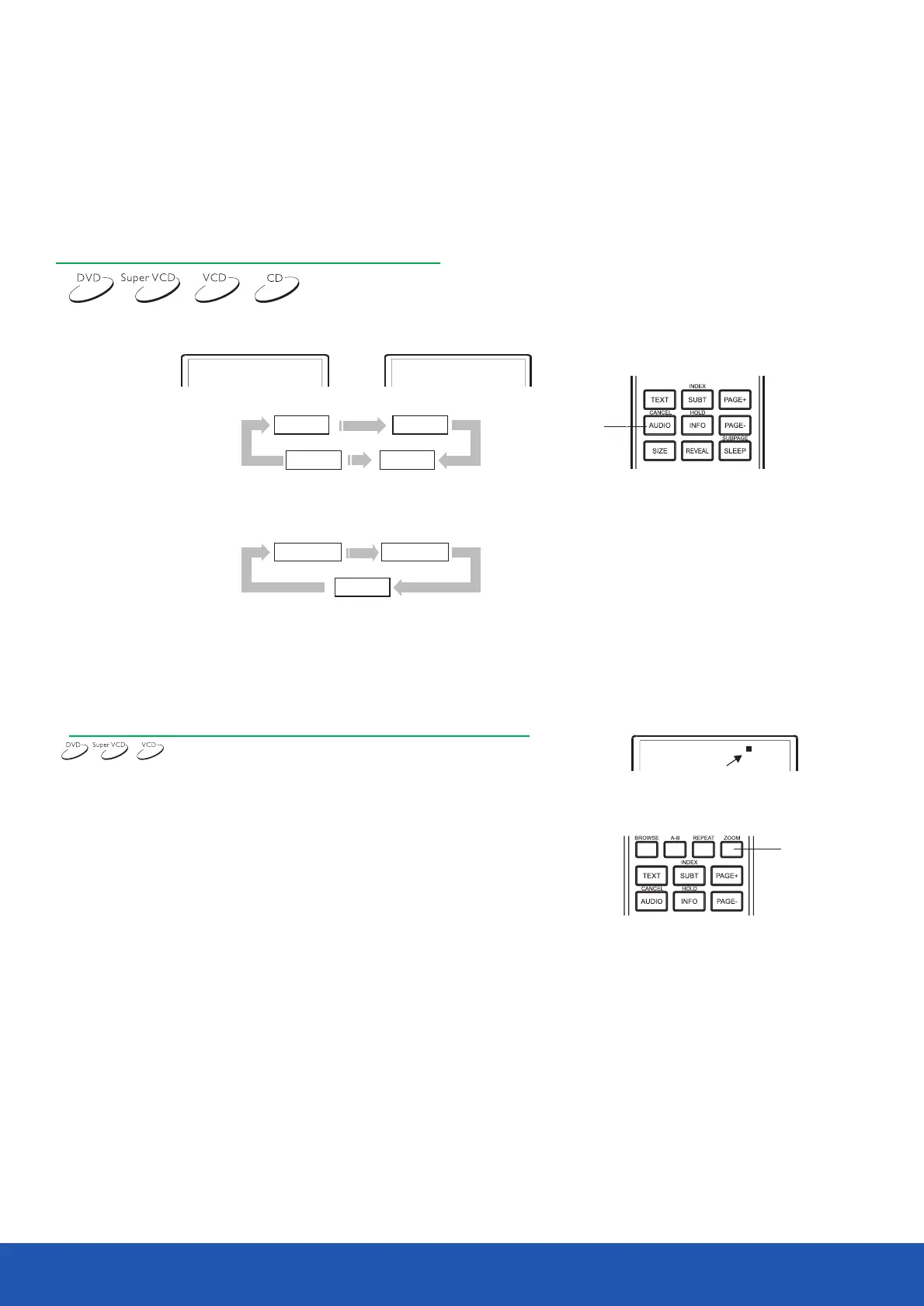
Language/audio channel selection
Disc playback mode
Press the button.AUDIO
You may select the desired language if you play a DVD or SVCD disc supporting multiple languages.
DVD disc:
SVCDdisc:
Some VCD and SVCD discs have a separate audio channel for each dubbed language.
You may select the audio channel of the preferred language in mono or stereo.
NOTES
Language selection depends on the disc recording.
When you play DVD-Video discs, if you press the language switch button , the current track
may be played from the Very beginning.
VCD,CD disc:
I . When playing a disc.pressingthe button will open the zoom in/out ZOOM
function, and the TV screen displays(take X2 mode as an example):
2. Press the button continually, all the magnified/minified modes ZOOM
display on the screen in turn. The magnified/minified modes includes:
2X, 3X, 4X, 1/2, l/3, l/4.
3. When the mode is on I/4, press button to close the zoom in/out ZOOM
function, and the picture returns to normal size.
4. When the fame is magnified, press the cursor buttons to move the frame.
ZOOM Function
Audio 1/2: English
Audio 2/2: Russian
AUDIO 1 AUDIO 2
AUDIO 4AUDIO 3
MONO Left
MONO Right
STEREO
AUDIO
ZOOM
2X


 To Next Page