The Axiomatic AX140900 is an Ethernet to CAN Converter, designed to bridge communication between Ethernet and CAN networks. This device acts as a simple network device, allowing CAN frames to be converted into UDP or TCP IP datagrams and sent over the Ethernet network, and vice versa. It supports both UDP and TCP datagrams into CAN frames.
Function Description:
The AX140900 converter features one CAN and one Ethernet port. It supports a high-speed CAN with baud rates up to 1Mbit/s and a fast 100Mbit/s Ethernet. It supports all standard and extended CAN frames, including data and remote frames. The device is powered through the CAN port.
The converter contains a web server for setup configuration parameters and to monitor the internal state of the converter using a web browser. The user can also update the converter firmware from the web browser. A simple command-line application, AxioDisc.exe, is provided to locate a converter on the LAN.
The device is designed to work in off-road machinery and in harsh industrial environments with power transients, high humidity, and vibrations. It ensures low latency in processing CAN and Ethernet messages, making it suitable for real-time operating systems.
Important Technical Specifications:
- Power Supply:
- Voltage: 9 - 36 VDC
- Power Consumption: 2W
- Protection: Under Voltage Shutdown, Over Voltage Shutdown, Reverse Polarity, Transients (12V Load Dump)
- Power Output:
- Voltage Output: 9 - 36 VDC
- Current Output: 0.7A (Maximum pass-through current)
- Voltage Drop: 1V (Maximum)
- Protection: Overcurrent, Short to Battery, Short to Ground (> 1A)
- Ethernet:
- Number of Ports: 1
- Port Type: 10BASE-T, 100BASE-TX
- MDX: Auto-MDX (Auto-crossover to eliminate cabling mismatch)
- LED Indicators: Speed/Activity
- Protocols: Ethernet IEEE 802.3, IP, ICMP, ARP, UDP, TCP, HTTP (Proprietary CAN messages are transmitted using a proprietary application protocol running on top of the user selectable UDP or TCP transport protocol. The internal web server uses HTTP protocol. The unit supports a proprietary discovery protocol.)
- Server Mode: Up to 10 bi-directional simultaneous connections
- Client Mode: 1 remote bi-directional connection (Auto-connect to a remote server; if connection is dropped or temporary unavailable, Client mode can be disabled.)
- Web server: Provided (Always enabled for converter configuration and diagnostics.)
- CAN:
- Number of Ports: 1
- Port Type: High Speed, ISO 11898-2 compatible (Twisted pair, up to 1 Mbit/s. Shield connection is provided if shielded cable is used.)
- Baud Rate: 1000, 666.6(6), 500, 250, 125, 100, 83.3(3), 50, 20, 10 kbit/s (Programmable through web interface. Support for 666.6(6) kbit/s is absent in firmware versions 1.xx...4.xx.)
- Protocol: CAN Bosch 2.0A and B (Data Frames and Remote Frames with Standard and Extended IDs are supported. CAN ID range and mask filtering is provided.)
- CAN port does not contain 120 Ohm termination resistor.
- Environmental Protection: IP67
- Vibration: Sine sweep, 5-200 Hz, 8.9G peak, 2.5 hr (15 sweeps), each axis. Random, 10-1014 Hz, 6.86 Grms, 5.0 hr, each axis.
- Shock: 50G peak, 6 shocks, each axis.
- Operating Temperature: -40...+85 °C (Industrial temperature range)
- Storage Temperature: -40...+85 °C
- Weight: 0.15 lb (0.068 kg)
- Compliance: RoHS Directive
- Electromagnetic Compatibility (EMC):
- DIN EN 13309:2010 - Construction Machinery- Electromagnetic Compatibility of Machines with Internal Electrical Power Supply.
- EN ISO13766-1:2018 - Earth-moving and building construction machinery — Electromagnetic compatibility (EMC) of machines with internal electrical power supply — Part 1: General EMC requirements under typical electromagnetic environmental conditions.
- EN61000-6-4:2007 - Emission Standard for Industrial Environments.
- EN61000-6-2:2007 - Generic Standards – Immunity for Industrial Environments.
- Housing: Injection molded enclosure and cover. Material: PA66, 30% glass fiber reinforced, flame retardant UL 94 V-0. Ultrasonically welded.
Usage Features:
- Web Server Interface: The device features a user-friendly web server that provides a dynamic website for general information, configuration parameters, and real-time diagnostics. The web browser should support JavaScript.
- Configuration: The converter's internal website runs on the default embedded web server. The default Device IP Address is 192.168.0.34 and the default Web Server Port is 80. The device IP address and port can be configured through the web interface.
- CAN ID Range and Mask Filtering: The converter supports CAN ID range and mask filtering, allowing users to specify which CAN messages are processed and sent to the Ethernet network. This helps in managing network traffic and focusing on relevant data.
- Auto Connect to Remote: The device can be configured to automatically connect to a remote server. This feature is useful for client-server communication scenarios.
- Loopback Messages: The converter can be configured to loopback messages, which is useful for testing and debugging.
- Discovery Protocol: A proprietary Axiomatic discovery protocol allows locating converters with unknown IP addresses and/or web server ports on a LAN using the simple Axiomatic discovery application AxioDisc.exe.
- Daisy-Chain Connection: Multiple converters can be connected in a daisy-chain configuration, where one converter acts as a server and others as clients, allowing for scalable network solutions.
- LED Indicators: Three LED indicators on the front panel show the power status and Ethernet link/activity status. A bi-color "Power" indicator shows whether the unit is powered (green) or if there is an error on the CAN power output (red). The two Ethernet LED indicators are hardwired to the PHY chip and show the transmission speed "Ethernet 10/100" and the link/activity status "Ethernet Link/Act".
Maintenance Features:
- Firmware Updates: The firmware can be remotely updated through the web server. The update process involves uploading the new firmware file to the converter. The web server provides feedback on the update status and progress.
- Diagnostics: The converter provides real-time diagnostic information on the Diagnostics page of the web server. This page displays the Health Status of the converter, including CAN and Ethernet statistics (receive/transmit errors, bus off errors, frames received/sent, messages received/sent).
- Reboot Functionality: The converter can be rebooted from the Diagnostics page of the web server. This is useful for clearing errors or applying new configurations.
- Save and Discard Settings: Configuration changes can be saved or discarded through the web interface. This allows users to experiment with settings without permanently altering the device's configuration.
- Factory Defaults: The device can be reset to factory default settings, which is useful for troubleshooting or reconfiguring the device from scratch.
- Error Reporting: The web server provides alerts and messages for various events, such as configuration changes, firmware updates, and errors.
- Documentation: The user manual provides detailed instructions for installation, configuration, and troubleshooting. It also includes a version history for tracking firmware updates and modifications.

 Need help?
 General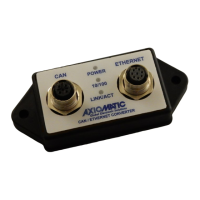

 To Next Page
