EasyManua.ls Logo

Axis AX1507BT - User Manual

Axis AX1507BT
28 pages
Print Icon
To Next Page IconTo Next Page
Loading...
2
WARRANTY
YEAR
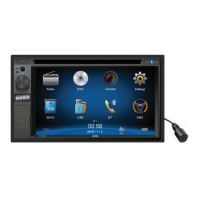
Designed as a complete vehicle
infotainment system, integrating
an array of technologies &
media sources. The generous
2-DIN 6.2” LCD touchscreen user
interface is combined with exciting
functions including Bluetooth.
AX1507BT
6.2” 2-DIN TOUCHSCREEN DVD/
MULTIMEDIA PLAYER with BLUETOOTH
• 6.2 Inch LCD Display
• Reversing Camera Input
• Bluetooth HF + Audio
GENERAL
- 6.2” WVGA Digital TFT LCD (800 X 480 Pixels)
- Multi-core Processor
- WinCE 6.0 Operating System
- Touchscreen Control
- Dynamic Graphic User Interface
- ISO 2-DIN Mounting
- ISO Wiring Harness
- RCA Ch Line Out - Front, Rear & Subwoofer
- 1 Ch Video Line Out
- 2 Ch AV Line In - Rear
- Reverse Camera Input (Rear)
- Steering Wheel Control (Programmable)
Internal Analogue Module
- 10.5 - 15.8V DC Voltage
- Speaker Impedance 4-8 Ohm
- Max Power 4 Ch x 40 Watts
- Dimensions: 178W x 100H x 165D mm
AUDIO CONTROL
- Rotary Volume Encoder
- 3 Band EQ
- Loud / Mute
TUNER
- PLL Synthesized AM/FM Stereo
- Xtreme Long Range Tuner
- Interference Absorption Circuit
- FM 87.5-108 MHz; AM 531-1701 KHz
- 30 Station Presets
- 18FM/12AM Memory
- Station Seek/Scan/Auto Store
- Local/Distant Control
- Digital Clock/12/24 Hour Mode
MULTIMEDIA
- USB Input - Front Panel
- AVI*/DIVX*/MPG/MP4*/MP3/WMA/
JPEG
- SD/MMC Card Port
- AUX-IN Socket - Front Panel (3.5mm)
- RCA AUX-IN - Rear
- Video RCA OUT - Rear
- Video RCA IN - Rear
- Camera Input - Rear
INCLUDED
- External Microphone
- ISO Wiring Harness
BLUETOOTH
- Bluetooth in Handsfree Mode
- External Microphone
- Phone Contacts / History
- Dial Pick-Up/Call Transfer
- A2DP Audio Streaming
- AVRCP Control
DVD/CD PLAYER
- Supports DVD/VCD/CD/MP3/DIVX*/JPEG
- Supports DVD±R/DVD±RW/CD-R/RW
- Electronic Shock Protection
- Zoom/Multi-Angle/Last Position Memory
- Go to/Repeat/Random Play/Track Up-Down
- Select Folder/Track/File Search
*Some formats may not be supported
- refer to page 23
DVD/CD/MP3 LCD MONITOR
SCREEN
USB/SD
+
STEERING WHEEL
CONTROL
BLUETOOTH

Questions and Answers

  • R
    Rebecca GomezSep 2, 2025
    How do I fix my Axis AX1507BT Car Stereo System monitor if it does not display automatically?
    • S
      Shelley PorterSep 2, 2025
      If the monitor on your Axis Car Stereo System does not display automatically, it might be because the TFT Auto Open feature is turned off. To fix this, simply turn the TFT Auto Open feature on.
  • J
    James PorterAug 31, 2025
    Why is warning information shown at all times on my Axis Car Stereo System?
    • T
      Timothy WalkerAug 31, 2025
      If warning information is constantly displayed on your Axis Car Stereo System, it indicates that the park brake wiring is not correct. You should check the wiring and correct it to resolve the issue.
  • J
    Jessica MccallAug 29, 2025
    What should I do if my Axis AX1507BT Car Stereo System disc does not play back?
    • R
      Ryan GainesAug 29, 2025
      If your Axis Car Stereo System disc does not play back, there might be a problem with the disc itself. Make sure you are using a disc in good condition, as a warped or scratched disc can cause playback issues. If the disc is dirty or wet, clean it with a soft cloth. Ensure that you are using a compatible disc and that it is inserted with the label side up. Finally, verify that the disc region code is compatible with your unit.
  • A
    Alicia AllisonAug 28, 2025
    Why does my Axis AX1507BT Car Stereo System reset itself when the engine is off?
    • R
      rebecca43Aug 28, 2025
      If your Axis Car Stereo System resets itself when the engine is off, it is likely due to an incorrect connection between the ACC and BATT wires. Check the wiring and correct it to resolve this issue.
  • R
    ryanjonathonAug 26, 2025
    Why does my Axis Car Stereo System screen have a flashing image or interference?
    • M
      Marie StevensAug 26, 2025
      If you observe a flashing image or interference on the screen of your Axis Car Stereo System, the issue could be due to several reasons. Ensure that the color system of the DVD disc matches the monitor settings; adjust as necessary. Avoid using pirated discs, and instead use original discs. Inspect the video cable for damage and replace it if needed. Check the video signal connections to ensure they are properly wired.
  • K
    Kathy JacksonAug 25, 2025
    What to do if my Axis Car Stereo System has poor sound quality or distortion?
    • L
      Lee WardAug 25, 2025
      Poor sound quality or distortion in your Axis Car Stereo System can stem from several issues. Avoid using pirated discs and use original discs instead. Ensure that the speaker power rating matches the unit; if not, replace the speakers. Check the wiring and correct any wrong connections or shorted speaker wires.
  • M
    Marcia RiceAug 22, 2025
    Why is there no or low audio output from my Axis AX1507BT?
    • B
      Brian HermanAug 23, 2025
      If you're experiencing no or low audio output from your Axis Car Stereo System, consider these potential causes and solutions: * **Improper audio output connection:** Check the wiring and correct any issues. * **Volume set too low:** Increase the volume level. * **Speakers damaged:** Replace the speakers. * **Heavily biased volume balance:** Adjust the channel balance to the center position. * **Speaker wiring is in contact with metal part of car:** Insulate all speaker wiring connections.

Summary

Safety Precautions

Before Using

Front Panel

Overview and description of the unit's front panel controls and ports.

Basic Operations

Playing Source Selection

How to switch between different audio/video sources.

Radio Mode

Playback Mode

Bluetooth Mode

Pair the Bluetooth-enabled Devices

Steps to connect a Bluetooth device to the unit.

Make a Call

How to initiate phone calls using the Bluetooth connection.

Settings

Other Modes

Steering Wheel Control Programming

Configuring steering wheel remote control functions.

Troubleshooting

Steering Wheel Control - Questions

Installation

Axis AX1507BT Specifications

General IconGeneral
BrandAxis
ModelAX1507BT
CategoryCar Stereo System
LanguageEnglish

Related product manuals