EN-15 EN-16
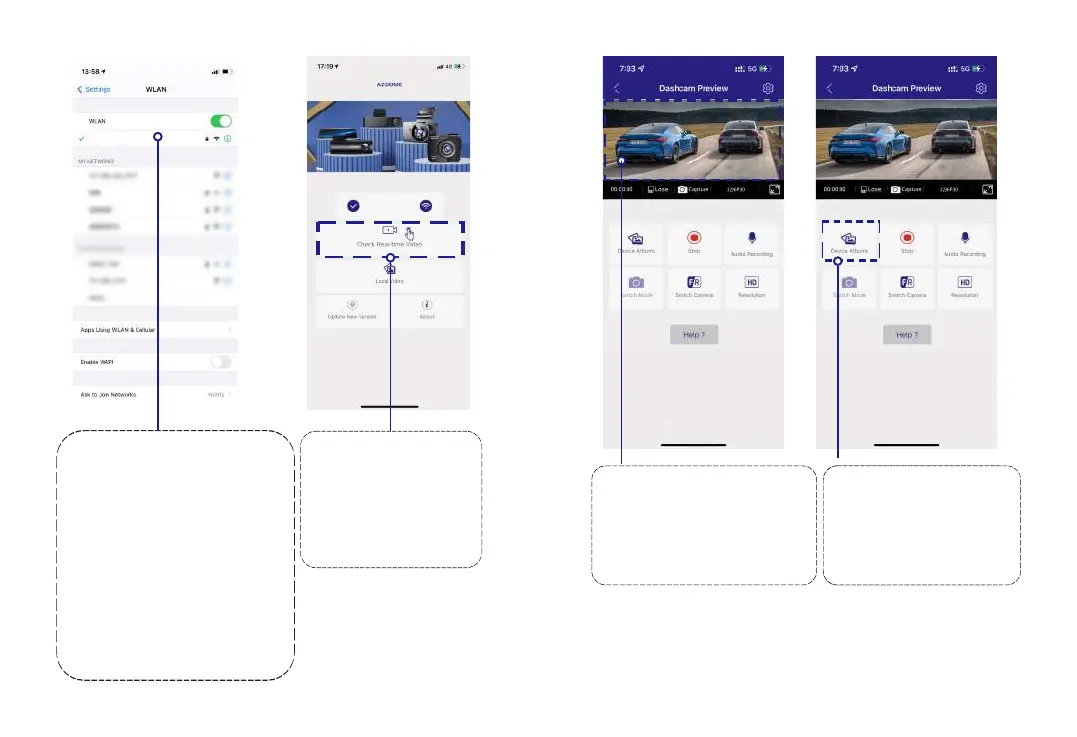
Go to Phone's Settings >
WiFi > Select WiFi of the dash
cam. After it's connected to the
WiFi, it will say ‘No lnternet
Connection’ which was normal.
Because dash cam WiFi is ONLY
for video/photo transfer function,
NOT made to broadcast footage
over the cloud or internet,
please ignore the prompt.
WiFi Name SSID: M301_******
Default PASSWORD: 12345678
There will show dash
cam model M301 when
connect successfully.
Press “Check Real-time
Video” to live video
preview interface.
2
3
PleaseSTOPrecording
first,thenressthe‘ Device
Album’togetPhoto,Video,
Emergencyfiles.
Now you can view the
video currently being recorded
real-time by connecting
your smartphone to the
dashcam via Wi-Fi Direct.
4
Please STOP recording
first, then press the ‘Device
Album’ to get Photo, Video,
Emergency files.
5
M301...hCam
M301



 To Next Page