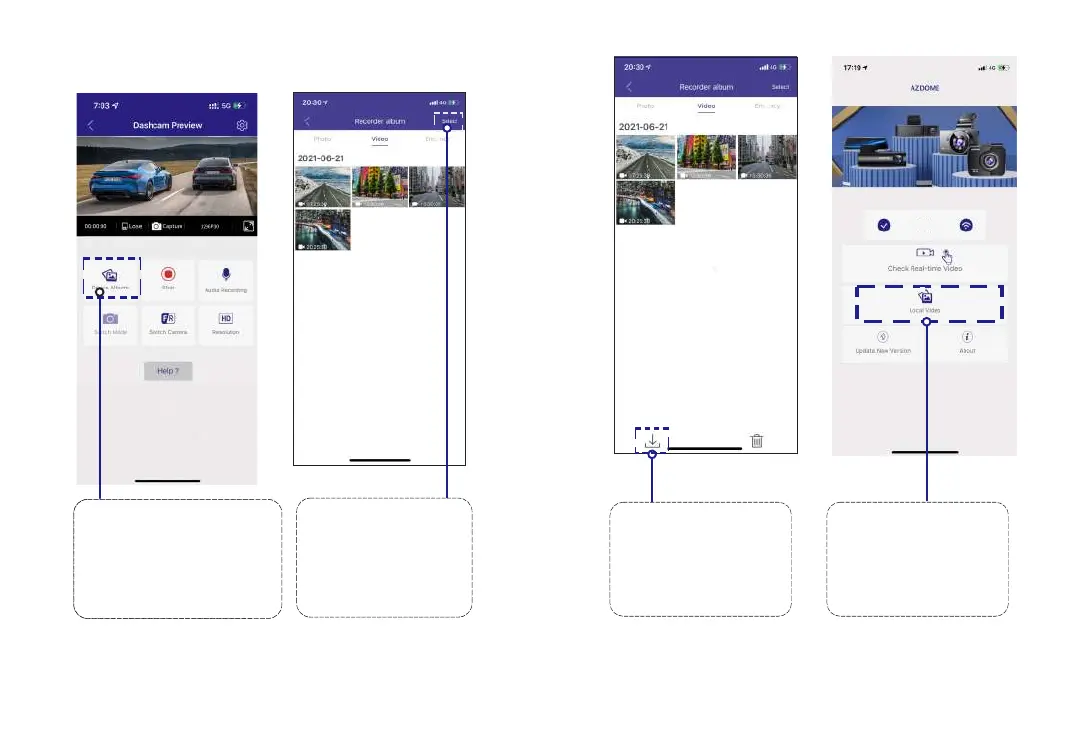
8.2 Download the video files into your smartphone
PleaseSTOPrecording
first,thenressthe‘ Device
Album’togetPhoto,Video,
Emergencyfiles.
Go to Dashcam Preview
interface. Please STOP
recording first, then press the
‘Device Album’ to get Photo,
Video, Emergency files.
1
Select the video
files to download into
your smartphone.
2
Then you can find
these downloaded video
files in APP original
interface menu named
‘Downloaded
File
’.
4
Press the icon to
download the video files.
However, it will take a bit
of time to download one
video file.
3
EN-17 EN-18
M301...hCam



 To Next Page