EasyManua.ls Logo

B. Braun Vista basic - Start;Quit the Service Program; Unit Data Management

B. Braun Vista basic
55 pages
Print Icon
To Next Page IconTo Next Page
To Previous Page IconTo Previous Page
Loading...
Service
Program
Start
/Quit
the
Service
Program
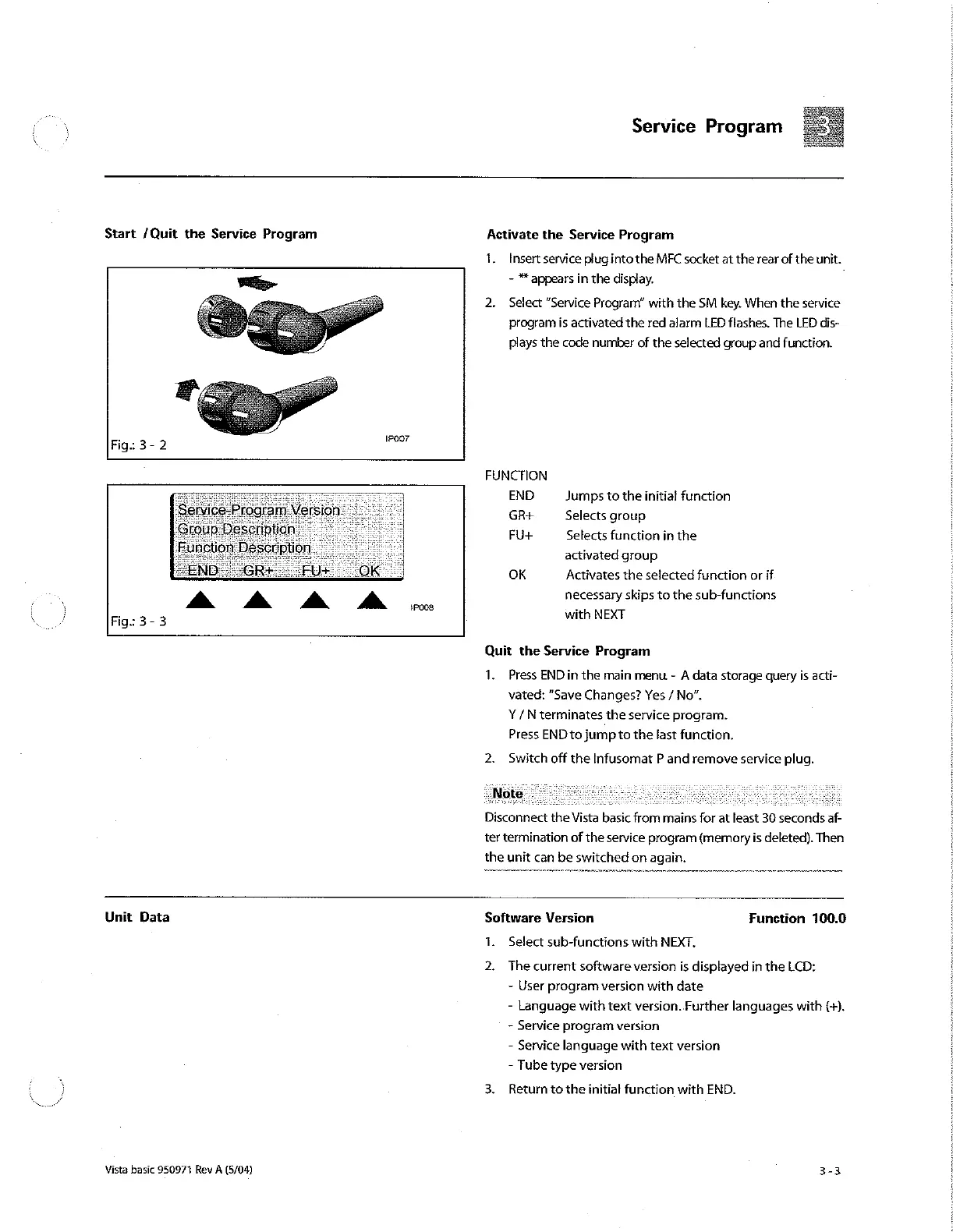
Activate
the
Service
Program
1.
Insert
service
plug
into
the
MFC
socket
at
the
rear
of
the
unit.
πες
-
*
appears
in
the
display.
2.
Select
"Service
Program”
with
the
SM
key.
When
the
service
program
is
activated
the
red
alarm
LED
flashes.
The
LED
dis-
plays
the
code
number
of
the
selected
group
and
function.
Fig:
3-2
12007
FUNCTION
END
Jumps
to
the
initial
function
GR+
Selects
group
FU+
Selects
function
in
the
:
activated
group
FE
OK
Activates
the
selected
function
or
if
à
à à à
necessary
skips
to
the
sub-functions
i
16008
ο
Fig:
3-
3
with
NEXT
Quit
the
Service
Program
1.
Press
END
in
the
main
menu
-
À
data
storage
query
is
acti-
vated:
“Save
Changes?
Yes
/
No”.
Y/N
terminates
the
service
program.
Press
END
to
jump
to
the
last
function.
2.
Switch
off
the
Infusomat
P
and
remove
service
plug.
Disconnect
the
Vista
basic
from
mains
for
at
least
30
seconds
af-
ter
termination
of
the
service
program
(memory
is
deleted).
Then
the
unit
can
be
switched
on
again.
Unit
Data
Software
Version
Function
100.6
1.
Select
sub-functions
with
NEXT.
2.
The
current
software
version
is
displayed
in
the
LCD:
-
User
program
version
with
date
-
Language
with
text
version..Further
languages
with
(+).
-
Service
program
version
-
Service
language
with
text
version
-
Tube
type
version
3.
Return
to
the
initial
function
with
END.
Vista
basic
950971
Rev
A
(5/04)
3-3

Other manuals for B. Braun Vista basic

Related product manuals