5 Test Procedure
© b2electronic gmbh
DHV0053 b2 EN
Step Procedure
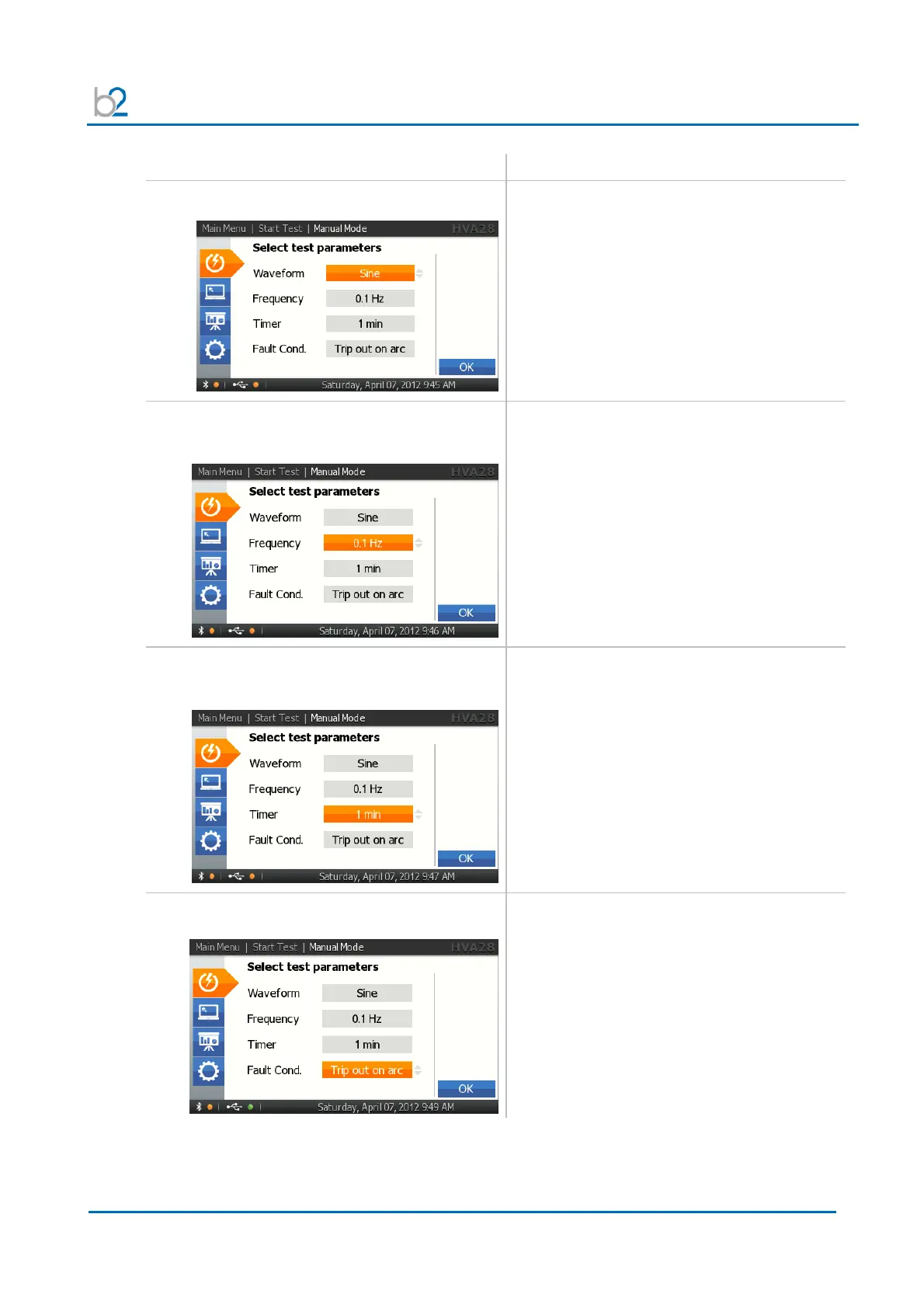
(Set Manual Test Parameters)
MS4: SETUP: Waveform
Select one of the following output modes:
• Sine wave
• Square wave
• DC+
• DC-
• Vacuum Bottle Test
• Sheath Test
• Sheath Fault Location
MS5: SETUP: Frequency
Sinewave, Squarewave
Set the frequency to as close to 0.1Hz as
possible.
• 0.1 Hz/Auto: Recommended setting that
automatically maintains the frequency as
close to 0.1Hz as possible
To correct entry select “CANCEL” at bottom of
display.
MS6: SETUP: Duration
(Not applicable Vacuum Bottle Test)
To modify the duration, rotate navigation knob
(5).
To accept value, push in knob.
• Min. test duration = 1 minute
• Max. test duration = 24 hours
To return to “Manual Mode” screen, select
“OK”
MS7: Arc Management Mode
Rotate navigation knob (5) until the field on
bottom of the screen is highlighted.
To change the mode, push in the knob. One of
the following modes will be displayed:
• Trip out on Arc
• Burn on Arc



 To Next Page