6 Tangens Delta
© b2electronic gmbh
DHV0053 b2 EN
6.3 Tangens Delta Test
Running a Manual Test with Tangens Delta
Steps TD1 – TD8 describe how to run a test in the manual mode with
Tangens Delta
.
Step Procedure
(Run Manual Test)
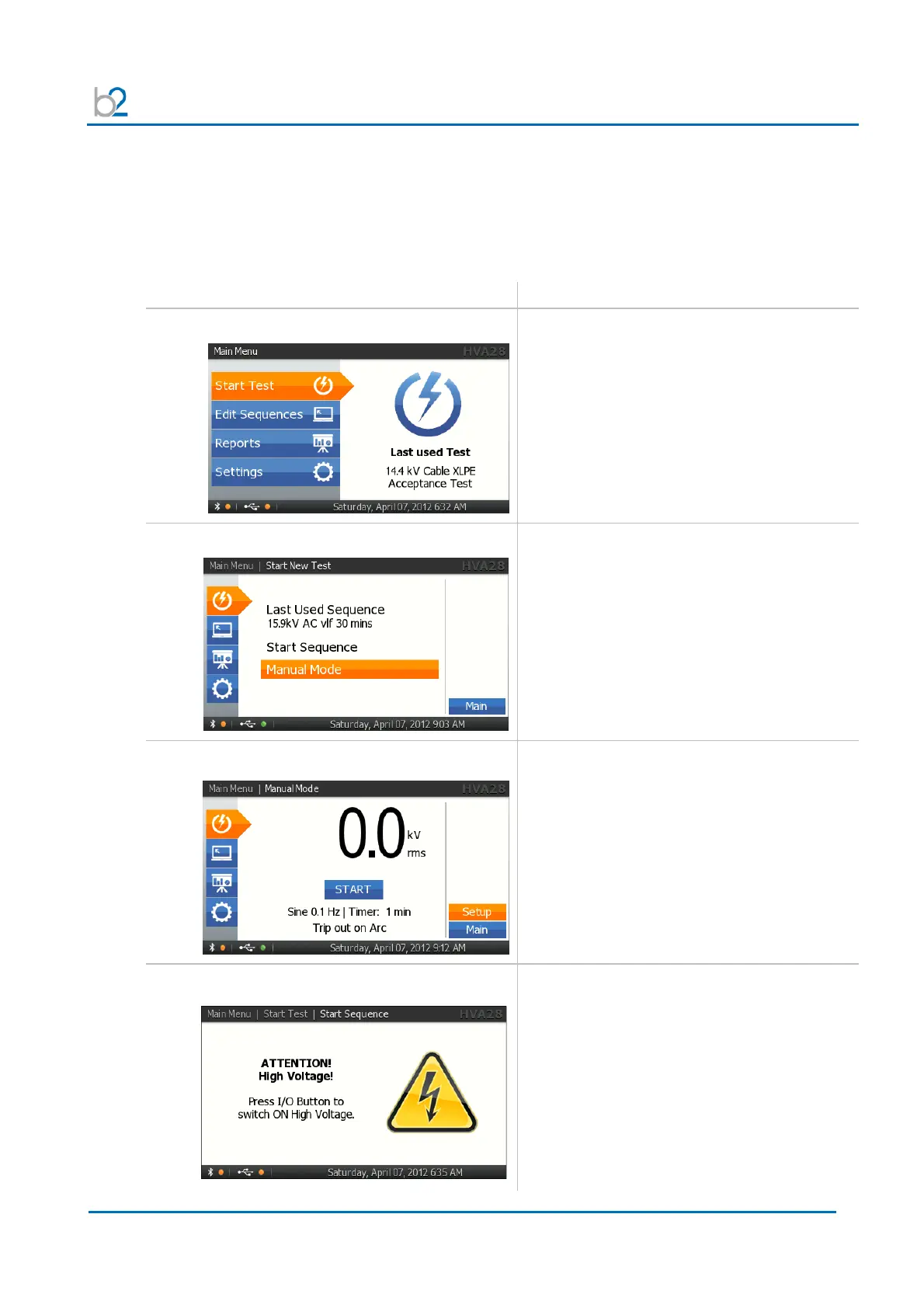
TD1: Start new Test
Select “Start Test”
TD2: Start Manual Mode
Select “Manual Mode”
TD3: START Test
Start the test when test parameters displayed
on the “Manual Test” screen are correct.
Rotate navigation knob (5) until the “START”
field is highlighted.
To run the test, push in knob (5)
TD4: HV Activation
Once the activation screen appears,
• Press the HV switch (6) within 10 seconds.
If the HV switch is not activated within the 10
second window, the “Manual Mode” screen will
reappear.



 To Next Page