Using the Memory Function 167
4
— — — — — — — — — — — — — — — — — — — — — — — — — — — — — — — — — — — — — — — — — — — — — — — — — — — —
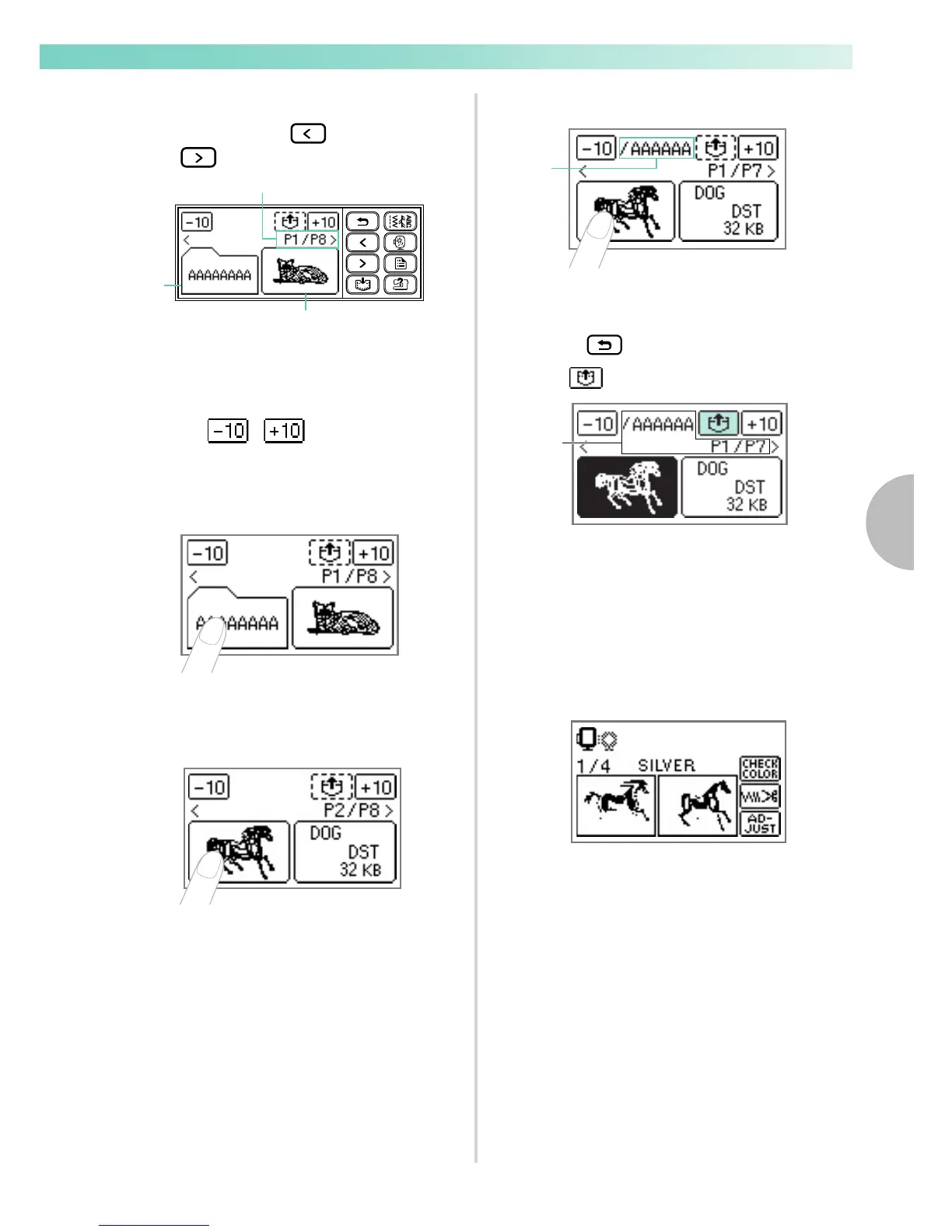
Select the desired folder or the pattern you
wish to retrieve.
Switch screens using (Previous page key)
and (Next page key).
a Number of the currently displayed page from the
total number of pages
b Folder (folder name)
c Pattern file (thumbnail-size image or file name)
•
When / is pressed, the display
of folders and/or patterns moves forward or
backward in increments of 10.
■ When you have selected a folder
X Pattern files in the folder are displayed.
Go to step
d.
■ When you have selected a pattern
X The pattern is shown in reverse highlighting.
Skip to step
Select the pattern you wish to retrieve.
•
a Folder name (Displayed in up to 6 characters
only when a folder is selected.)
• To return to the main menu of USB media,
press .
Press
*1) The display of this part differs depending
on the operation in step
c.
X The saved pattern is retrieved.
X The embroidery screen appears, and you
can embroider the retrieved pattern.
Adjust the pattern as desired, and then begin
embroidering.
1
2
3
1
*1)










 To Next Page