33
DP C18.UART
CUSTOMER MANUAL FRONT HUB MOTOR SYSTEM
⑶ “Auto Off”--- set automatic Off time
Briefly press (<0.5S)
or to select
“Auto Off”, and then briefly press (<0.5S)
. This moment, briefly press (<0.5S)
or to switch automatic Off time as
“OFF”/“9”/“8”/“7”/“6”/“5”/ “4”/“3”/“2”/“1”.
The unit is minute. After selection, briefly
press (<0.5S) to save the set and exit
back to “Auto Off”. Briefly press for twe
times (interval time is less than0.5S) to exit
back to main interface or select “BACK” →
“EXIT” to exit back to main interface.
⑷ “MAX PAS”---set riding mode for starting
up
Briefly press (<0.5S)
or to select “MAX
PAS”, and then briefly press (<0.5S) . This
moment, briefly press (<0.5S) or to
select support mode: 3/5/9. After confirma-
tion, briefly press (<0.5S) again to save
the set and exit back to“MAX PAS”. And
then briefly press for two times (interval
time is less than0.5S) to exit back to main
interface, or select“BACK” → “EXIT”to exit
the main menu.
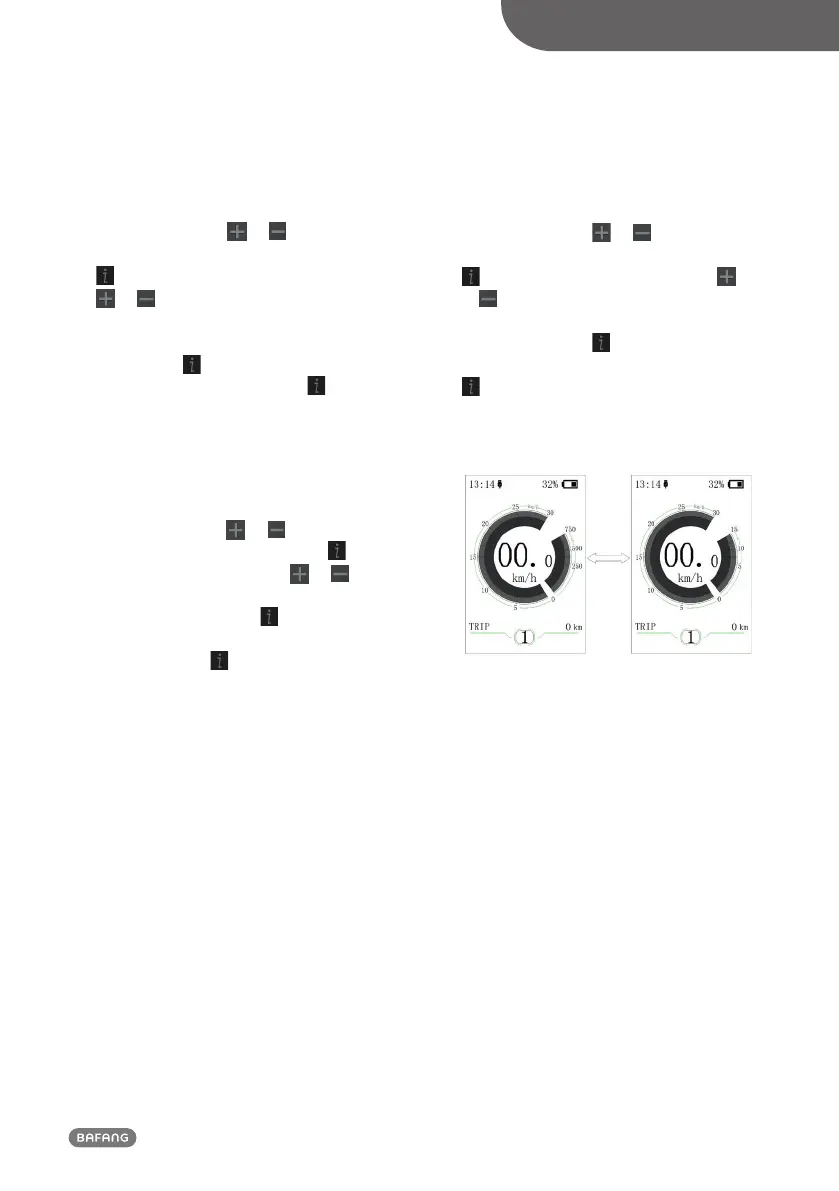
⑸ “Power View”--- set output display mode
Briefly press (<0.5S)
or to select
“Power View”, and then briefly press (<0.5S)
. This moment, briefly press (<0.5S)
or to switch the output display mode as
“Power”/“Current”. After confirmation,
briefly press (<0.5S) again to save the set
and exit back to “Power View”. Briefly press
for two times (interval time is less than
0.5S) to exit back to the main interface, or
select “BACK” → “EXIT” to exit back the
main interface.


 To Next Page