23
DP C13.UART
CUSTOMER MANUAL FRONT HUB MOTOR SYSTEM
1
Lamp status indication
2
State of charge indication
3
Riding record
4
Assistance level indication
5
Speed unit indication
6
Unit indication
7
Setting indication
8
Speed indication
9
"Down" button
10
Power on / off button
11
"Up" button
7.5 Usual operation
There are three buttons ( , , ) on the DP
C13.UART display that represent the following
functions respectively: MODE, UP, DOWN.
7.5.1 Power ON / OFF
• To switch ON the Pedelec system, hold the
MODE button for 2 seconds.
• To switch OFF the Pedelec system, repeat
the process and hold the MODE button for
2 seconds.
• When switching off the Pedelec system, the
leakage current is less than 1uA.
• When the Pedelec remains parked for more
than 5 minutes, the Pedelec system switches
off automatically.
• After switching on the Pedelec system, the
display shows Running Speed and Total
Distance as well as the battery indicator and
assistance level.
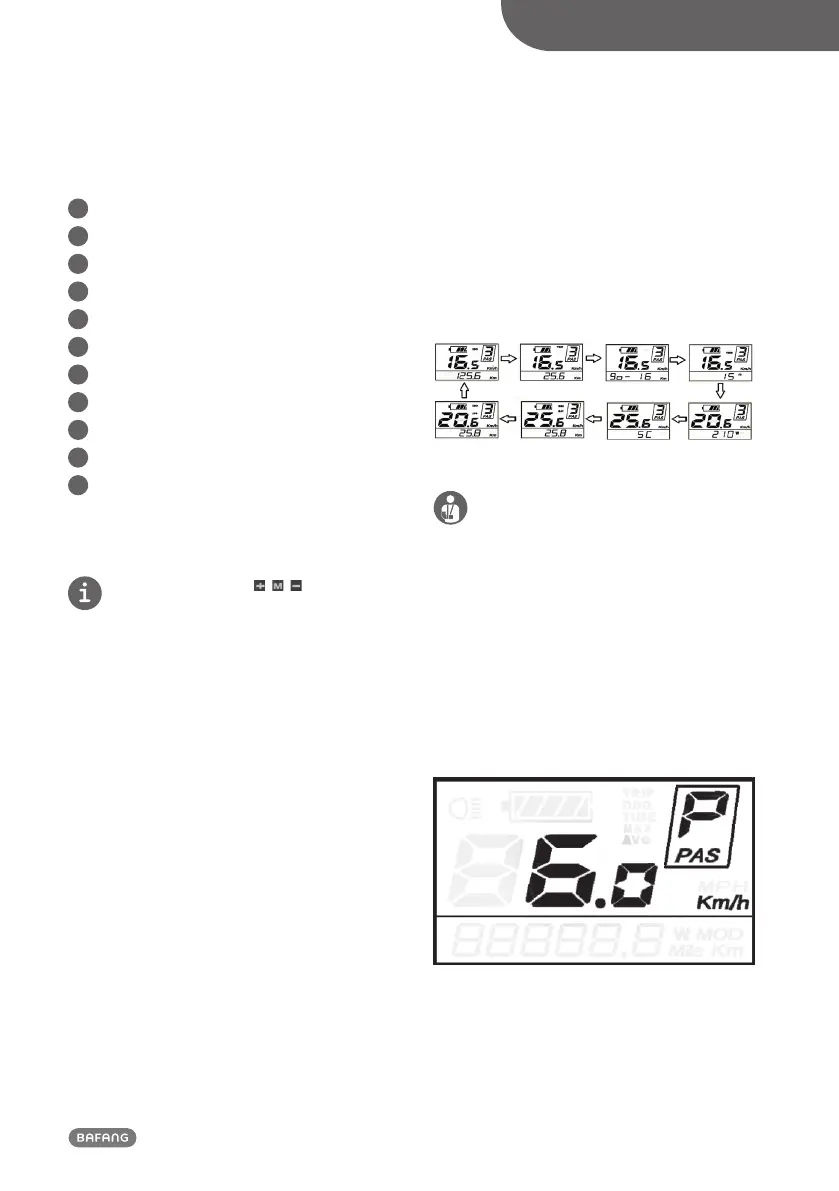
To change the indicated information, press the
MODE button to opt for the following:
Total range"ODO"(Km) →
Trip Distance (Km)
→ Remaining Distance (Km) → Trip Time
(Min.) → Motor Power(W)→ Calory(C) → Max
Speed(Km/h) → Average Speed(Km/h).
7.5.2 Push-assistance
The push-assistance function may only be used
when pushing the Pedelec. There is a danger of
injury when the wheels of the Pedelec are not in
contact with the ground while using the
push-assistance function.
• To access the push-assistance mode, hold
the DOWN button; the Pedelec will travel at
a uniform speed of 6 kmph.
• The screen will display “P” while the push-
assistance is operational.
• The push-assistance function switches off as
soon as you release the DOWN button.
Push-assistance Mode


 To Next Page