25
DP C13.UART
CUSTOMER MANUAL FRONT HUB MOTOR SYSTEM
7.6 Functions Settings
• Once the Pedelec system is switched ON, to
access the Primary Settings menu, hold both
the UP and DOWN buttons for 2 seconds.
Never change settings while the Pedelec is in
motion.
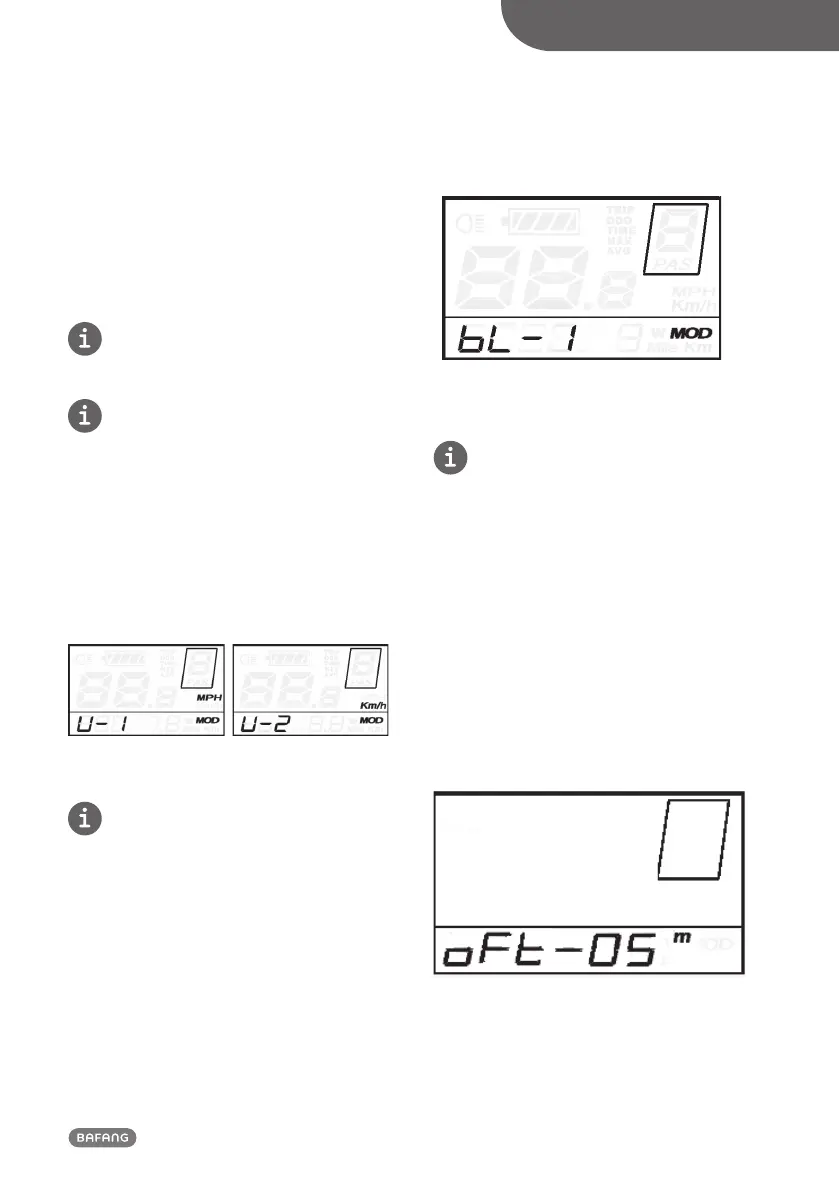
7.6.1 Unit Conversion "km / mile"
U represents unit settings
• “1” is for miles, “2” is for kilometers.
• The default value is “2”.
• To convert the units, press the UP or DOWN
button to increase or decrease until the
desired setting is displayed.
• To save a changed setting, hold the MODE
button for 2 seconds and then exit settings.
Mile and Kilometer Conversion Settings Interface
7.6.2 Backlight Contrast Settings
bL represents backlight contrast settings.
• These range from 1 to 8; Level.
• “1” is the lowest brightness.
• Level “8” is the highest brightness.
• The default value is “1”.
• To modify the backlight brightness, press the
UP or DOWN button to increase or decrease
until the desired setting is displayed.
• To save a changed setting, press the MODE
button and then access Wheel Diameter
Settings.
Backlight Brightness Settings Interface
7.6.3 Automatic Power-Off settings
oFt represents the Automatic Power-Off
Settings.
• The default value is 5 minutes or as specified
by the owner.
• To change the basic settings, press the UP or
DOWN button to increase or decrease until
the desired value is displayed.
• These values range from 0 to 60 minutes. 0
means the display won’t switch off automat-
ically, while 60 means the display will switch
off automatically after the Pedelec has been
parked for more than 60 minutes.
• To save a changed setting and access the As-
sistance Level Selection interface, press the
MODE button.
Automatic Power-Off Interface


 To Next Page