6
DISPLAY MANUAL DP C18.UART
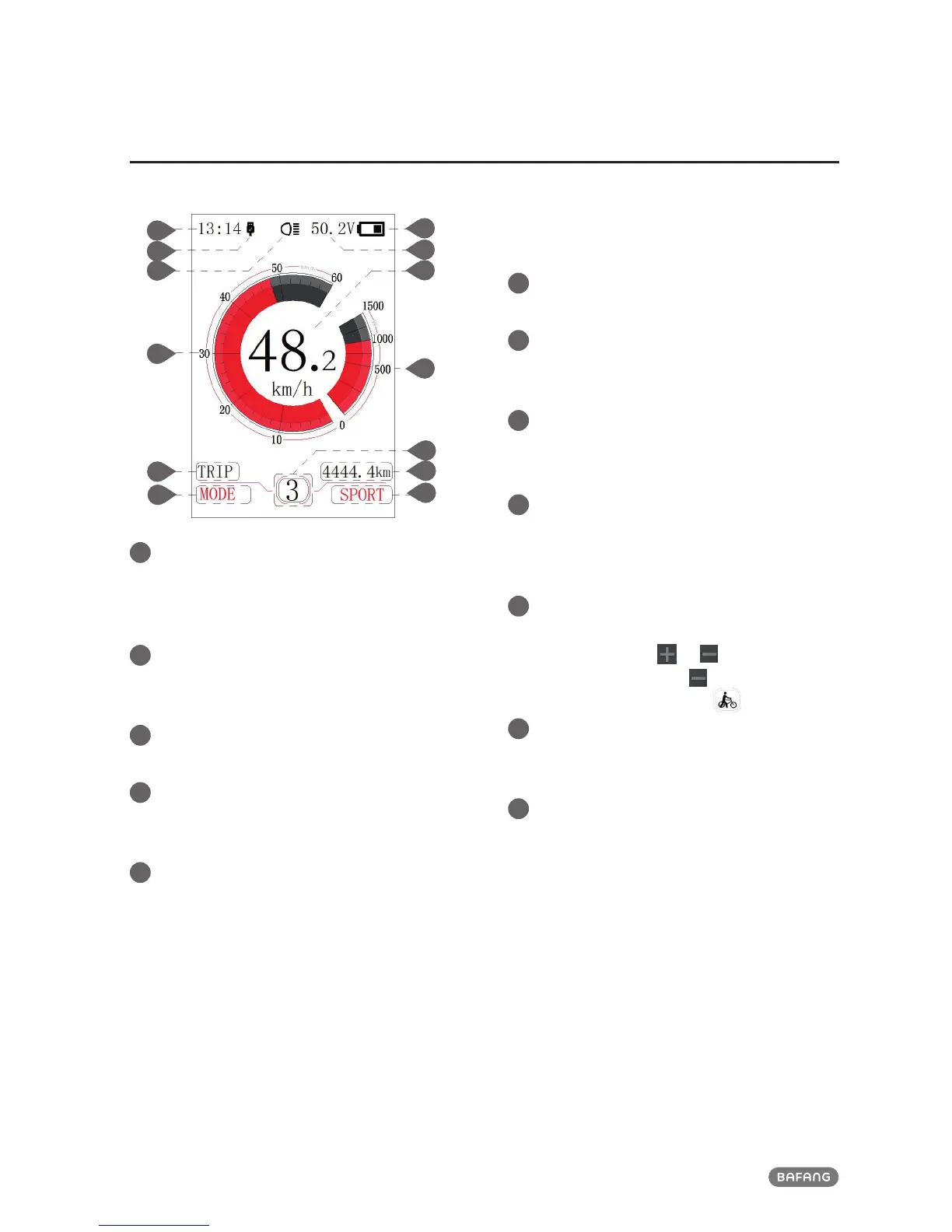
NORMAL INDICATION AREA
1
Time indication:
The time is represented in the 24-hour system
and show the current time, time can be set in
the“Set clock”.
2
USB charge indication:
When external connect into the display, it
display the symbol.
3
Headlight indication:
Only shows when headlight is on.
4
Speed scale display:
the scale value is in accordance with the
digital value.
5
Mode selection:
single-trip distance (TRIP) → total distance
ODO → maximum speed (MAX) → average
speed (AVG) →remaining distance (RANGE)
→ energy consumption (CALORIES) → time
(TIME).
6
Battery indication:
Indicate current battery level value.
7
Voltage indication/percentage indication:
Indicate actual battery level value, display
mode can be set in the “Soc View”.
8
Speed digital indication:
Display current speed value, speed unit can
be set in“Unit”.
9
Power scale indication/current scale
indication:
Display current output value, output unit can
be set in“Power View”.
10
Power assistantance level indication/push
assistance:
Briefly press (0.5S)
or to switch the lev-
el. Touch and hold (2S) to start the mode
“ push assistance”, display symbol.
11
Mode data indication:
Display current data corresponding to the
mode.
12
Support mode option:
Indicate the current riding mode: SPORT/ ECO
1
2
3
4
5
12













 To Next Page