6
Installation and connection
Please observe the special installation instructions.
The appliance is fitted with a plug and must only be connected
to a properly-installed earthed socket. The fuse protection must
be rated at 16 amperes (L or B circuit breakers). The mains
voltage must correspond to the voltage specified on the rating
plate.
The socket must be installed and the power cable replaced by
a qualified electrician only. If the plug is no longer accessible
following installation, an all-pin disconnecting device must be
present on the installation side, with a contact gap of at least 3
mm.
Multiple plugs, plug bars and extension leads must not be
used. Overloading can result in a risk of fire.
Your new appliance
Use this section to familiarise yourself with your new appliance.
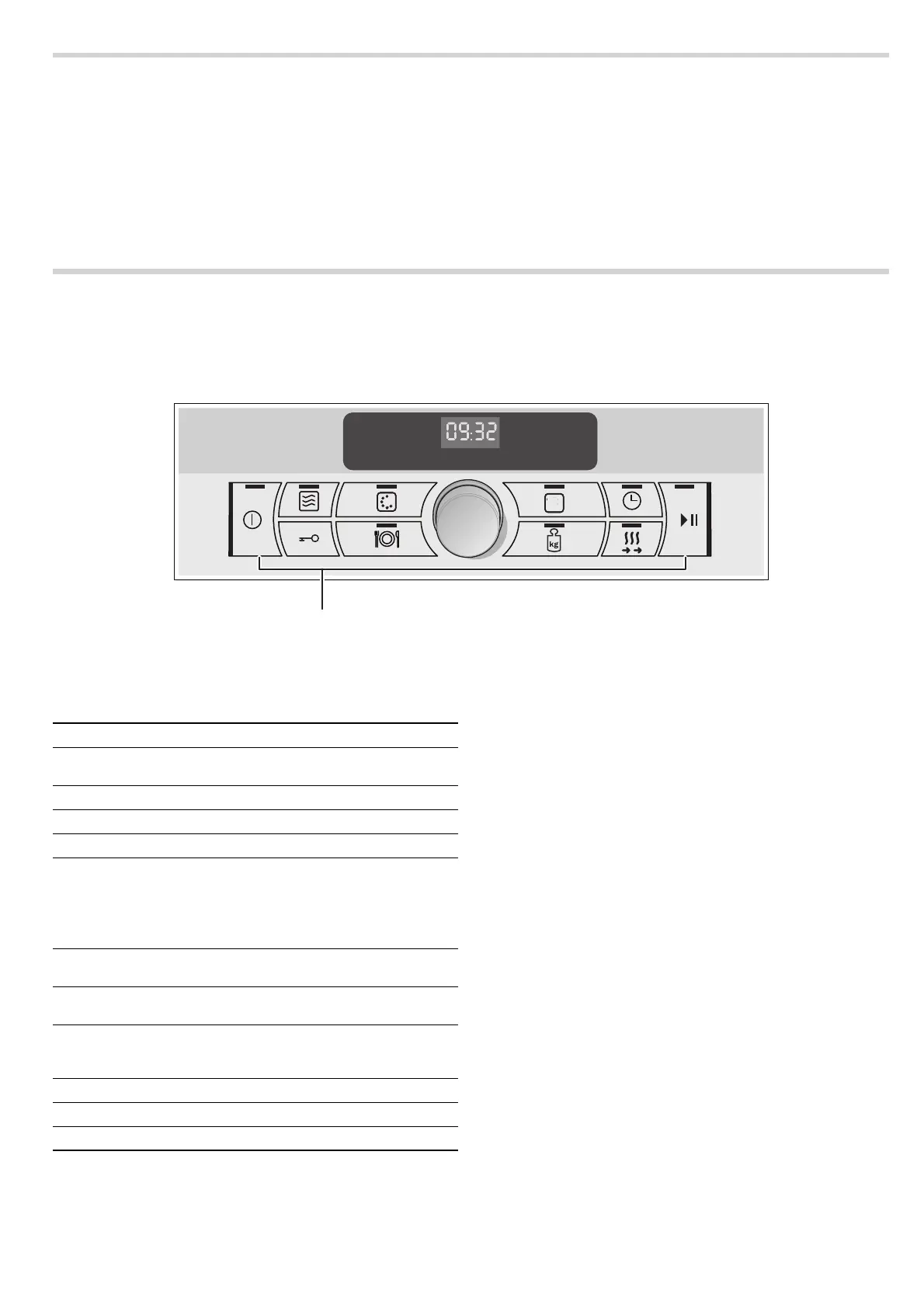
The control panel and the individual operating controls are
explained. You will find information on the cooking
compartment and the accessories.
Control panel
Buttons
Sensors are located under the individual buttons. They respond
when you touch them gently with your finger.
If you cannot make a setting, you will hear a short signal.
Cooking compartment
The cooling fan for the cooking compartment switches on and
off as required. Hot air escapes via the ventilation slots above
and below the appliance door.
Caution!
Do not cover the ventilation slots. Otherwise, the appliance will
overheat.
Notes
■ The cooling fan continues to run for a certain time after
operation.
■ Condensation may appear in the cooking compartment and
on the door window. This is normal and does not adversely
affect appliance operation. Once the cooking compartment
has cooled down, you can wipe away the condensation.
■ When you open the oven door, the oven lamp switches on for
10 minutes.
&
&RQWUROEXWWRQVDQGURWDU
VHOHFWRU
Symbol Button function
#
Main switch Switches the appliance on and off;
ends appliance operation
ß
Microwave Selects the microwave
‚
Oven Selects types of heating for the oven
[
Temperature Selects the temperature
0
Cooking time Touch briefly: Selects the cooking
time
Touch and hold (switched-off appli-
ance):
Selects the basic settings
@
Childproof lock Activates/deactivates the childproof
lock
=
Automatic pro-
grammes
Selects a preset programme
Rotary selector Changes values for the clock, cook-
ing time, weight, etc. Press on the
rotary selector to pop it in or out
@
Start/Pause button Starts and interrupts operation
A
Weight Selects a weight for a programme
d
Rapid heat-up Shortens the preheat time


 To Next Page