Flashing characters
Progressive message
Press TEMP button for “action”
Press LIGHT button to “select”
Pause / back to Main Screen / setting not saved
Pause / back to Main Screen / setting saved
SEQUENCE KEY
( View page 2 for full description )
Main Screen
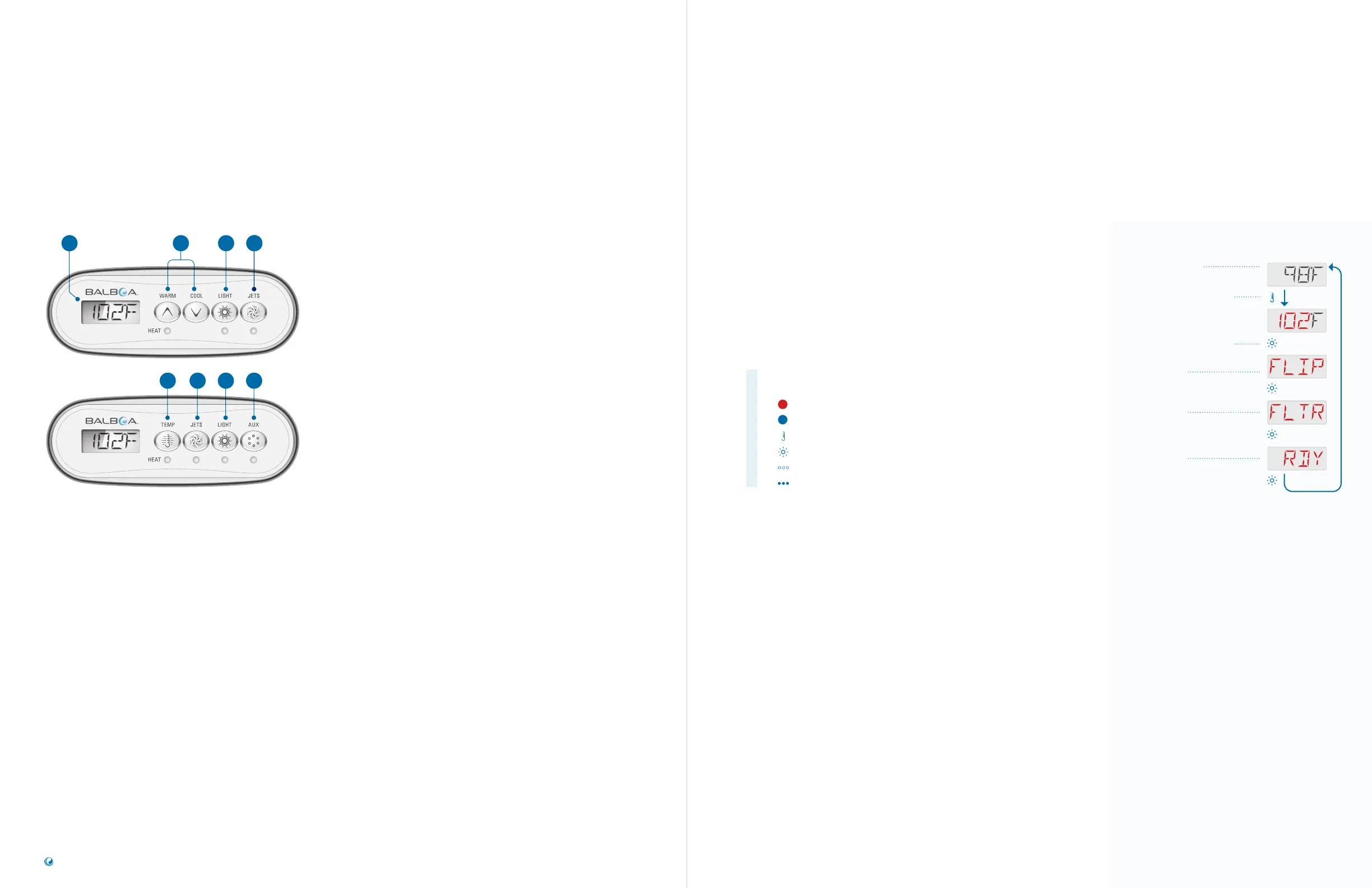
The Main Screen (A) displays the water
temperature by default. The water temperature
does not flash. If you press the TEMP button,
the water temperature is replaced by the Set
Temperature. The Set Temperature flashes.
Set Temperature
The Set Temperature is programmed by you.
If you start at the Main Screen and press the
TEMP button, the Set Temperature will appear,
and it will be flashing. At this point you can
do two things: One, you can change the Set
Temperature. Two, you can navigate menus
by pressing the LIGHT button. If you do not
press any buttons for a few moments, the Main
Screen will appear automatically.
PANEL INTERFACE
& TERMINOLOGY
A B D
FE
TEMP
TEMP is an umbrella term that refers to panel
buttons that control temperature. For example,
TEMP refers to these buttons (B)(E).
TEMP Button(s)
In addition to controlling the Set Temperature,
use the TEMP buttons to initiate actions while
changing various settings.
LIGHT Button
In addition to turning On/O the spa lights,
use the LIGHT button (D) to navigate menus.
Also, when you change settings such as Filter
Cycle duration, make sure you press LIGHT to
save your settings. If you don’t press LIGHT,
the Main Screen will appear automatically and
your setting will not be saved in most cases.
JETS Button
The JETS button (C) will control a one-speed
pump or a two speed pump. It depends on
how your spa is configured.
AUX Button
Control an auxiliary device, such as a pump or
a blower (F).
C
CC
D
SEQUENCE
Press the TEMP button.
The Set Temperature will
appear and flash.
While the Set Temperature
is still flashing, press the
LIGHT button.
Flip Display
Filter Cycle
Heat Mode
Main Screen
Follow this sequence to navigate the Main menu.
If you are navigating any of the menus and
decide you want to go back to the Main Screen,
simply pause a few moments. The Main Screen
will appear automatically.
MAIN MENUS &
NAVIGATION
TP200 USER GUIDE 42375 Rev A1
4
3
Balboa Water Group | Your Single Source Solution



 To Next Page