Main Screen
SEQUENCE
Set Filter Cycle Duration
In the following example we will
set the Filter Cycle duration to 4
hours. Follow the same steps to
set your desired duration.
Purge Cycles
The heater pump (view page 10)
runs for the whole duration of the
filter cycle.
In order to maintain sanitary
conditions, secondary Pumps
and/or a Blower will purge water
from their respective plumbing by
running briefly at the beginning of
each filter cycle.
On some systems, purge cycles
may run several times a day,
independent of the filter cycle.
TP200 USER GUIDE 42375 Rev A1
8
7
Balboa Water Group | Your Single Source Solution
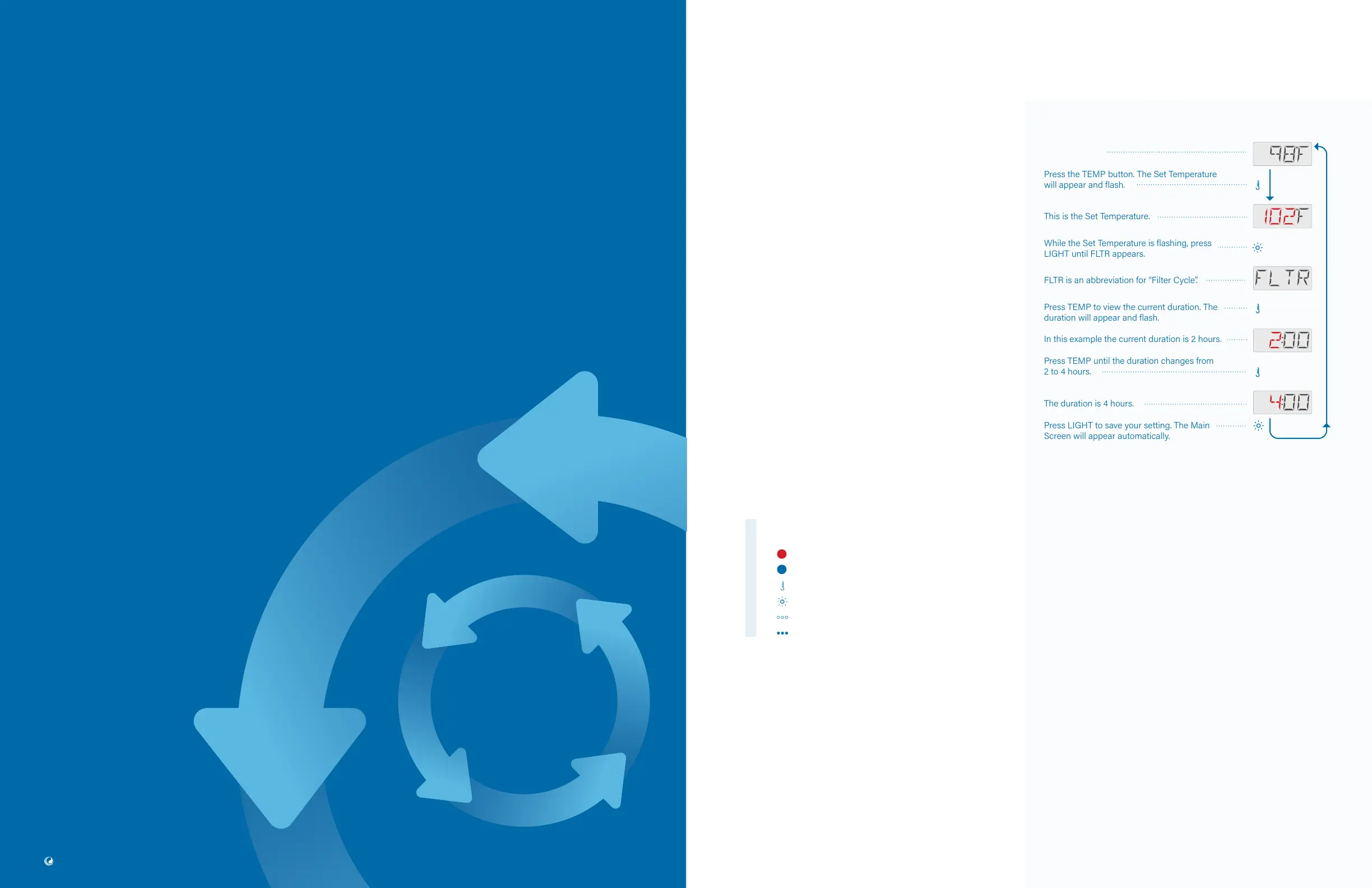
Press the TEMP button. The Set Temperature
will appear and flash.
This is the Set Temperature.
While the Set Temperature is flashing, press
LIGHT until FLTR appears.
FLTR is an abbreviation for “Filter Cycle”.
Press TEMP to view the current duration. The
duration will appear and flash.
In this example the current duration is 2 hours.
Press TEMP until the duration changes from
2 to 4 hours.
The duration is 4 hours.
Press LIGHT to save your setting. The Main
Screen will appear automatically.
Flashing characters
Progressive message
Press TEMP button for “action”
Press LIGHT button to “select”
Pause / back to Main Screen / setting not saved
Pause / back to Main Screen / setting saved
SEQUENCE KEY
( View page 2 for full description )
SET FILTER
CYCLE DURATION
Main Filtration
• Most spas have one filter cycle per day, but
some spas have two filter cycles per day.
• Your spa’s Filter Cycle begins six minutes
after the spa is powered On.
• You can adjust the Filter Cycle duration in
1-hour increments. The duration range
is 1 - 24 hours.
• If your spa has one Filter Cycle, the Filter
Cycle will run once every 24 hours.
• If your spa has two filter cycles, they will run
once every 12 hours.



 To Next Page