Parameter Descriptions 7-29
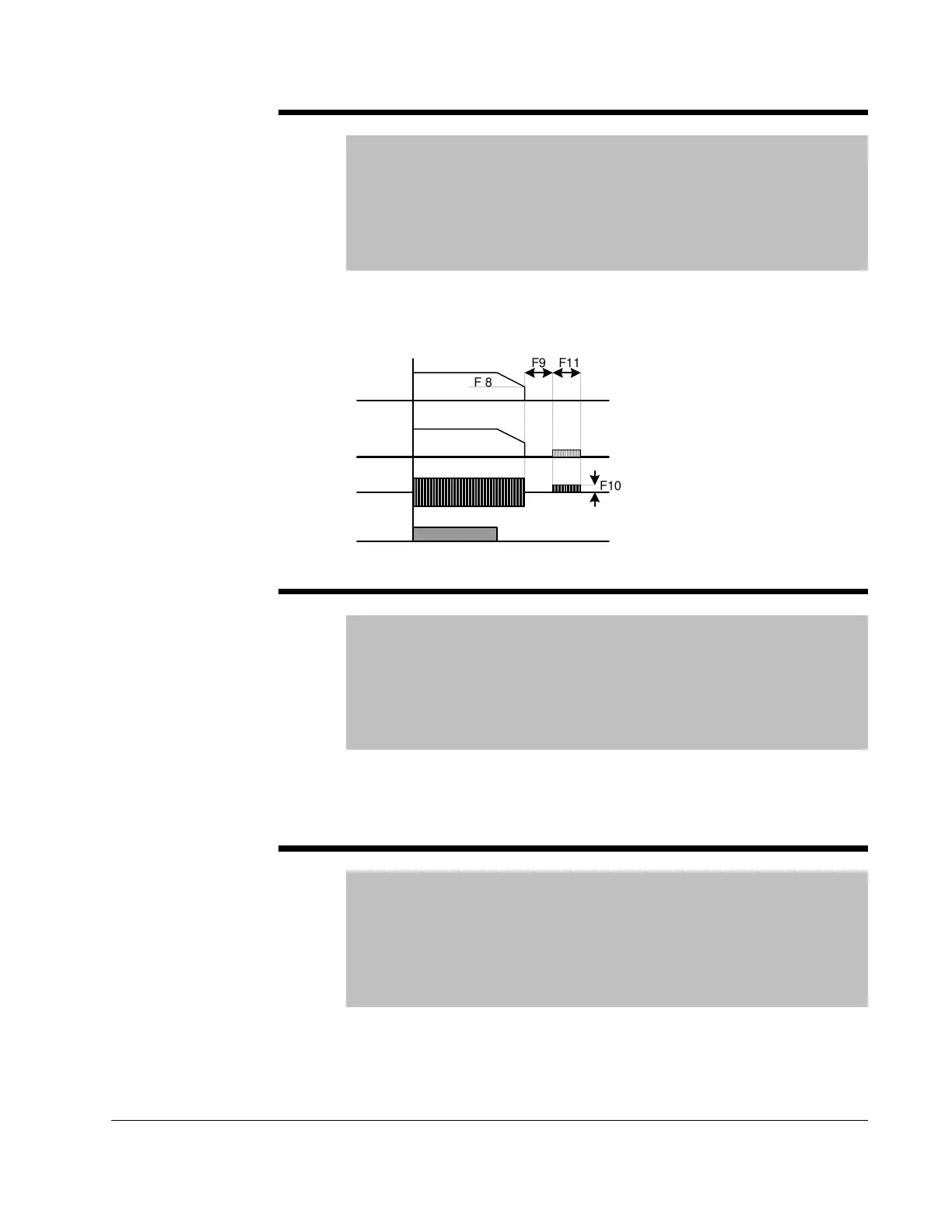
F8 DC Brake start frequency
Range: 0.1-60 [Hz]
Default: 5.00
Access Configurable
See Also: P35,P39, F8-F11
Note: Only viewable when P39 – Stop mode select is set to DC
Brake.
Establishes the DC brake start frequency, it can not be set below P35 –
Frequency low limit. Setting this value too high may cause an over current
trip. It can be prevented by adjusting F9 – DC Brake wait time.
F9 DC Brake wait time
Range: 0-60 [sec]
Default: 0.1
Access Configurable
See Also: P35, P39, F8-F11
Note: Only viewable when P39 – Stop mode select is set to DC
Brake.
The drive will hold for the time set in F9 after F8 – DC Brake start frequency
is reached before it applies the voltage level set in F10 – DC Brake Voltage.
Use DC Brake wait time when the load inertia is large to prevent nuisance
trips or damage to the motor.
F10 DC Brake Voltage
Range: 0-200 [%]
Default: 50
Access Configurable
See Also: P32,P35, P39, F8-F11
Note: Only viewable when P39 – Stop mode select is set to DC
Brake.
Sets the DC Brake Voltage as a percent of P32 – Motor Rated Current.
Freq.
Run
command
Voltage
Current
0000000000000000000
0000000000000000000
0000000000000000000
F 8
F9 F11
F10











 To Next Page