Weather channel frequencies and names
NOTE: Weather Channels Wx 1 Thru 10, Receive-only channels for NOAA and Canadian weather broadcasts. You cannot transmit on these
channels.
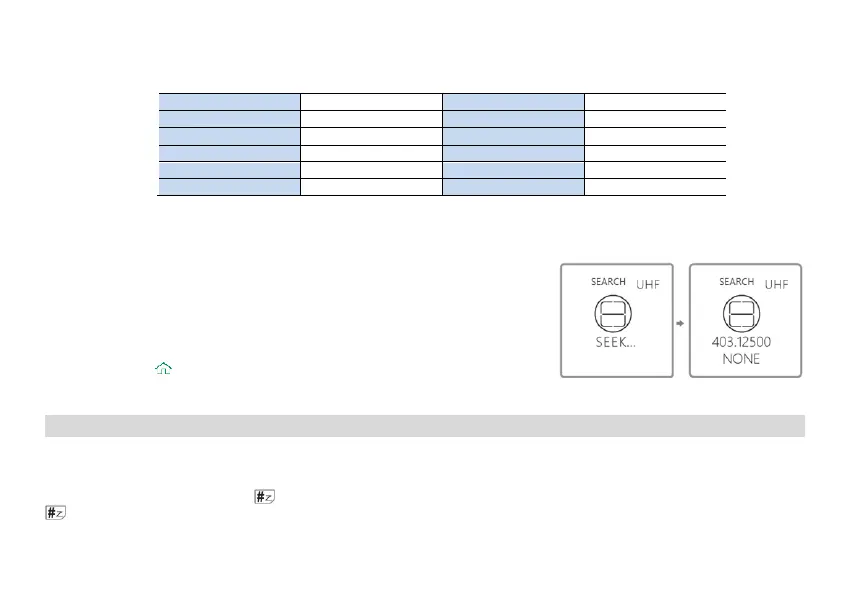
5.16 One touch frequency Search
(1) Through the CPS program software or the radio menu >> Radio Setting >> Press the [SK1] key to
define the [SK1] side key as a Search function.
(2) The radio will act as a receiver. Briefly press the preset" Search "key, and the screen will display
“SEARCH SEEK..."
(3) If the transmitter continues to transmit and the unit receives an effective frequency (the strongest
and stable signal), the received frequency will be displayed. If there is a CTCSS or DCS, the CTCSS
or DCS value is displayed, and if there is no CTCSS or DCS, NONE is displayed
(4) You can press the
key to save the Search frequency and CTCSS or DCS to the channel.
Note: During frequency Search, press the # key on the radio to switch between UHF or VHF
bands.
6. ADVANCED FEATURES
6.1 Scanner
The radios features a built in scanner for the VHF and UHF bands. When in Frequency (VFO) mode it will scan in steps according to your set frequency step.
In Channel (MR) mode it will scan your channels.
To enable the scanner, press and hold the
key for about two seconds. You can change the scanning direction with the or keys. Press and hold the
key to exit scanning mode.
6.1.1 Frequency Ranger


 To Next Page