Appendix C. - Shortcut Menu operations
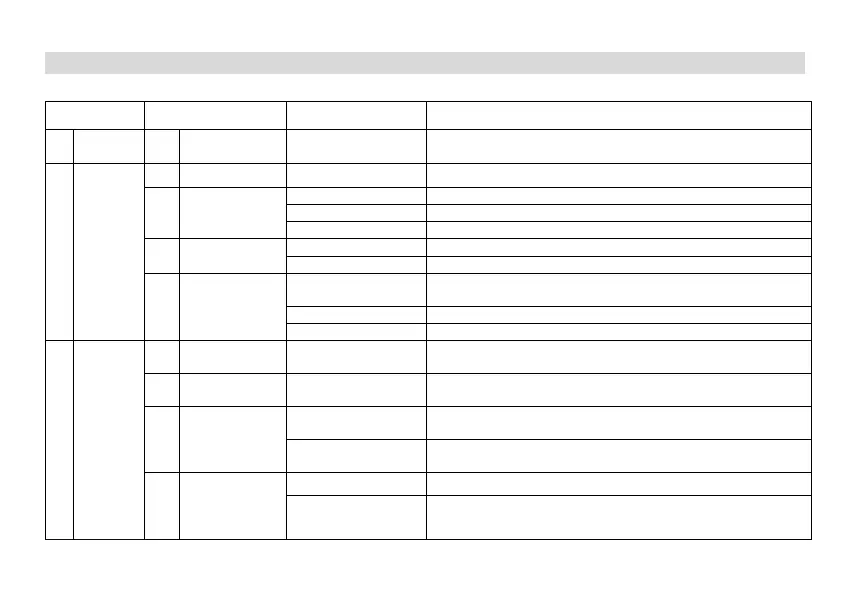
Menu Name Setting Description
1 BANK 1 BANK 1 Channel1-Channel100
A Bank is a group of channels grouped together. The radio has 10 Banks.
A Bank can have the maximum of 100 channels.
2 SCAN
1 Freq Ranger NNNNnnn Input VFO range lower and upper frequency
2 Scan Mode
Time Operation - scanning will resume after a fixed time has passed
Carrier Operation -scanning will resume after the signal disappears
Search Operation -scanning will not resume
3 Scan SubCode
Search within CTCSS Tone (Rang 67-254.1, A total of 50 groups)
Search within DCS Code (Rang 023N-754I, A total of 210 groups)
4 Scan Memory
ALL
RX_TX are saved
(default is all, encoding and decoding are the same)
Save only in Transmitter CTCSS/DCS
Save only in Receiver CTCSS/DCS
3
Radio
Setting
1 Step 2.5-100K
Selects the amount of frequency change in VFO/Frequency mode when
scanning or pressing the or keys.
2 Squelch OFF,LEVEL1-LEVEL5
Squelch silences the receiver when there is no signal. Setting the squelch
to 0 will open up the squelch entirely.
3 Power Save
OFF
Turn off radio sleep. The battery consumption is large, and the standby
ON
Turn on radio sleep. Turning on is more power efficient, but you might miss
the first few syllables before the RX turns on.
4 VOX Switch
OFF Turn off the radio VOX.
ON Turn on the radio VOX.


 To Next Page