EasyManua.ls Logo

Baofeng UV-3R+ - Advanced Operation

Baofeng UV-3R+
20 pages
Print Icon
To Next Page IconTo Next Page
To Previous Page IconTo Previous Page
Loading...
_
BAOFENG
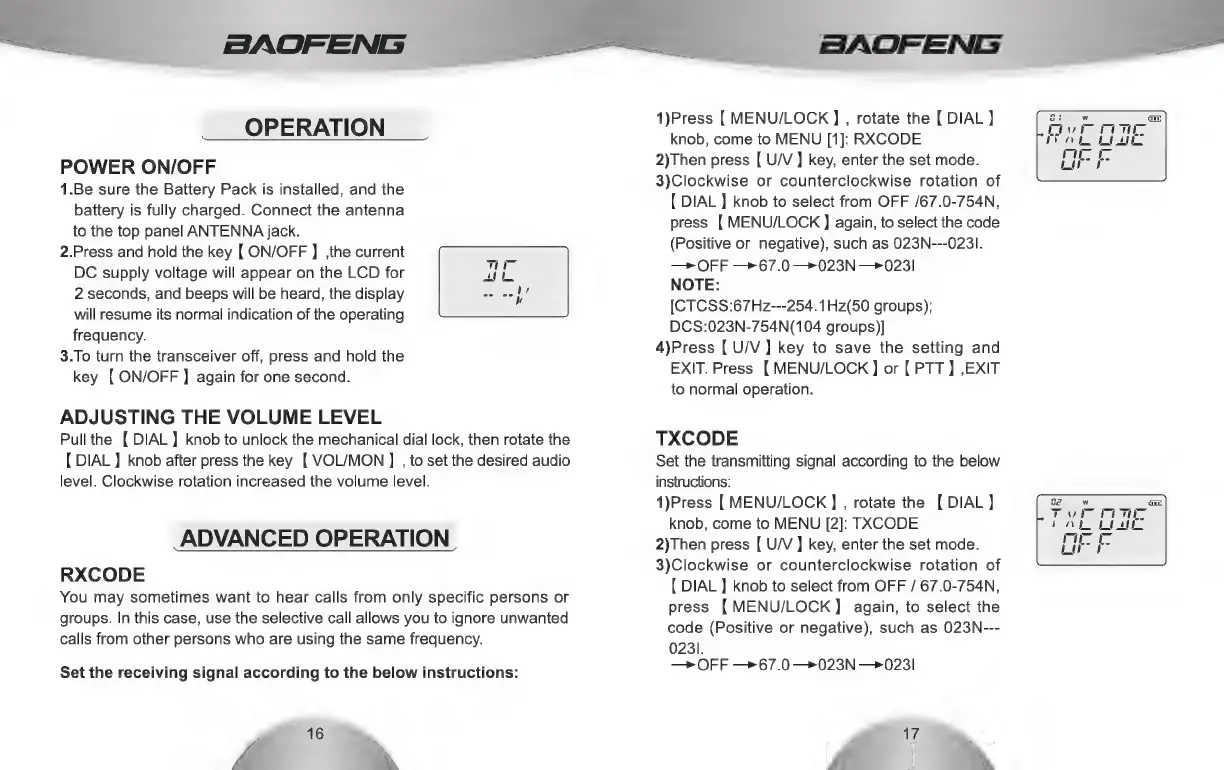
OPERATION
POWER
ON/OFF
1.Be
sure
the
Battery
Pack
is
installed,
and
the
battery
is
fully
charged.
Connect
the
antenna
to
the
top
panel
ANTENNA
jack.
2.Press
and
hold
the
key
{
ON/OFF
]
,the
current
DC
supply
voltage
will
appear
on
the
LCD
for
2
seconds,
and
beeps
will
be
heard,
the
display
will
resume
its
normal
indication
of
the
operating
frequency.
3.To
turn
the
transceiver
off,
press
and
hold
the
key
[
ON/OFF
]
again
for
one
second.
ADJUSTING
THE
VOLUME
LEVEL
Pull
the
[DIAL]
knob
to
unlock
the
mechanical
dial
lock,
then
rotate
the
{
DIAL
)
knob
after
press
the
key
[
VOL/MON
]
,
to
set
the
desired
audio
level.
Clockwise
rotation
increased
the
volume
level.
ADVANCED
OPERATION
RXCODE
You
may
sometimes
want
to
hear
calls
from
only
specific
persons
or
groups.
In
this
case,
use
the
selective
call
allows
you
to
ignore
unwanted
calls
from
other
persons
who
are
using
the
same
frequency.
Set
the
receiving
signal
according
to
the
below
instructions:
16
yi
NX
BAOFENG
1)Press
[
MENU/LOCK
]
,
rotate
the
[
DIAL]
knob,
come
to
MENU
[1]:
RXCODE
2)Then
press
[
U/V
]
key,
enter
the
set
mode.
3)Clockwise
or
counterclockwise
rotation
of
{
DIAL
]
knob
to
select
from
OFF
/67.0-754N,
press
[
MENU/LOCK
]
again,
to
select
the
code
(Positive
or
negative),
such
as
023N---0231.
>
OFF
—>67.0
—023N
—>0231
NOTE:
[CTCSS:67Hz---254.1Hz(50
groups);
DCS:023N-754N(104
groups)]
4)Press
[
U/V]
key
to
save
the
setting
and
EXIT.
Press
[MENU/LOCK]
or
[
PTT
]
,EXIT
to
normal
operation.
TXCODE
Set
the
transmitting
signal
according
to
the
below
instructions:
1)Press
[
MENU/LOCK
]
,
rotate
the
[
DIAL]
knob,
come
to
MENU
[2]:
TXCODE
2)Then
press
[
U/V
]
key,
enter
the
set
mode.
3)Clockwise
or
counterclockwise
rotation
of
{
DIAL
]
knob
to
select
from
OFF
/
67.0-754N,
press
[MENU/LOCK]
again,
to
select
the
code
(Positive
or
negative),
such
as
023N---
023).
—>
OFF
—>67.0
—>023N
—0231
a7
7
NX

Related product manuals