EasyManua.ls Logo

Baofeng UV-3R+ - Additional Functions and Settings

Baofeng UV-3R+
20 pages
Print Icon
To Next Page IconTo Next Page
To Previous Page IconTo Previous Page
Loading...
BAOFENG
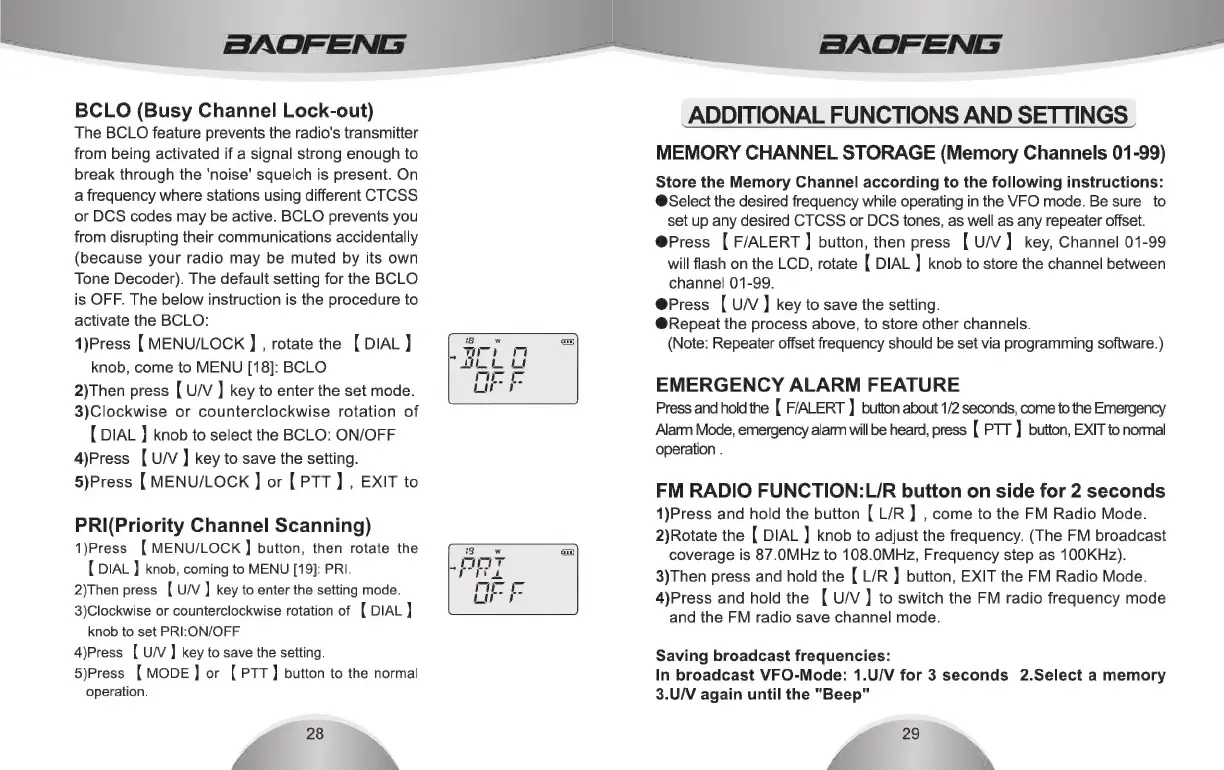
BCLO
(Busy
Channel
Lock-out)
The
BCLO
feature
prevents
the
radio's
transmitter
from
being
activated
if
a
signal
strong
enough
to
break
through
the
'noise’
squelch
is
present.
On
a
frequency
where
stations
using
different
CTCSS
or
DCS
codes
may
be
active.
BCLO
prevents
you
from
disrupting
their
communications
accidentally
(because
your
radio
may
be
muted
by
its
own
Tone
Decoder).
The
default
setting
for
the
BCLO
is
OFF.
The
below
instruction
is
the
procedure
to
activate
the
BCLO:
1)Press
[
MENU/LOCK
]
,
rotate
the
[
DIAL
]
knob,
come
to
MENU
[18]:
BCLO
2)Then
press
[
U/V
]
key
to
enter
the
set
mode.
3)Clockwise
or
counterclockwise
rotation
of
[
DIAL
}
knob
to
select
the
BCLO:
ON/OFF
4)Press
[
U/V
]
key
to
save
the
setting.
5)Press
[
MENU/LOCK
]
or
[
PTT]
,
EXIT
to
PRI(Priority
Channel
Scanning)
1)Press
[MENU/LOCK
]
button,
then
rotate
the
{
DIAL
)
knob,
coming
to
MENU
[19]:
PRI.
2)Then
press
[
U/V
]
key
to
enter
the
setting
mode.
3)Clockwise
or
counterclockwise
rotation
of
(
DIAL
]
knob
to
set
PRI:ON/OFF
4)Press
[
U/V]
key
to
save
the
setting.
5)Press
(
MODE
]
or
[
PTT
]
button
to
the
normal
operation.
28
BAOFENG
ADDITIONAL
FUNCTIONS
AND
SETTINGS
MEMORY
CHANNEL
STORAGE
(Memory
Channels
01-99)
Store
the
Memory
Channel
according
to
the
following
instructions:
@Select
the
desired
frequency
while
operating
in
the
VFO
mode.
Be
sure
to
set
up
any
desired
CTCSS
or
DCS
tones,
as
well
as
any
repeater
offset.
@Press
[
F/ALERT
]
button,
then
press
[
U/V]
key,
Channel
01-99
will
flash
on the
LCD,
rotate
[
DIAL
]
knob
to
store
the
channel
between
channel
01-99.
@Press
[
U/V]
key
to
save
the
setting.
@Repeat
the
process
above,
to
store
other
channels.
(Note:
Repeater
offset
frequency
should
be
set
via
programming
software.)
EMERGENCY
ALARM
FEATURE
Press
and
hold
the
{
F/ALERT
}
button
about
1/2
seconds,
come
to
the
Emergency
Alarm
Mode,
emergency
alarm
will
be
heard,
press
[
PTT
]
button,
EXIT
to
normal
operation
.
FM
RADIO
FUNCTION:L/R
button
on
side
for
2
seconds
1)Press
and
hold
the
button
[
L/R
]
,
come
to
the
FM
Radio
Mode.
2)Rotate
the
[
DIAL
}
knob
to
adjust
the
frequency.
(The
FM
broadcast
coverage
is
87.0MHz
to
108.0MHz,
Frequency
step
as
100KHz).
3)Then
press
and
hold
the
[
L/R
]
button,
EXIT
the
FM
Radio
Mode.
4)Press
and
hold
the
[
U/V]
to
switch
the
FM
radio
frequency
mode
and
the
FM
radio
save
channel
mode.
Saving
broadcast
frequencies:
In
broadcast
VFO-Mode:
1.U/V
for
3
seconds
2.Select
a
memory
3.U/V
again
until
the
"Beep"
29

Related product manuals