Page 1 of 2
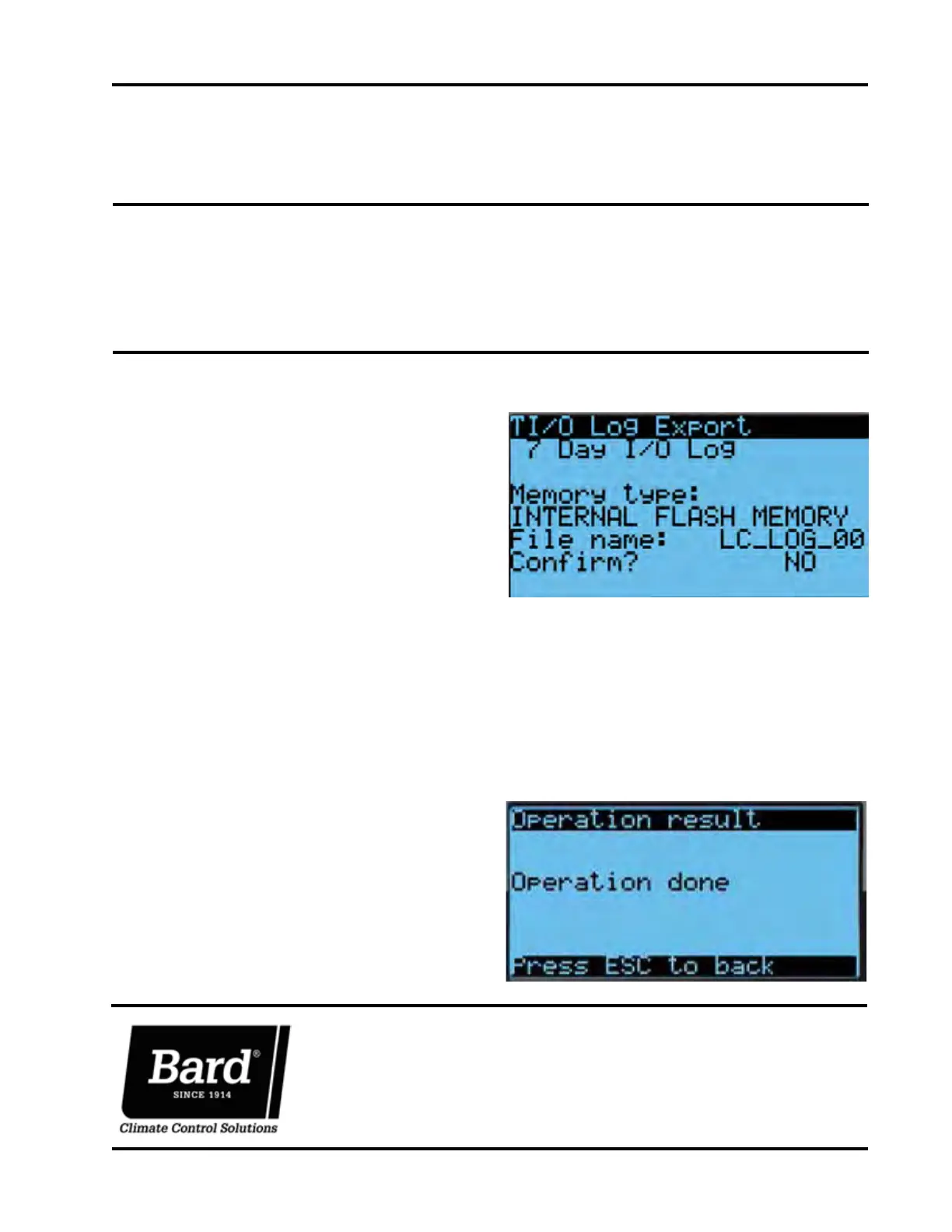
FIGURE 1
SUPPLEMENTAL INSTRUCTIONS
Bard Manufacturing Company, Inc.
Bryan, Ohio 43506
www.bardhvac.com
Manual: 7960-826
Supersedes: NEW
Date: 12-17-18
Exporting 7 Day I/O Logs on
LC6000-200 Controller
These instructions detail the process for exporting 7
day I/O logs on the LC6000-200 controller.
Tools and Supplies Needed
• Laptop computer
• USB cable
• Personal anti-static grounding strap
INSTRUCTIONS
IMPORTANT:
Bard recommends the use of personal
grounding straps to prevent static
electricity shorts to electronic controls.
To export an alarm log:
1. Press MENU key to go to the Main Menu screen.
2. Use UP or DOWN keys and ENTER key to enter
USER password 1313.
3. Press UP or DOWN keys to scroll to Settings; press
ENTER key.
4. Press UP or DOWN keys to scroll to Initialization;
press ENTER key.
5. Press UP or DOWN keys to scroll to I/O Log Export;
press ENTER key.
6. Press ENTER key to scroll to File Name (see Figure
1).
NOTE: Make sure Memory type is set as INTERNAL
FLASH MEMORY to ensure proper download.
7. Press UP or DOWN key to change the LC_LOG
number, if desired.
8. Press ENTER key to scroll to Confirm?
9. Press UP or DOWN key to change value to YES;
press ENTER key.
10. After download is complete, the Operation done
screen will appear (see Figure 2).
FIGURE 2



 To Next Page