Manual 2100-671C
Page 20 of 59
Dirty Filter Alarm
The wall-mount unit is equipped with a differential
pressure switch input to the controller. When the switch
indicates a dirty filter, the controller will generate an
alarm. The alarm will latch once triggered requiring a
technician to acknowledge the alarm after replacing
filters. Additionally, an indicator light will be turned on
with the alarm and turned off when the alarm clears.
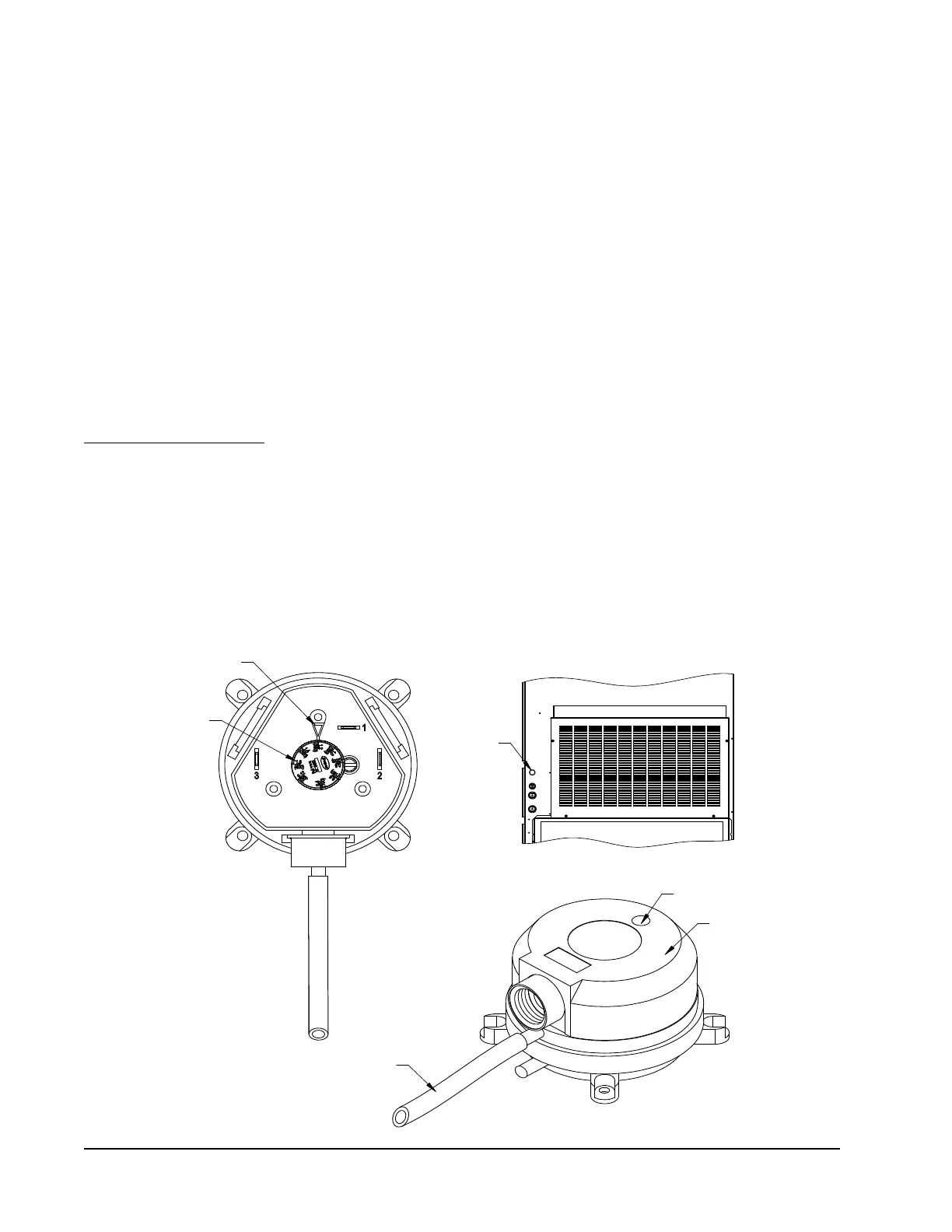
The threshold of this alarm is adjusted by changing the
settings on the switch (see Figure 26).
Filter Indicator Light
The wall-mount unit is equipped with a 24v indicator
light mounted on side of unit that displays the current
status of the filter (see Figure 26). When the light is
on, the filter needs to be replaced. Once the filter(s)
has been changed and the alarm has been cleared, the
indicator light will turn off.
Indoor Airflow Operation
Blower Speed Control
The blower is capable of changing speeds to best match
the requirements of the system depending on which
mode the system is in.
The unit will automatically adjust its blower speed based
on the mode and number of stages active. In addition to
the nominal speeds for each cooling stage, the controller
has the option to enable high sensible operation or
Balanced Climate
TM
operation (see Table 8).
High Sensible Operation
In high sensible operation, the blower speed will be
raised for each stage of cooling to increase the sensible
cooling of the equipment. With this option enabled, the
higher speeds will be used during compressor operation
unless passive or active dehumidification modes are
operating.
Balanced Climate Operation
In Balanced Climate operation, the blower speed will
be lowered for each stage of cooling to improve the
moisture removal capabilities of the equipment. With
this option enabled, the lower speeds will be used
during compressor operation when the indoor humidity
is above the passive dehumidification setpoint.
NOTE: Blower speeds may revert back to nominal
speeds during active dehumidification if electric
reheat is used.
To enable or disable either high sensible operation or
balanced climate operation:
1. Press MENU key to access the Main Menu screen.
2. Press UP or DOWN keys and ENTER key to enter
USER password 2000.
FIGURE 26
Dirty Filter Switch and Filter Indicator Light
SCREW TO
REMOVE COVER
COVER
TUBE LOCATED IN
AIRSTREAM AFTER FILTER
MIS-3952
INDICATOR ARROW
ADJUSTMENT
ADJUSTMENT
KNOB
FILTER LIGHT
* See Figure 24 for Dirty
Filter Switch settings



 To Next Page